Paste your page's head HTML to see how its link card looks when shared, which tags each app falls back to, and what to fix.
0 characters, 0 lines pasted
Browsers block a page from reading other websites, so nothing is fetched to read your tags: they come from the HTML you paste. The preview does ask your server for the og:image itself, the same way a normal image loads.
| Check | Result |
|---|
Card layouts are close approximations: each app changes its design from time to time and crops long text in its own way. Platforms also cache cards, so re-scrape in their debugger after any change.
This Open Graph preview shows how your page will look when someone shares the link on Facebook, LinkedIn, X, WhatsApp or Slack, for marketers, bloggers and developers anywhere. It reads the og: and twitter: tags from the HTML you paste, runs 10 checks based on the Open Graph protocol and Meta's image rules, and applies the fallbacks each app uses when a tag is missing, so the card you see is the card your audience will get. Figures checked October 2026.
Quick answer: paste your page's head HTML into the Open Graph preview to see the share card on five apps. A reliable card needs og:title, og:type, og:url and og:image, plus an image of 1200 × 630 pixels (1.91:1), og:image:alt and twitter:card set to summary_large_image.
In This Guide
What Is an Open Graph Preview?
An Open Graph preview is a mock up of the link card that social and messaging apps build from a page's Open Graph meta tags, so you can see and fix it before anyone shares the link.
Every app follows the same basic rule: use the og: tag if it exists, otherwise fall back to something else on the page. Facebook falls back to the title tag and meta description, while X looks for twitter: tags first and then uses the og: versions. When nothing suitable exists, you get a bare URL or a random image from the page, which is why the same link can look polished in Slack and broken in WhatsApp.
How to Use the Open Graph Preview
Step 1: Paste the Head HTML
Open the page, press Ctrl+U (Option+Cmd+U on a Mac) and copy either the head section or the whole source. Browser security stops this page fetching your site directly, so pasting also lets you preview a draft or staging page before it goes live.
Step 2: Check the Tags Found
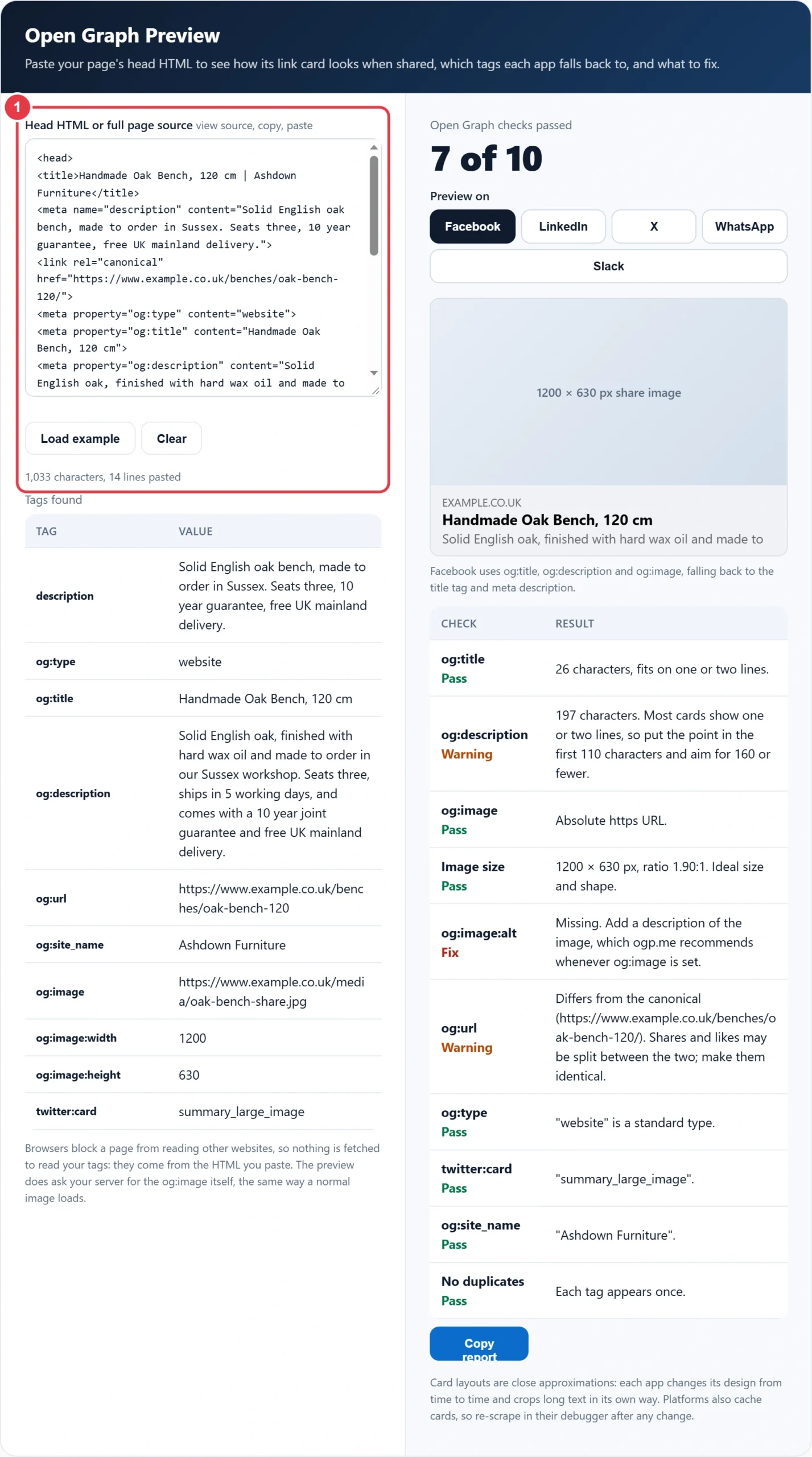
The table lists every og:, twitter:, article: and description tag in the order they appear. If a tag is missing here, your SEO plugin or theme is not printing it, which is worth knowing before you blame the platform's cache.

Step 3: Switch Between Apps
Pick Facebook, LinkedIn, X, WhatsApp or Slack. Each card uses that app's fallback order and typical crop, and the line underneath explains which tags it read. If your image URL is live, the real image loads in the card.

Step 4: Fix What the Checks Flag
Ten checks cover required tags, image size and shape, alt text, canonical match, type, X card, site name and duplicate tags. To rebuild the tags rather than patch them, the Open Graph tag generator writes a clean, escaped set you can paste straight into your head section, then you can preview it here again.

Which Open Graph Tags Are Required?
Four: og:title, og:type, og:image and og:url are the required properties in the Open Graph protocol. In practice, add og:description, og:site_name, og:image:width, og:image:height, og:image:alt and twitter:card as well, because several apps use them and the size tags let a card render on the very first share.
Here is the worked example loaded in the tool. Ashdown Furniture's oak bench page passes 7 of 10 checks. Its og:description runs to 197 characters, so most of it is hidden; og:image:alt is missing; and og:url lacks the trailing slash that the canonical URL has, which can split share counts between two addresses. Trimming the description to 120 characters, adding alt text such as "Oak bench with three cushions in a garden room" and adding the slash takes it to 10 of 10.
What Size Should an Open Graph Image Be?
Use 1200 × 630 pixels, a 1.91:1 ratio. Meta recommends that size for the best display on high resolution screens, needs at least 600 × 315 for the large card, rejects images under 200 × 200 and caps the file at 8 MB, according to its guidance on sharing images, so one 1200 × 630 JPEG works almost everywhere.
| App | Title from | Description shown | Image shape |
|---|---|---|---|
| og:title, then title tag | Usually one line | 1.91:1 | |
| og:title | Usually hidden | 1.91:1 | |
| X (large card) | twitter:title, then og:title | Not on the card | Wide, cropped to fit |
| og:title | Up to two lines | Wide or small square | |
| Slack | og:title, under og:site_name | Up to three lines | Wide, shown smaller |
Keep text and logos away from the edges, roughly 60 pixels in from each side, because apps crop slightly differently. Save it as a JPEG under 1 MB where you can, since messaging apps are less patient with large files than Facebook is.
Why Is My Link Preview Showing the Old Image?
Because the app cached the card the first time the link was shared, and it does not check again straight away. Confirm the new tags are live with this preview, then ask each platform to read the page again: Facebook's Sharing Debugger has a Scrape Again button and LinkedIn's Post Inspector refreshes on request.
If the old image still appears, change the image file name, for example oak-bench-share-v2.jpg, and update og:image. A new URL forces a fresh fetch everywhere, including apps with no debugger. Also make sure the image is not blocked by robots.txt or a login wall, since crawlers must download it.
Common Open Graph Mistakes and Fixes
- Two sets of tags: an SEO plugin and a theme both print og:title, and apps take the first one, which is often the stale one. Switch one of them off.
- Relative image paths: og:image="/media/share.jpg" fails because crawlers do not resolve it. Use the full https address.
- Tracking parameters in og:url: ?utm_source=newsletter splits share counts. Point og:url at the clean canonical address.
- Logo as the share image: a 400 × 400 logo gets shown as a small square or blown up and blurred. Make a dedicated 1200 × 630 image per key page.
- Text heavy images: small writing becomes unreadable on a phone. Keep it to a few large words, or none.
- Blocked images: if robots.txt or hotlink protection blocks the image folder, the card shows no image at all.
Most of these show up in the checks above: duplicate tags fail the last check, relative and http image URLs fail the og:image check, and a mismatch with the canonical URL is flagged on og:url.
Open Graph Tags and Search Results
Open Graph tags control social cards, not Google's blue links, which use your title tag and meta description instead. Writing both together keeps your message consistent wherever the link appears, and the SERP preview tool shows the Google side so you can compare the search snippet and share card side by side before you publish.
Key Open Graph Preview Terms Explained
These social sharing terms explain what the Open Graph preview checks, helping you understand why link cards differ between apps and how to fix them.
- Link preview
- The card a social network or messaging app builds when someone shares a URL, typically showing an image, a title, a short description and the domain. Apps generate it by reading metadata from the page rather than its visible content.
- Tag fallback
- The order of alternative sources an app reads when a preferred tag is missing, such as using the HTML title in place of a missing share title. Because each platform has its own order, the same page can produce different cards.
- Required Open Graph properties
- The four properties the Open Graph protocol treats as mandatory for every page: title, type, image and canonical URL. Without them, a page cannot be represented as a complete object when shared.
- Aspect ratio
- The proportion between an image's width and height, written as a ratio. Platforms crop share images to fixed shapes, so an image with the wrong proportions loses its edges or appears as a small thumbnail instead of a large card.
- Alt text
- A short written description of an image, provided for people using screen readers and for situations where the picture cannot load. In share cards it describes the preview image to users who cannot see it.
- Scraper cache
- The stored copy of a page's metadata that a platform keeps after first reading a link. Changes to tags are not shown until the platform reads the page again, which is why debuggers offer a re-scrape option.
</>Embed this calculator on your website
Add the free Open Graph Preview to your own site or blog. Copy the code below and paste it into an HTML block. It resizes itself and works on phones.
How we checked this tool: the Tools Veria Editorial Team built this tool by hand, checked it against the official rules or published standards where they apply, and tested it against worked examples. Results are estimates for planning, not personal financial or tax advice. Read our editorial policy and disclaimer, or report an error.
Frequently Asked Questions
How do I preview Open Graph tags before publishing?
Paste the page's head HTML into an Open Graph preview tool. It reads your og: and twitter: tags, shows the card for each app and flags missing or oversized fields, so you can fix them before anyone shares the link.
What happens if a page has no og:image?
Most apps show a text only card, and some pick a random image from the page, such as a logo or advert. Set og:image to an absolute https URL of a 1200 × 630 pixel image to control what appears.
Does X use Open Graph tags?
Yes. X reads twitter: tags first and falls back to og:title, og:description and og:image when they are missing. You still need twitter:card set to summary_large_image to request the large image card.
Why does my preview differ between Facebook and LinkedIn?
Each app has its own layout, crop and cache. LinkedIn usually hides the description and Facebook shows one line, so put the key message in og:title and keep important parts of the image away from the edges.
How long should og:title and og:description be?
Keep og:title under about 60 characters and og:description under about 160, with the main point in the first 110. Longer text is not an error, but most cards cut it off after one or two lines.
Can this tool fetch my live URL?
No. Browsers block one website from reading another site's HTML, so the tool works on pasted source instead. That also means it previews drafts and staging pages that online fetchers cannot reach.