Fill in your page and image details, fix anything flagged, then copy the code into your page head.
Everything runs in your browser and nothing is uploaded. Values are HTML escaped. The preview is an approximation: each platform crops and trims text in its own way.
This open graph tag generator builds the og: and X card meta tags that control how a page looks when it is shared on Facebook, LinkedIn, WhatsApp, Slack, X and most messaging apps. It follows the property names in the Open Graph protocol and checks your entries as you type, so site owners, bloggers and developers can catch a missing image or a broken URL before anyone shares the link.
Quick answer: every page needs four Open Graph tags: og:title, og:type, og:image and og:url. Add og:description and an image of 1200 × 630 pixels, a 1.91:1 ratio, for a large share card. Fill in the open graph tag generator above, fix any warnings, then paste the code inside your page head.
In This Guide
What Is an Open Graph Tag Generator?
An open graph tag generator is a tool that turns your page details into ready to paste meta tags that tell social platforms which title, description and image to show for a link. Without them, each platform guesses, and often picks a logo, a cookie banner or the first sentence of your footer.
Each tag is a single line in the head of the HTML: a property name such as og:image and a content value. Open Graph was created at Facebook in 2010 and is now read by almost every service that unfurls links. X reads its own twitter:card tag for the card style, then falls back to og:title, og:description and og:image when twitter: versions are missing, which is why this tool only adds duplicates if you ask for them. The output is the same set of meta tags you would write by hand, just escaped, ordered and checked.
How to Use the Open Graph Tag Generator
Step 1: Add the Page Details
Write a share title and description for people scrolling a feed, not for search engines. If you also need the HTML title, canonical and robots tags, the meta tag generator covers those, while this page goes deeper on social sharing. Use your canonical URL for og:url and keep en_GB as the locale for UK sites.

Step 2: Set the Share Image
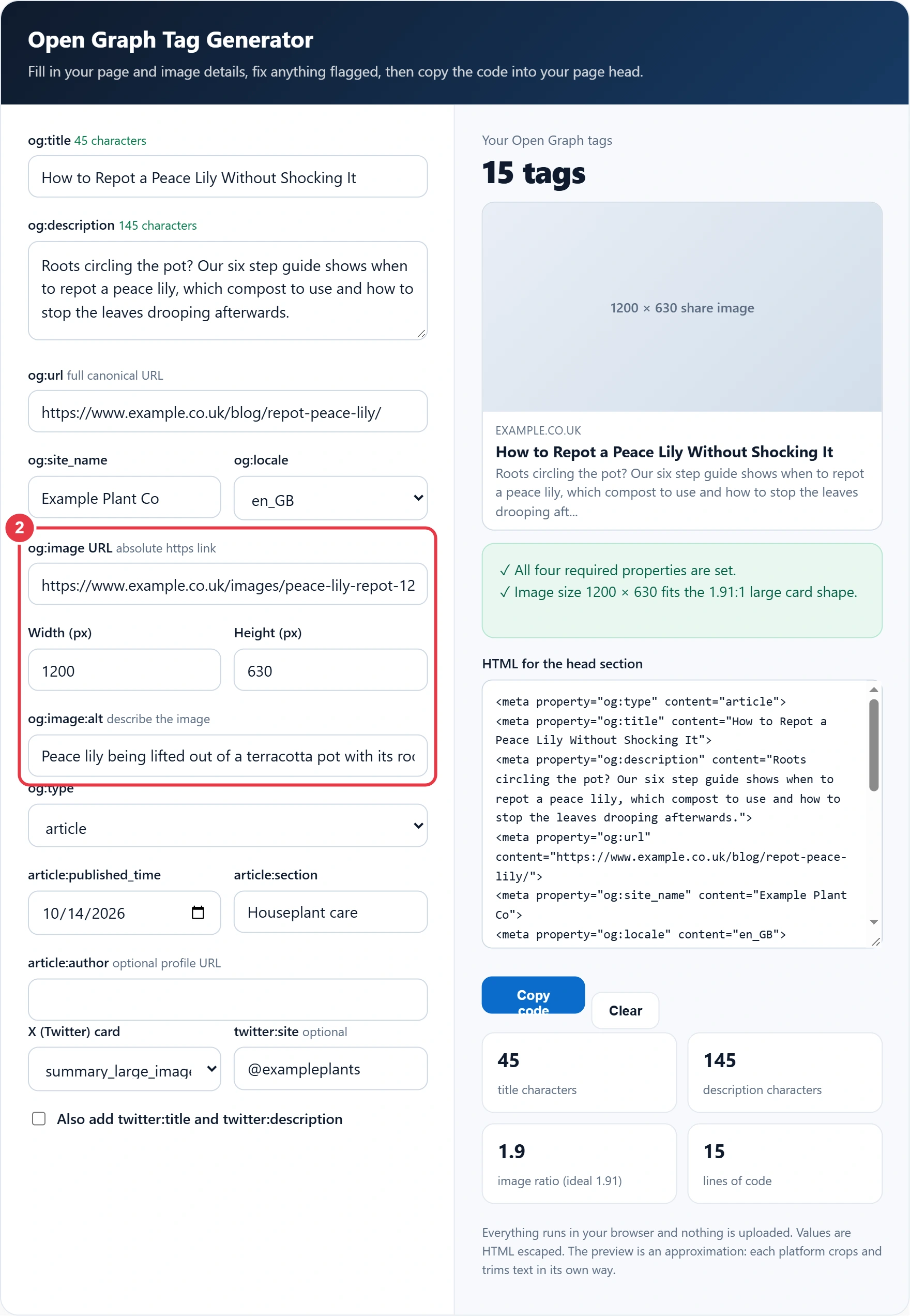
Paste the full https address of the image and enter its width and height in pixels. The tool works out the ratio and warns you if the picture will be cropped. Always write alt text: it is read aloud to screen reader users when the card appears in a feed.
Step 3: Choose the Type and X Card
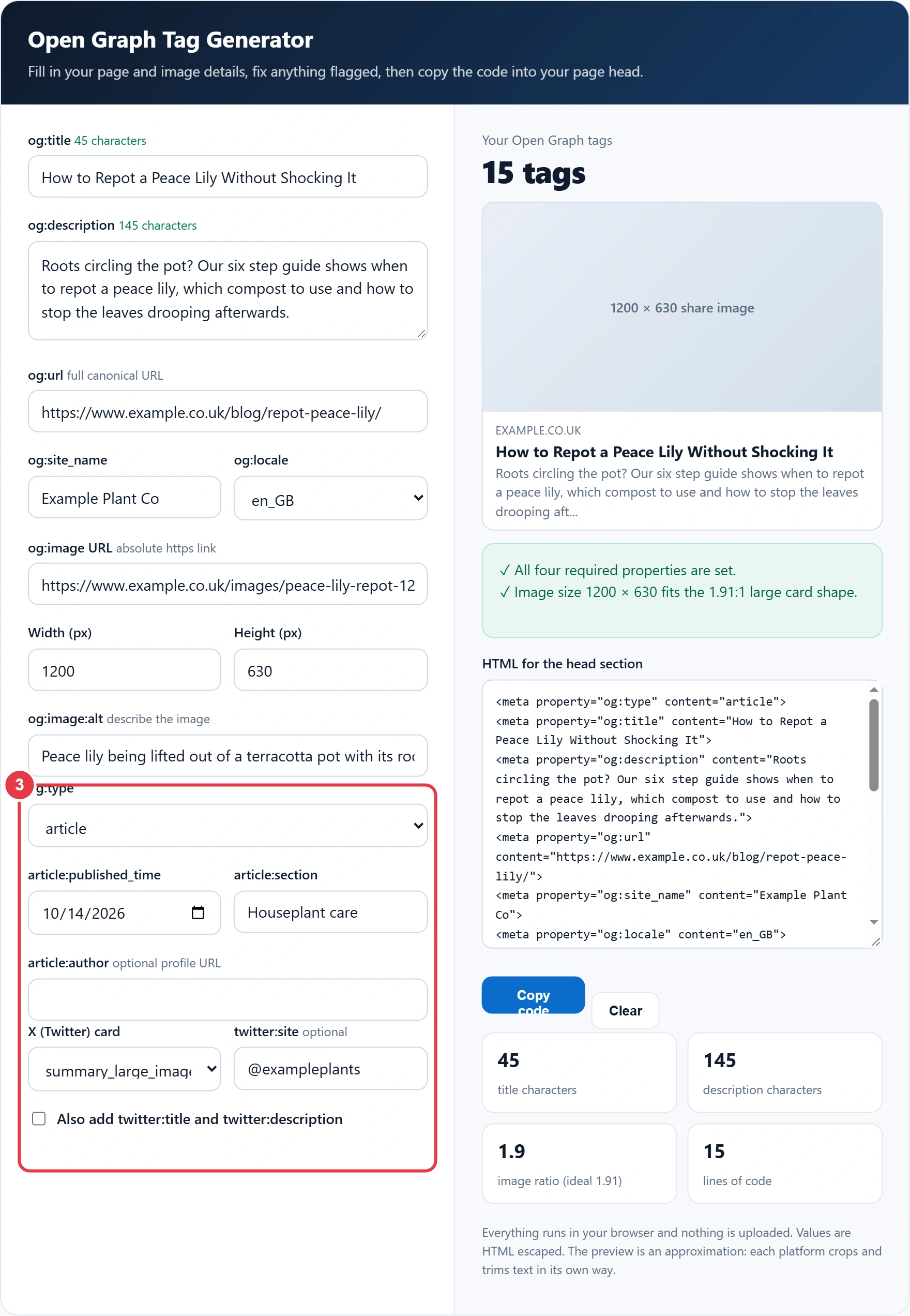
Use article for blog posts and news, and website for home, product and category pages. Article reveals a published date, section and optional author profile URL. Pick summary_large_image for a wide picture on X, or summary for a small square thumbnail.
Step 4: Check the Preview and Copy
Read the checklist: a tick means the item is fine, a warning sign means fix it before you publish. Then press Copy code and paste the tags inside the head element, or enter the same values in your SEO plugin's social fields so you do not end up with two sets.

What Size Should an Open Graph Image Be?
Use 1200 × 630 pixels, a ratio of 1.91:1, and keep the file under 8 MB. That size shows sharply as a large card on high resolution screens, and the Meta guide for webmasters treats 600 × 315 as the smallest size that still gets the large layout.
Here is a worked example. Sam runs a garden centre blog and reuses a 1080 × 1080 Instagram photo as the share image. The tool shows a ratio of 1080 ÷ 1080 = 1:1 and warns that it may be cropped, because a large card is almost twice as wide as it is tall. Sam exports a 1200 × 630 version instead, which gives 1200 ÷ 630 = 1.905, and the warning turns into a tick. Keep text and faces inside the central area so they survive a square crop on platforms that use one.
Open Graph Meta Tags Reference
| Property | What it does | Needed? |
|---|---|---|
| og:title | Headline on the share card | Required |
| og:type | Kind of object: website, article, profile, book | Required |
| og:image | Absolute URL of the share image | Required |
| og:url | Canonical address that shares and likes are grouped under | Required |
| og:description | One or two sentences under the title | Recommended |
| og:site_name | Brand shown alongside the card | Recommended |
| og:locale | Language and region, such as en_GB | Optional (default en_US) |
| og:image:width and height | Image size, so the first share renders straight away | Recommended |
| og:image:alt | Text description of the image | Recommended |
| twitter:card | Card layout on X | Needed for X cards |
Adding Open Graph Tags on Popular Platforms
- WordPress: Yoast, Rank Math and All in One SEO all print Open Graph tags. Fill in their social tab for each post rather than pasting code, and set a default share image in the plugin settings for pages without one.
- Shopify: most themes output og: tags from the product title, description and first image. Edit the social sharing image in your online store preferences for the home page.
- Squarespace and Wix: set the social image and description in each page's SEO or social settings panel.
- Hand coded sites and static site builders: paste the output of the open graph tag generator into your shared head template and swap the values for each page with your template variables.
Whichever route you take, view the page source after publishing and search for og:title. You should see exactly one of each tag. Two different values usually mean the theme and a plugin are both adding them, and one of them needs switching off.
Testing and Fixing Share Previews
Platforms cache a page the first time it is shared, so a fix may not show straight away. Paste the URL into the Meta Sharing Debugger and press Scrape Again, or into the LinkedIn Post Inspector, to force a fresh read. On X, start a new post with the link in the compose box to see the card before you publish.
- Relative image paths such as /images/share.jpg are ignored by most crawlers. Always use the full URL.
- Images blocked by robots.txt, a login or hotlink protection will not load on the card.
- A theme and an SEO plugin that both print og:title create duplicates, and platforms may pick the wrong one.
- An unescaped quote mark in a title can cut the tag short, which is why every value here is escaped.
- Changing og:url splits share counts between the old and new address.
Open Graph tags are not a Google ranking factor, but a clear card earns more clicks from social and chat, and that traffic matters. To polish the search side of the same page, the SERP preview tool shows how your title and meta description could look in Google, so both snippets work together.
Open Graph Tag Generator Terms You Should Know
These metadata terms explain each field in the open graph tag generator, helping you write share tags that display correctly wherever your link is posted.
- og:type
- The Open Graph property that states what kind of object a page represents, such as a website, an article or a profile. Choosing article unlocks extra properties for publication date, section and author.
- og:locale
- The property that declares the language and territory of the content, written as a language code and a country code joined by an underscore. It helps platforms present the card appropriately for the audience the page targets.
- Absolute URL
- A complete web address including the protocol and domain name, rather than a path relative to the current page. Share image and page URL tags need absolute addresses because platforms read them outside the context of your site.
- Twitter card
- A set of meta tags read by X to decide how a shared link is displayed, with types such as a large image card or a compact summary. When its own title or image tags are missing, it borrows the Open Graph versions.
- article:published_time
- An Open Graph article property giving the date and time content was first published, written in a standard machine readable date format. Platforms and aggregators can use it to show when a story appeared.
- Screen reader
- Assistive software that converts on screen text and image descriptions into speech or braille for blind and partially sighted users. It relies on image alt text, which is why share images should always include a description.
</>Embed this calculator on your website
Add the free Open Graph Tag Generator to your own site or blog. Copy the code below and paste it into an HTML block. It resizes itself and works on phones.
How we checked this tool: the Tools Veria Editorial Team built this tool by hand, checked it against the official rules or published standards where they apply, and tested it against worked examples. Results are estimates for planning, not personal financial or tax advice. Read our editorial policy and disclaimer, or report an error.
Frequently Asked Questions
Do Open Graph tags help SEO?
Open Graph tags do not directly affect Google rankings. They control how links look on social platforms and in messaging apps, and a clear title and image usually earn more clicks and shares, which brings visitors to the page.
What is the best og:image size?
Use 1200 × 630 pixels, a 1.91:1 ratio, and keep the file under 8 MB. Images smaller than 600 × 315 pixels often appear as a small thumbnail instead of a large card.
Why is Facebook showing the wrong image for my link?
Facebook caches the first version it saw. Fix the og:image tag, then paste the URL into the Meta Sharing Debugger and press Scrape Again. Also check that no plugin is adding a second og:image tag.
Do I need Twitter card tags if I have Open Graph tags?
You need twitter:card to choose the card layout on X. For the title, description and image, X falls back to your og: tags, so separate twitter:title and twitter:description tags are optional.
Should I use en_GB or en_US for og:locale?
Use en_GB for pages written in British English for UK readers. If you leave og:locale out, platforms assume en_US, which is harmless but slightly less accurate for a UK site.
Where do I put Open Graph tags in WordPress?
Enter the values in the social or Facebook tab of an SEO plugin such as Yoast or Rank Math, which prints the tags for you. Only paste code into the theme header if no plugin is adding Open Graph tags already.