Paste JSON-LD or a page's HTML to check the syntax, schema.org types, Google's required and recommended properties and rich result eligibility.
Browsers do not let one website read another site's pages, so this validator never fetches a URL. It checks the code you paste, in your browser, so unpublished drafts and staging pages work too. Markup added by JavaScript after the page loads is only included if you copy the rendered HTML from your browser's developer tools.
| Item | Google rich result | Issues |
|---|
Required and recommended properties follow Google Search Central's structured data documentation, checked October 2026. Valid markup makes a page eligible for a rich result; Google does not guarantee to show one.
This schema markup validator checks the structured data on a web page for site owners, developers and SEOs who want rich results in Google. Paste JSON-LD or a whole page's HTML and it tests the JSON syntax, the schema.org types and the properties Google lists as required and recommended in its structured data search gallery, then tells you which items are eligible for a rich result in 2026 and exactly what to fix on the rest.
Quick answer: structured data is valid when the JSON parses, @context is https://schema.org, every item has a correct @type, and Google's required properties for that type are present with correct formats. Paste your JSON-LD or page HTML into the schema markup validator to see errors, warnings and rich result eligibility for each item.
In This Guide
What Is a Schema Markup Validator?
A schema markup validator is a tool that reads the structured data on a page and reports whether search engines can parse it and use it. Schema markup is code, usually JSON-LD, that labels what a page is about, such as a product with its price and rating or an event with its date and venue.
The check in plain words: markup passes when the JSON is valid, it names the schema.org vocabulary, each item has a recognised type, every property Google requires for that type is filled in, and values use the right formats: ISO 8601 for dates and durations, plain numbers for prices and ratings, ISO 4217 codes for currencies and full URLs for links. This tool runs three layers in one pass: JSON syntax, schema.org types, then Google's rich result rules, which neither the schema.org validator nor a plain JSON linter covers on its own.
How to Use the Schema Markup Validator
Step 1: Paste JSON-LD or Page HTML
Paste a JSON-LD snippet before you publish it, or open a live page, press Ctrl+U (Cmd+Option+U on a Mac), select all and paste the HTML. The validator finds every script block of type application/ld+json and also reports any Microdata or RDFa it sees. It never fetches a URL, because browsers block one website from reading another's pages. If a plugin or tag manager injects the markup with JavaScript, copy the rendered HTML from your browser's developer tools instead.

Step 2: Choose the Checks
Keep both boxes ticked for a full audit. Recommended property warnings show what would make a result richer. The visible text check compares each item's name or headline with the page text, because markup that describes content readers cannot see breaks Google's guidelines. If the JSON will not parse, Fix common JSON slips straightens curly quotes and removes trailing commas.

Step 3: Read the Rich Result Table
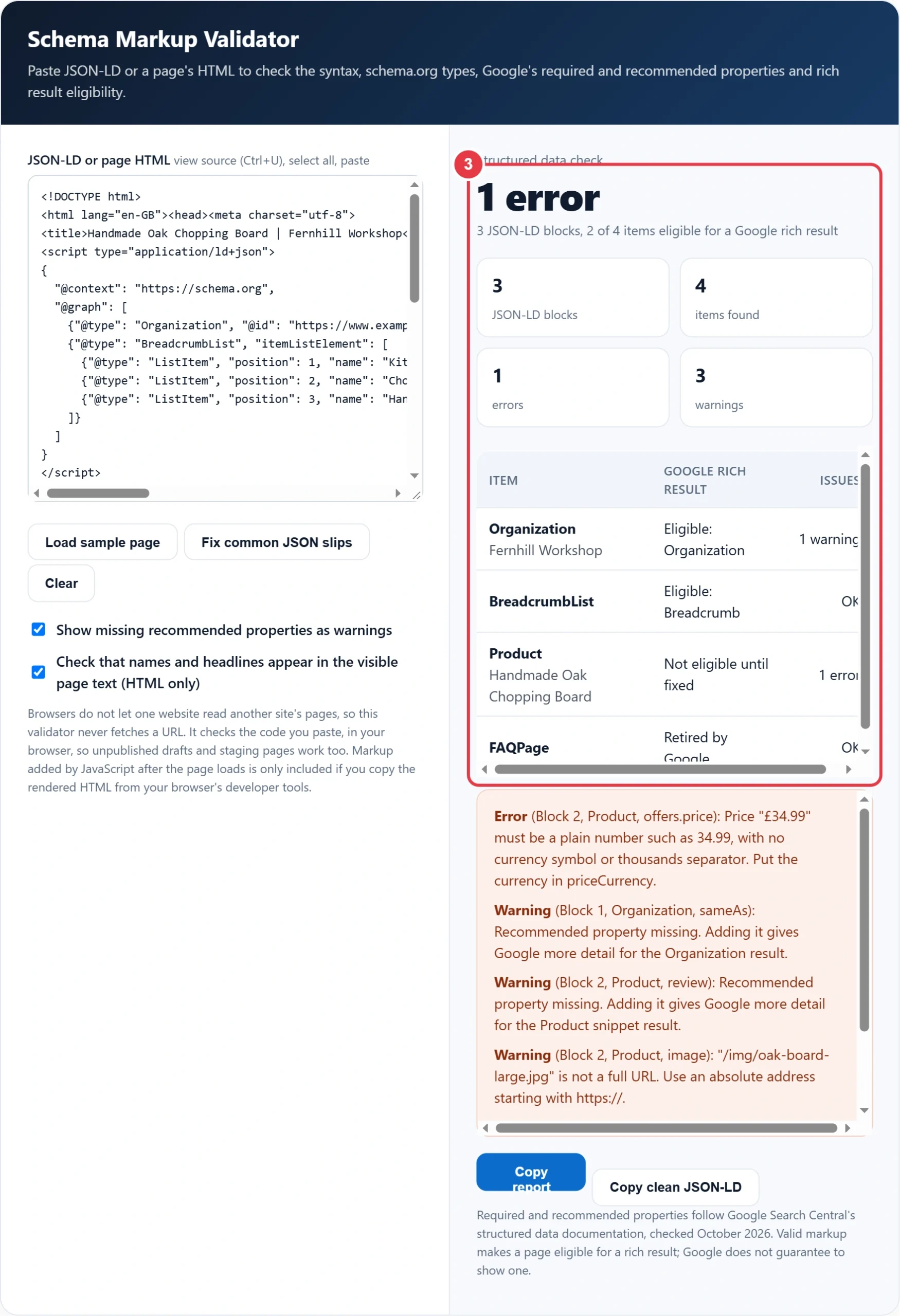
Each item gets one row: its type and name, the Google feature it can earn and an error or warning count. "Eligible" means no errors were found for that feature; "Retired by Google" means the markup is valid but the feature no longer appears in search.
Step 4: Fix the Issues and Copy Clean Code
The issue list names the block, type and property path for every error, warning and note, with the fix in plain English. Copy the report for a developer, or copy the clean JSON-LD, which is your parsed markup reformatted with consistent indentation and ready to paste back into the page.

Which Schema Types Get Google Rich Results in 2026?
Google currently lists 25 structured data features in its search gallery, including Article, Breadcrumb, Event, Local business, Product, Recipe, Review snippet and Video. FAQ rich results stopped appearing on 7 May 2026 and HowTo results were removed in 2023, so that markup is valid but earns nothing visible in Google.
| Schema type | Google rich result (October 2026) | Required properties |
|---|---|---|
| Article, BlogPosting | Yes | None; headline, image, author and dates recommended |
| Product | Yes | name plus offers, review or aggregateRating |
| LocalBusiness | Yes | name, address |
| Event | Yes | name, startDate, location with address |
| Recipe | Yes | name, image |
| BreadcrumbList | Yes | 2 or more ListItems with position, name, item |
| VideoObject | Yes | name, thumbnailUrl, uploadDate |
| JobPosting | Yes | title, description, datePosted, hiringOrganization, jobLocation |
| QAPage | Forums with user answers only | Question with name, answerCount and an answer |
| FAQPage | No, retired 7 May 2026 | Valid schema.org only |
| HowTo | No, retired in 2023 | Valid schema.org only |
Keep FAQ markup if it is already in place, since it does no harm, but do not add it expecting a dropdown in results. Spend the time on Product, Breadcrumb and Article markup, which still produce visible features.
Why Does Valid Schema Not Show a Rich Result?
Valid markup only makes a page eligible: Google decides whether to show a rich result, and its general structured data guidelines say there is no guarantee even when everything is marked up correctly. The common blockers are a retired feature such as FAQ, markup describing content that is not visible, self serving reviews on LocalBusiness or Organization markup, and a page that is not indexed at all.
Here is a worked example. Tom sells handmade chopping boards from a workshop in Hebden Bridge. He pastes his product page into the schema markup validator and gets 1 error and 3 warnings across four items. The Product price is written as "£34.99", which is not a plain number, so the product is not eligible for its price and star rating snippet. The warnings say the product image is a relative path, the product has no individual review, and the Organization has no sameAs links to its social profiles. Breadcrumb and Organization are eligible, and the FAQ block is flagged as retired. He changes the price to 34.99 with priceCurrency GBP, makes the image URL absolute and pastes again: 0 errors and 3 of 4 items eligible.
What Are the Most Common Schema Markup Errors?
The most common errors are JSON syntax slips, wrong value formats and missing required properties. A single trailing comma or curly quote makes search engines ignore the whole block, so the schema markup validator points to the line and offers a one click fix. Value errors are quieter: the block still parses, but Google cannot use a price, date or rating it does not understand, so the item silently loses eligibility.
- Curly quotes pasted from a word processor, and trailing commas before a closing bracket.
- Prices with symbols or commas, such as £1,299.00 instead of 1299.00.
- Dates like 14/10/2026 instead of 2026-10-14, and cook times like 20 mins instead of PT20M.
- Lower case or misspelt types: Localbusiness is not a type, LocalBusiness is.
- Relative image and logo URLs that resolve differently on each page.
- Ratings above 5 without bestRating, which Google reads as out of range.
- Breadcrumb items with no URL other than the last one.
Structured data works best alongside the rest of your on-page setup. Write the title and description that will sit beside a rich result with the meta tag generator, set the social preview with the Open Graph tag generator, and confirm that every marked up page is listed by running your sitemap through the XML sitemap validator before you request indexing in Search Console. After each template change, paste one page of every type into the schema markup validator again, because a theme or plugin update can silently drop or rename properties. Rules and feature list checked October 2026.
Schema Markup Validator Terms You Should Know
Understanding these structured data concepts helps you read every error and warning from the schema markup validator and fix your code for rich result eligibility.
- JSON-LD
- JavaScript Object Notation for Linked Data, a W3C format for expressing linked data in JSON. Placed inside a script element, it describes page entities without altering the visible HTML, which makes it the format Google recommends for most structured data.
- Schema.org
- A shared vocabulary of types and properties created by the major search engines to describe things such as products, events, recipes and organisations. Declaring it as the @context lets crawlers interpret every property name in the same, consistent way.
- Rich result
- An enhanced search listing that displays extra details drawn from structured data, such as review stars, prices, cooking times or event dates. Correct markup earns eligibility only, since the search engine decides case by case whether the enhanced format appears.
- Microdata
- An HTML specification for embedding machine-readable data through attributes such as itemscope, itemtype and itemprop placed on visible elements. It can carry the same schema.org vocabulary as JSON-LD but ties the markup closely to the page's HTML structure.
- ISO 8601
- The international standard for writing dates, times and durations in a fixed, unambiguous order, beginning with the year. Structured data properties such as startDate, datePublished or cookTime expect values in this format so parsers read them correctly.
- ISO 4217
- The international standard that assigns three-letter codes to currencies, for example GBP for the pound sterling and EUR for the euro. Offer and price markup uses these codes in the priceCurrency property instead of currency symbols.
</>Embed this calculator on your website
Add the free Schema Markup Validator to your own site or blog. Copy the code below and paste it into an HTML block. It resizes itself and works on phones.
How we checked this tool: the Tools Veria Editorial Team built this tool by hand, checked it against the official rules or published standards where they apply, and tested it against worked examples. Results are estimates for planning, not personal financial or tax advice. Read our editorial policy and disclaimer, or report an error.
Frequently Asked Questions
How do I validate schema markup?
Paste the JSON-LD, or the full page HTML from view source, into a schema markup validator. It checks the JSON syntax, the @context and @type, Google's required properties and value formats, then lists each error with the property path and the fix.
What is the difference between the Schema Markup Validator and the Rich Results Test?
The schema.org validator checks markup against the whole schema.org vocabulary but says nothing about Google features. Google's Rich Results Test only checks types that earn Google rich results. This tool shows both views together for pasted code.
Does Google still show FAQ rich results?
No. Google stopped showing FAQ rich results on 7 May 2026, so FAQPage markup no longer produces a dropdown in search. The markup is still valid schema.org and does no harm, so existing FAQ markup can stay.
Why can't this tool check a URL?
Browsers block one website from reading another site's pages, a security rule called the same origin policy. Paste the page source instead: press Ctrl+U, select all and copy. For JavaScript injected markup, copy the rendered HTML from developer tools.
Is JSON-LD better than Microdata?
Google supports JSON-LD, Microdata and RDFa, but recommends JSON-LD because it sits in one script block, separate from the visible HTML. That makes it easier to add, check and maintain without breaking the page layout.
What format should prices and dates use in schema markup?
Prices should be plain numbers such as 34.99, with the currency in priceCurrency as a three letter code such as GBP. Dates use ISO 8601, for example 2026-10-14, and durations use forms like PT20M for 20 minutes.