
Ellie is a freelance illustrator in Bristol who registered for VAT last spring after a run of big publishing contracts. Her first invoice under the new rules nearly went out at the wrong total, and her first VAT Return took a whole evening. Learning how to calculate VAT properly turned both jobs into a few minutes of arithmetic she can check at a glance.
Once you see how to calculate VAT, every sum in the UK comes down to multiplying or dividing by one of a handful of numbers. Below, Ellie adds VAT to a quote, strips it from a receipt, works back from a VAT figure alone, completes a quarter’s return and tests whether the Flat Rate Scheme would save her money.
Quick answer: To calculate VAT at the UK standard rate of 20% for 2026/27, multiply the net price by 0.2 to get the VAT, or by 1.2 for the total. To remove VAT from a gross price, divide by 1.2. At the 5% reduced rate use 1.05. So £850 plus VAT is £1,020, including £170 VAT.
In This Guide
What are the UK VAT rates for 2026/27?
The UK has three VAT rates in 2026/27: 20% standard rate for most goods and services, 5% reduced rate for items such as home energy and children’s car seats, and 0% zero rate for most food and children’s clothes. The GOV.UK page on VAT rates lists these with examples and links to the detailed rules for each type of product.
A 0% rate and an exemption look identical on a till receipt, yet they lead to very different VAT Returns. A business selling zero rated goods, such as a children’s clothes shop, still records those sales on its return and can usually reclaim VAT on its costs. Exempt supplies, such as postage stamps and most financial services, sit outside the system, and a business making only exempt sales cannot register or reclaim VAT on what it buys.
How do you add VAT to a price?
To add VAT to a price, multiply the net figure by 1.2 at the 20% rate or by 1.05 at the 5% rate. If you only want the VAT itself, multiply the net figure by 0.2 or 0.05 instead.
Ellie quotes £850 for a book cover. The VAT is £850 × 0.2, which is £170, and the total on her invoice is £850 × 1.2, or £1,020. A children’s car seat priced at £64 before VAT falls in the 5% reduced band instead, so the VAT is £3.20 and the total is £67.20. When you are pricing a product to resell, the markup calculator shows the net selling price that gives the margin you want, so add your profit first and the VAT last, never the other way round.

How do you remove VAT from a price?
To remove VAT from a price that already includes it, divide the gross figure by 1.2 at 20% or by 1.05 at 5%. The answer is the net price, and the difference between the two figures is the VAT.
Ellie buys a laptop for £1,140 including VAT. Dividing by 1.2 gives a net cost of £950, so £190 of the price is VAT she can reclaim. A faster route to the VAT alone is the VAT fraction: at 20%, VAT is one sixth of any VAT inclusive price, so £1,140 ÷ 6 is £190. At 5%, VAT is one twenty first of the gross price.
The trap is knocking 20% off the gross price. On £1,020, taking off 20% leaves £816, yet the real net price is £850. The 20% was added to the net figure, so it is only 16.67% of the total. Our reverse VAT calculator does the division for any rate, and for invoices to or from the Republic of Ireland the Irish rates of 23%, 13.5% and 9% are already set up in the Ireland VAT calculator, so you never need to remember them.
How do you find the net price from the VAT amount?
If you know only the VAT, multiply it by 5 to get the net price at 20%, or by 20 at 5%. Add the VAT back on to get the gross price. This helps when a receipt shows the VAT line clearly but the other figures are faded or missing.
A crumpled taxi receipt in Ellie’s bag shows only “VAT £4.50”. Five times £4.50 is £22.50 net, and the fare was £27.00 including VAT. On a home energy bill showing £9.60 of VAT at 5%, the net charge is £192 and the total is £201.60.
| What you want | At 20% | At 5% | At 0% |
|---|---|---|---|
| Gross price from net | Net × 1.2 | Net × 1.05 | Same as net |
| VAT from net | Net × 0.2 | Net × 0.05 | £0 |
| Net price from gross | Gross ÷ 1.2 | Gross ÷ 1.05 | Same as gross |
| VAT from gross | Gross ÷ 6 | Gross ÷ 21 | £0 |
| Net price from VAT | VAT × 5 | VAT × 20 | Not possible |
| Example: £850 net | £1,020 gross, £170 VAT | £892.50 gross, £42.50 VAT | £850 gross |
In Excel or Google Sheets, with the price in cell A2, the formulas are =A2*1.2 to add VAT, =A2/1.2 to remove it and =A2/6 for the VAT inside a gross price. Wrap any of them in =ROUND(formula,2) to keep results to the penny.
How do you calculate the VAT you owe HMRC?
You calculate the VAT you owe HMRC by taking the VAT you charged on sales, called output VAT, and subtracting the VAT you paid on business purchases, called input VAT. If input VAT is larger, HMRC repays the difference.
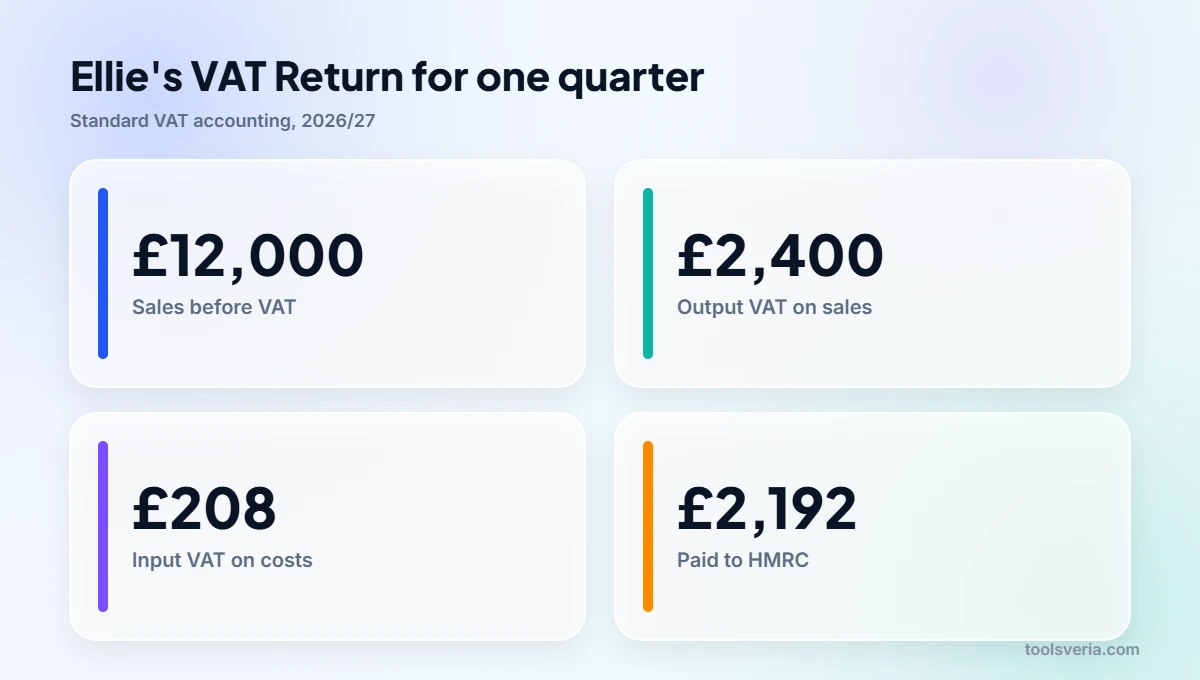
In her first quarter Ellie invoices £12,000 before VAT, so her output VAT is £2,400. Her input VAT is £190 on the laptop plus £18 on three months of design software at £36 a month including VAT, which is £208 in total. Her VAT Return shows £2,400 minus £208, so she pays HMRC £2,192. The self employed tax calculator helps her plan for income tax on her net profit too, and setting VAT aside as each invoice is paid avoids a shock at the deadline.
Pennies can differ between methods. Three items at £4.99 net each carry £0.998 of VAT apiece, which rounds to £1.00 per line, or £3.00 in total. Working on the invoice total instead, £14.97 × 0.2 gives £2.994, which rounds to £2.99. Neither is wrong, but pick one method, apply it consistently and make sure your accounting software does the same.

How does the Flat Rate Scheme change the calculation?
Under the VAT Flat Rate Scheme, you still charge customers the normal VAT, but you pay HMRC a fixed percentage of your VAT inclusive turnover and usually cannot reclaim VAT on purchases. It is open to businesses with VAT taxable turnover of £150,000 or less, excluding VAT.
Ellie spends very little on goods, so she would count as a limited cost business, which the GOV.UK Flat Rate Scheme rules define as goods costing less than 2% of turnover or less than £1,000 a year. Limited cost businesses pay 16.5%, with a 1% discount in the first year of VAT registration. Her VAT inclusive turnover for the quarter is £14,400.
| Ellie’s quarter | Standard accounting | Flat rate, first year (15.5%) | Flat rate, later years (16.5%) |
|---|---|---|---|
| VAT charged to clients | £2,400 | £2,400 | £2,400 |
| VAT reclaimed on costs | £208 | £0 (laptop under £2,000) | £0 |
| Paid to HMRC | £2,192 | £2,232 | £2,376 |
| Kept compared with standard | None | £40 worse | £184 worse |
For Ellie the scheme costs money, because 16.5% of gross turnover is close to the full 20% on her net fees. It tends to suit businesses in sectors with lower flat rates and few purchases. GOV.UK’s own example is a photographer on an 11% rate who charges £1,000 plus £200 VAT and pays HMRC £132, keeping £68.
When do you have to register for VAT?
You must register for VAT if your VAT taxable turnover for the last 12 months goes over £90,000, or if you expect it to pass £90,000 in the next 30 days alone. The 12 months are a rolling period, not the tax year, so you check the total at the end of every month.
Ellie’s turnover went over £90,000 at the end of March, so she had 30 days to register, and the GOV.UK guide to when to register explains that her registration took effect from the first day of the second month after she crossed the line. Businesses below the threshold can register voluntarily, which can make sense if most customers are VAT registered and can reclaim the VAT themselves.
Key points
- The UK VAT rates for 2026/27 are 20% standard, 5% reduced and 0% zero rate.
- Multiply a net price by 1.2 to add 20% VAT, and divide a gross price by 1.2 to remove it.
- At 20%, VAT is one sixth of a VAT inclusive price, and at 5% it is one twenty first.
- VAT owed to HMRC is output VAT on sales minus input VAT on business purchases.
- VAT registration is compulsory once taxable turnover passes £90,000 in a rolling 12 months.
Key UK VAT Terms Explained
These definitions support every step of how to calculate VAT in the UK, from pricing an invoice to working out what goes on your VAT Return.
- Standard rate
- The main VAT rate charged on most goods and services in the UK, set at 20% for 2026/27. Adding it means multiplying a net price by 1.2, while the VAT alone is the net price multiplied by 0.2.
- Reduced rate
- A lower VAT rate of 5% that applies to particular goods and services, such as home energy and children’s car seats. Sums at this rate use 1.05 to add VAT and divide by 1.05 to take it out.
- Zero rating versus exemption
- Two treatments that both leave no VAT on the sale price but work differently. Zero rated sales still sit inside the VAT system, so costs can usually be reclaimed, whereas exempt supplies fall outside it and give no right to reclaim.
- VAT fraction
- The share of a VAT inclusive price that is tax, used to find the VAT without first working out the net figure. At 20% it is one sixth of the gross price, and at 5% it is one twenty first.
- Input tax and output tax
- Output tax is the VAT a registered business charges on its sales, and input tax is the VAT it pays on business purchases. The VAT Return compares the two, with the difference paid to or reclaimed from HMRC.
- Flat Rate Scheme
- An HMRC scheme for smaller businesses that pay VAT as a fixed percentage of their VAT inclusive turnover, instead of tracking input and output tax line by line. Whether it saves money depends on the trade’s rate and costs.
Frequently Asked Questions
A supplier quotes £2,400 “plus VAT”. What will I actually pay?
You will pay £2,880 at the 20% standard rate, because £2,400 × 1.2 is £2,880, of which £480 is VAT. If you are VAT registered and the purchase is for your business, you can usually reclaim that £480 on your next VAT Return.
My receipt says £45 including VAT. Why is the VAT £7.50 and not £9?
Because 20% VAT was added to the net price of £37.50, not taken from the £45 total. Dividing £45 by 1.2 gives £37.50, and the VAT is £7.50, which is one sixth of the gross amount. Taking 20% of £45 overstates it by £1.50.
I turned over £84,000 last year. Do I need to charge VAT?
Not yet, because £84,000 is below the £90,000 registration threshold. Keep checking your rolling 12 month total at the end of each month, and register within 30 days once it goes over, or straight away if one month’s sales alone will pass £90,000.
I sell discounted items. Do I take the discount off before or after VAT?
Apply the discount to the net price first, then add VAT to what is left. A £100 net item with 10% off becomes £90, and VAT at 20% makes the customer price £108. The discount calculator works out the reduced figure before you add VAT.
Knowing how to calculate VAT turned a nervous evening into a ten minute job. Ellie now adds VAT with one multiplication, strips it from receipts with one division and knows exactly why she pays £2,192 a quarter rather than £2,400. Run your own figures through the reverse VAT calculator before you send an invoice or file a return, and check rates on GOV.UK when your products change. Figures checked October 2026.