Paste a page's HTML to list every heading in order, see the outline a screen reader or crawler gets, and fix structure problems.
0 characters, 0 lines pasted
Nothing is fetched or uploaded: browsers block pages from reading other websites, so the extractor parses the HTML you paste, safely and without running its scripts. For pages built by JavaScript, copy the rendered HTML from your browser's Elements panel.
This HTML heading extractor pulls every H1 to H6 heading out of a page's source code and lays them out as an indented outline, for SEOs, writers and developers checking any site. It flags missing and duplicate H1s, skipped levels and empty headings using the rules in the W3C headings tutorial, then exports the list as plain text, Markdown or CSV. Figures checked October 2026.
Quick answer: paste the page source into the HTML heading extractor and it lists every heading in source order with its level. A healthy page has 1 H1, then H2 sections, with H3s only inside an H2. Any jump of more than one level, such as H2 to H4, is flagged for fixing.
In This Guide
What Is an HTML Heading Extractor?
An HTML heading extractor is a tool that reads a web page's markup and returns only its h1 to h6 elements, in order, so you can see the page's outline without the design getting in the way.
The rule it applies is simple: each heading's level should be at most one deeper than the heading before it, and the page should open with a single H1. Visual design hides mistakes. A theme can make an H4 look like a section title, or a footer widget can add three H2s you never wrote. Screen reader users jump through a page by its headings, and search engines use them to understand which text belongs to which topic, so the outline matters more than how the headings look.
How to Use the HTML Heading Extractor
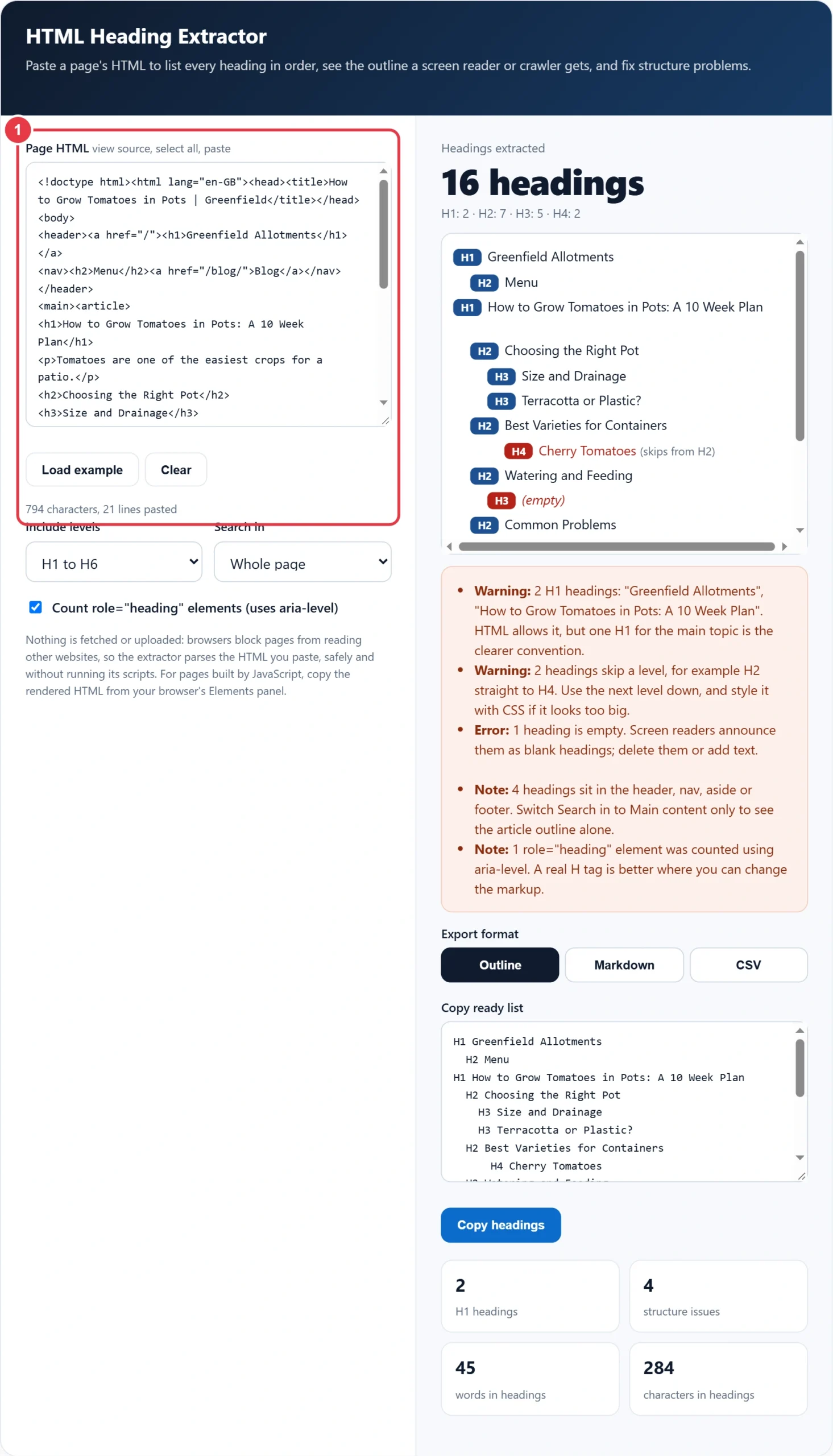
Step 1: Paste the Page HTML
Open the page, press Ctrl+U (Option+Cmd+U on a Mac) to view the source, select all and paste it in. For pages built in the browser by JavaScript, right click the html element in DevTools and copy its outer HTML instead, so you get the rendered headings.
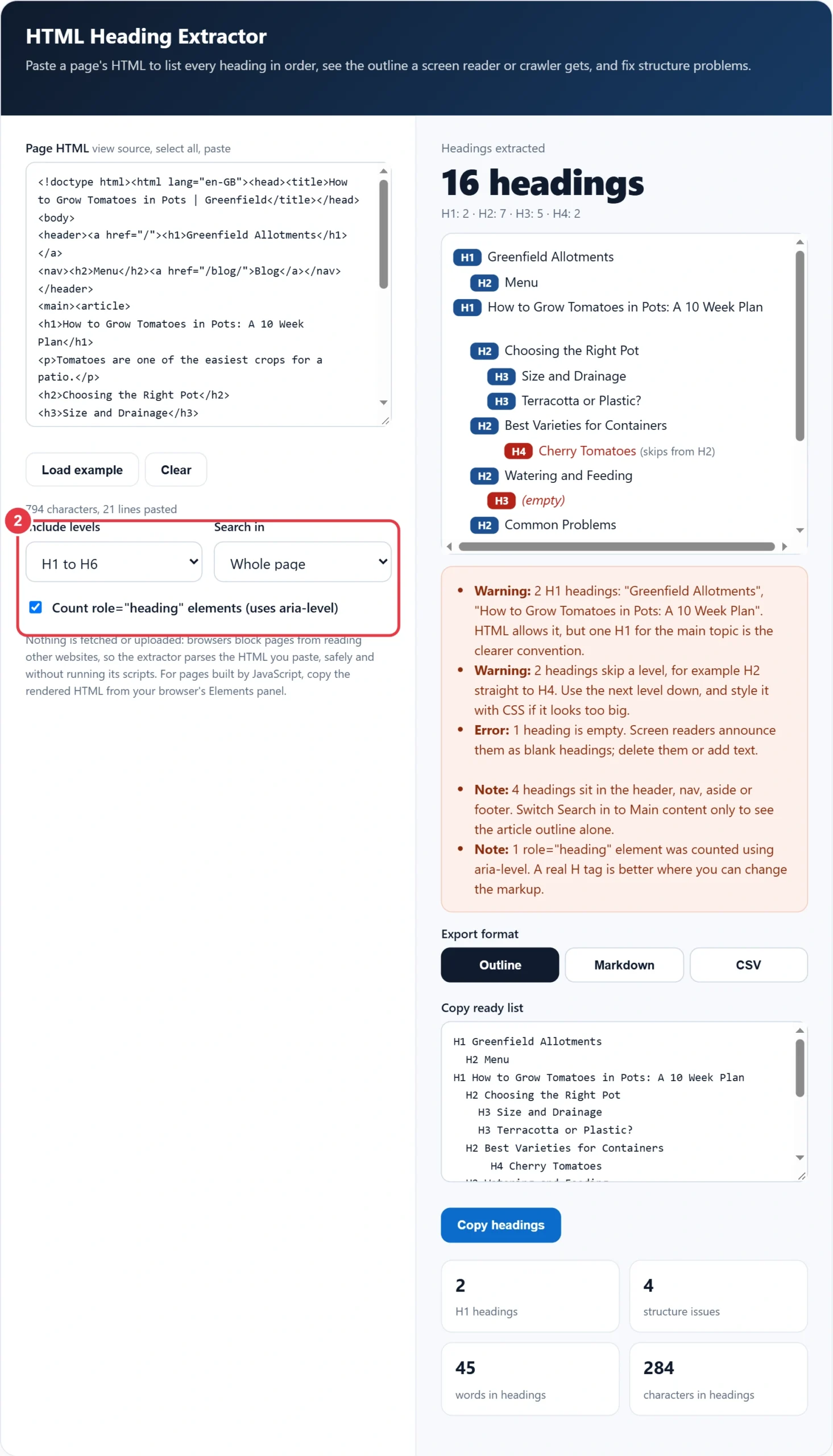
Step 2: Choose Levels and Scope
Keep H1 to H6 for a full audit, or limit it to H1 to H3 when you only want a content brief. Set Search in to Main content only to drop headings in the header, navigation, sidebar and footer, which is the outline your article actually gives readers.
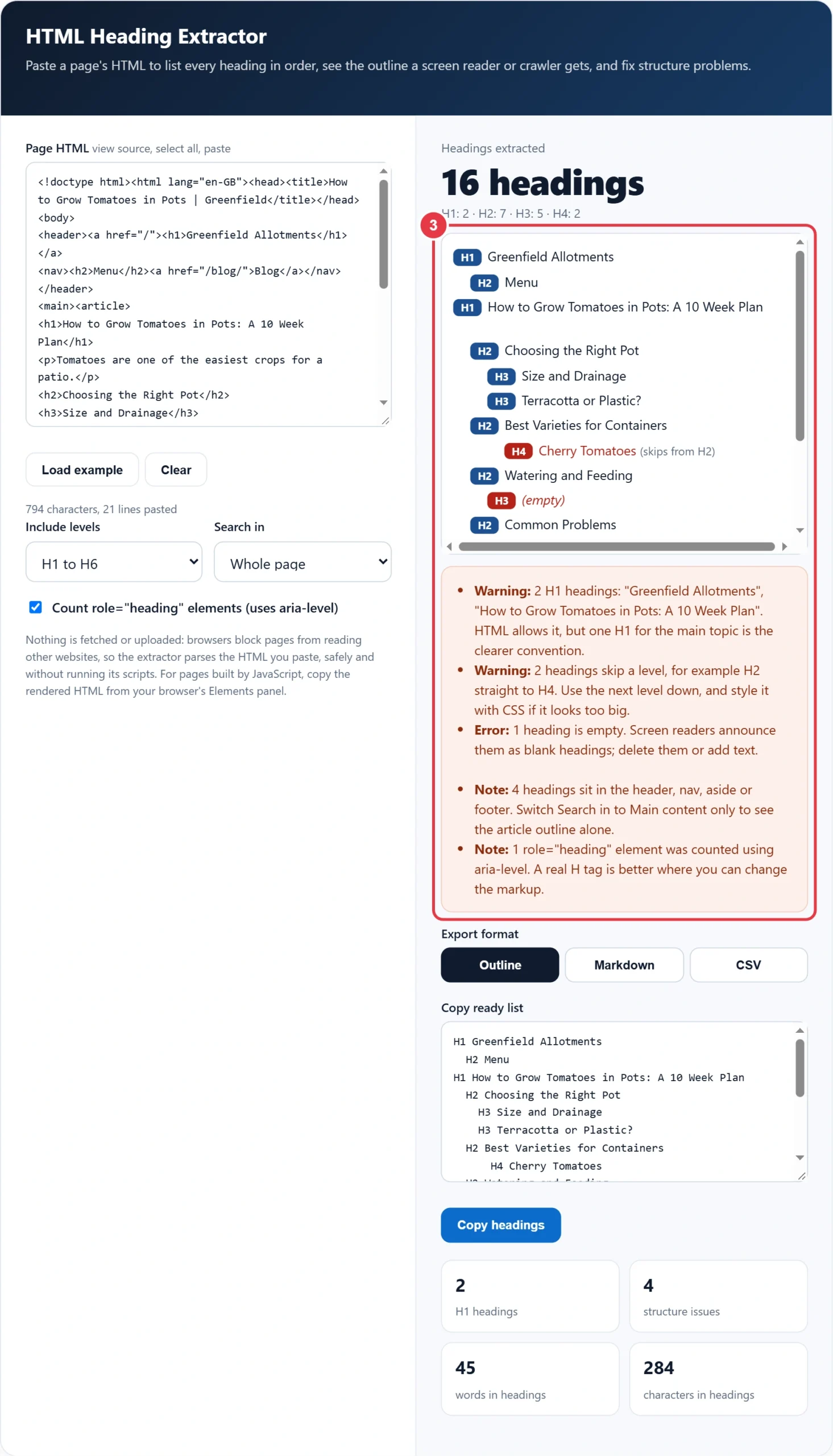
Step 3: Read the Outline and the Issues
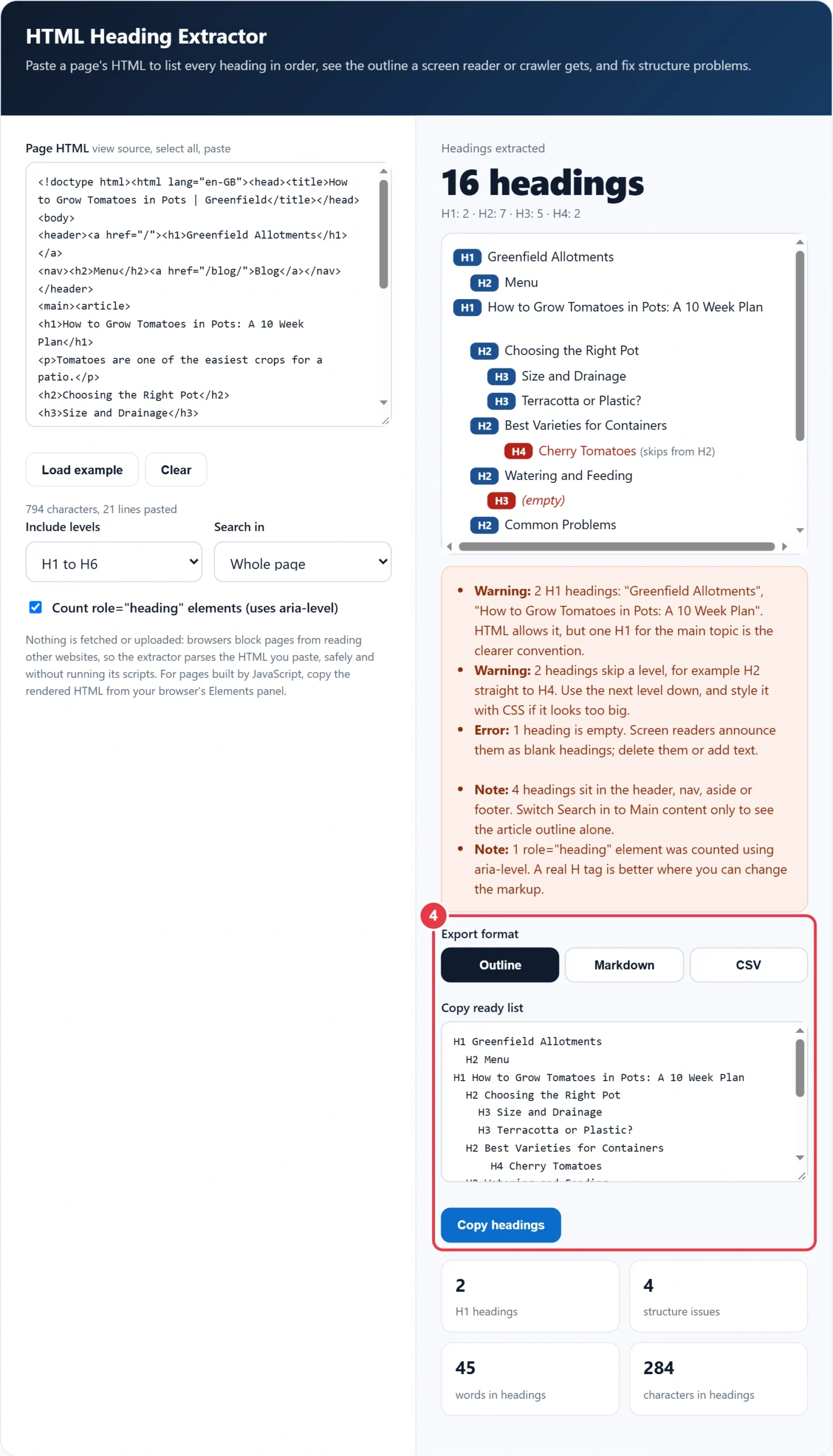
Each heading is indented by level with its tag shown as a badge. Red rows are empty or skip a level. The box below lists errors first, then warnings and notes, each with the fix in one sentence.
Step 4: Export the Headings
Pick Outline for a quick read, Markdown to paste into a content brief or Google Doc, or CSV to compare competitor pages in a spreadsheet. When you rewrite headings, the keyword density checker shows whether your main phrase now appears naturally across the copy, without stuffing it into every H2.
How Many H1 Tags Should a Page Have?
One. The HTML standard allows more, but MDN's guidance is that a page should generally have a single H1 that describes its content, much like the title tag, and that is the clearest signal for readers and crawlers.
The worked example loaded in the tool shows the most common cause of a second H1. Greenfield Allotments wraps its logo text in an H1 in the site header, so every post has two: "Greenfield Allotments" and the real title, "How to Grow Tomatoes in Pots: A 10 Week Plan". The extractor finds 16 headings, 2 H1s, 2 skipped levels and 1 empty H3. Changing the logo to a plain link and fixing the 3 other problems leaves one H1 and a clean outline.
Is It Bad to Skip Heading Levels?
Yes, going deeper by more than one level is a mistake, such as an H2 followed directly by an H4. Going back up is fine: an H2 can follow an H4 when a new section starts, and the extractor only flags the downward jumps.
| Issue | Example | Fix |
|---|---|---|
| No H1 | Title styled as a large paragraph | Make the page title an H1 |
| Two or more H1s | Logo wrapped in H1 | Use a plain link or image for the logo |
| Skipped level | H2 then H4 | Change the H4 to an H3 |
| Empty heading | A blank H3 left by an editor | Delete it or add text |
| Heading used for size | Bold sentence set as H3 | Use a paragraph and CSS instead |
| Widget headings | Related Posts as H4 in the sidebar | Use H2 or a non heading label |
Most of these come from themes and page builders rather than writers. The MDN heading elements reference is direct on the size problem: do not use headings to resize text, because CSS controls size and headings control structure. If a builder only offers "H4" for a small bold label, choose a paragraph style instead and set its size in the design panel.
Template headings repeat on every page, so one fix in the header, sidebar or footer template can clean up hundreds of URLs at once. Check one post, one category page and the home page, since each often uses a different template.
How Do Headings Help SEO and AI Answers?
Headings tell search engines and AI assistants which paragraphs answer which question. A heading phrased as a real query, followed by a sentence that answers it on its own, is the pattern most often lifted into featured snippets and AI summaries, so a tidy outline is also an easy content upgrade.
A quick way to use this: export the H2s of the top three ranking pages as CSV, put them side by side, and note the topics all three cover. Then preview how your page title and meta description will look in results with the SERP preview tool, so the heading plan and the search snippet promise the same thing.
Key HTML Heading Terms You Should Know
These terms explain what the HTML heading extractor reports, from heading levels to outline errors, so you can fix page structure with confidence.
- Heading elements
- The six HTML tags from h1 to h6 that mark section titles in order of importance. Their level, not their font size, tells browsers, assistive technology and crawlers how the content is organised.
- Document outline
- The nested structure formed by reading a page's headings in source order, much like a table of contents. A clean outline lets readers and screen readers jump straight to the section they need.
- Skipped heading level
- A jump of more than one step down the hierarchy, such as an h2 followed directly by an h4. It suggests a missing section and can confuse people navigating by headings, so the lower heading is usually raised one level.
- ARIA heading role
- An accessibility attribute that makes a non heading element, such as a styled div, behave as a heading for assistive technology. Its aria-level value supplies the level that a real h1 to h6 tag would normally provide.
- Main content region
- The part of a page that holds its primary content, usually wrapped in a main element, separate from the header, navigation, sidebar and footer. Auditing headings only here shows the outline of the article itself.
- Rendered DOM
- The live document structure a browser builds after running a page's scripts. On JavaScript driven sites it can contain headings that are absent from the raw source, so it must be copied from developer tools.
</>Embed this calculator on your website
Add the free HTML Heading Extractor to your own site or blog. Copy the code below and paste it into an HTML block. It resizes itself and works on phones.
How we checked this tool: the Tools Veria Editorial Team built this tool by hand, checked it against the official rules or published standards where they apply, and tested it against worked examples. Results are estimates for planning, not personal financial or tax advice. Read our editorial policy and disclaimer, or report an error.
Frequently Asked Questions
How do I extract all headings from a web page?
View the page source with Ctrl+U, select all, and paste it into an HTML heading extractor. It lists every H1 to H6 in source order with its level, which you can then copy as an outline, Markdown or CSV.
Can I have two H1 tags on one page?
HTML allows more than one H1, so it will not break the page. One H1 that matches the page topic is still the recommended convention, and a second one usually comes from a logo or widget that should not be a heading.
Why are some headings missing from the extracted list?
The page probably adds them with JavaScript after loading, so they are not in the source. Copy the rendered HTML from the Elements panel in your browser's DevTools and paste that instead to capture every heading.
Does the order of H2 and H3 matter for SEO?
Yes. Each H3 should sit under the H2 it belongs to, which helps search engines and screen readers link each subtopic to its section. Skipping from H2 to H4 makes that relationship unclear.
What does role=heading with aria-level mean?
It turns an element such as a div into a heading for assistive technology, with aria-level setting the level from 1 to 6. The extractor counts these, but a real h2 or h3 tag is the more robust choice.
Should the H1 match the title tag?
They should cover the same topic but need not be identical. A title tag around 50 to 60 characters is written for search results, while the H1 can be a little longer and written for readers already on the page.