Paste a page's source, and optionally its response headers, to see which URL it declares as canonical and whether every signal agrees.
Browsers block one website from reading another site's pages, so this checker never fetches your URL. It reads only what you paste, which also works for staging and logged in pages.
| Signal | Value found |
|---|
Rules follow Google Search Central guidance on canonical URLs, checked October 2026. Google treats your canonical as a strong hint, not a command.
This canonical tag checker shows site owners, SEOs and developers which URL a page declares as its preferred version and whether every signal agrees. It reads the rel=canonical tag in your source and the canonical in your HTTP headers, then applies the rules in Google's guide to canonical URLs to flag what needs fixing. Rules checked October 2026.
Quick answer: a correct canonical appears once, in the head, as a full absolute https URL that returns 200 and matches any canonical in the HTTP Link header. Paste your source into the canonical tag checker and it flags relative URLs, duplicates, conflicts, noindex clashes and tags placed outside the head.
In This Guide
What Is a Canonical Tag?
A canonical tag is a link element, written as link rel="canonical" in the head, that names the preferred URL when the same content is reachable at more than one address. Search engines use it to decide which address to index and show, and to combine signals from the duplicates.
The test is simple: a canonical is correct when there is exactly one, it is an absolute URL, it sits in the head, it points to a live indexable page, and every other signal points to the same address. Duplicates are everywhere: tracking parameters, filters, http and https, www and non www, trailing slashes and printer pages all create extra URLs for one page.
How to Use the Canonical Tag Checker
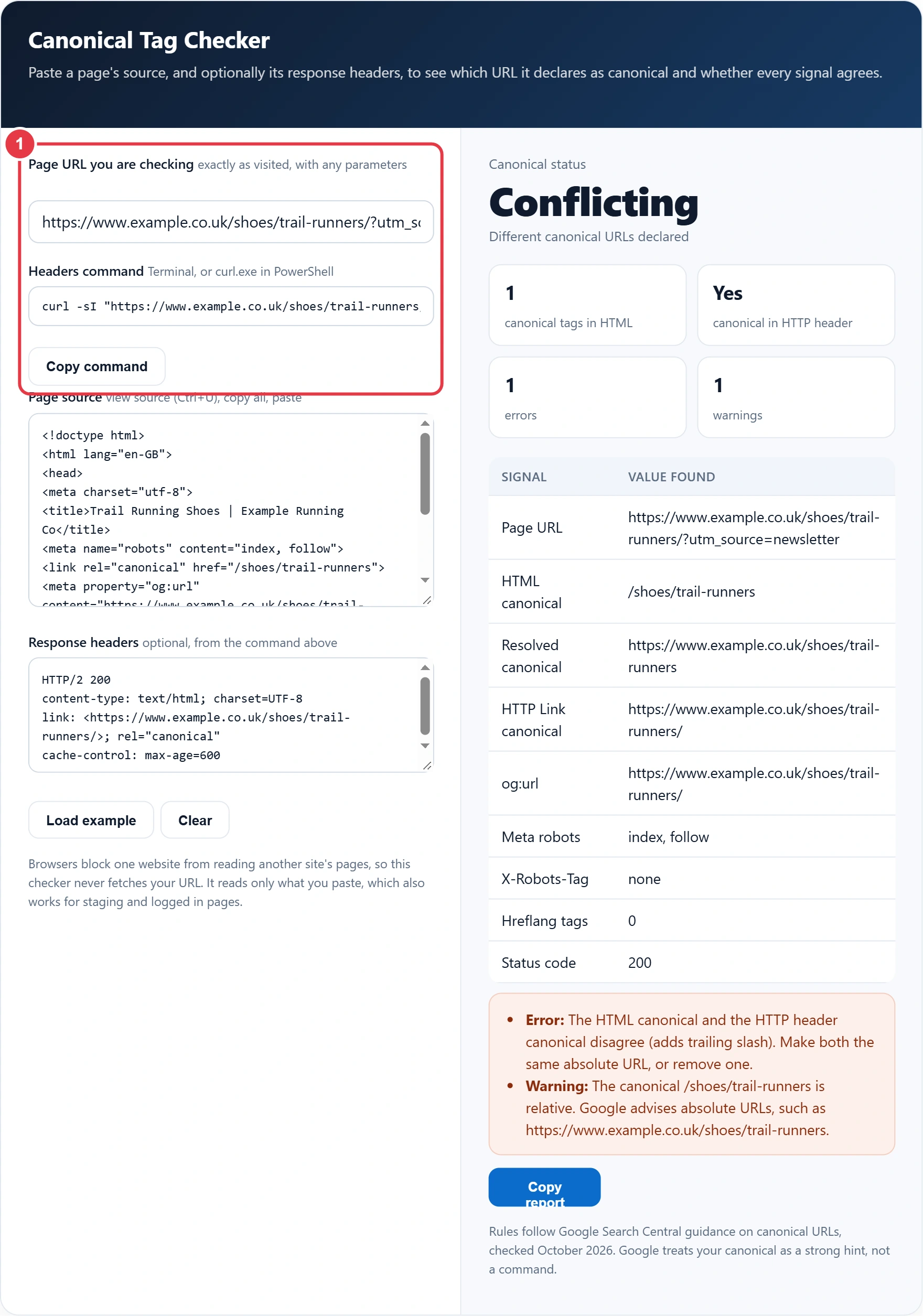
Step 1: Enter the Page URL
Type the address exactly as visitors or crawlers reach it, including any parameters. The canonical tag checker compares the declared canonical against this URL to tell you whether the page points to itself or somewhere else, and builds a curl command to fetch its headers.
Step 2: Paste the Page Source
Open the page, press Ctrl+U (Cmd+Option+U on a Mac), select everything and paste it in. The checker parses it the way a browser does, so a canonical that ends up in the body because of invalid markup in the head is caught. If you are also fixing titles and descriptions, the meta tag generator writes a clean head section you can paste back in.

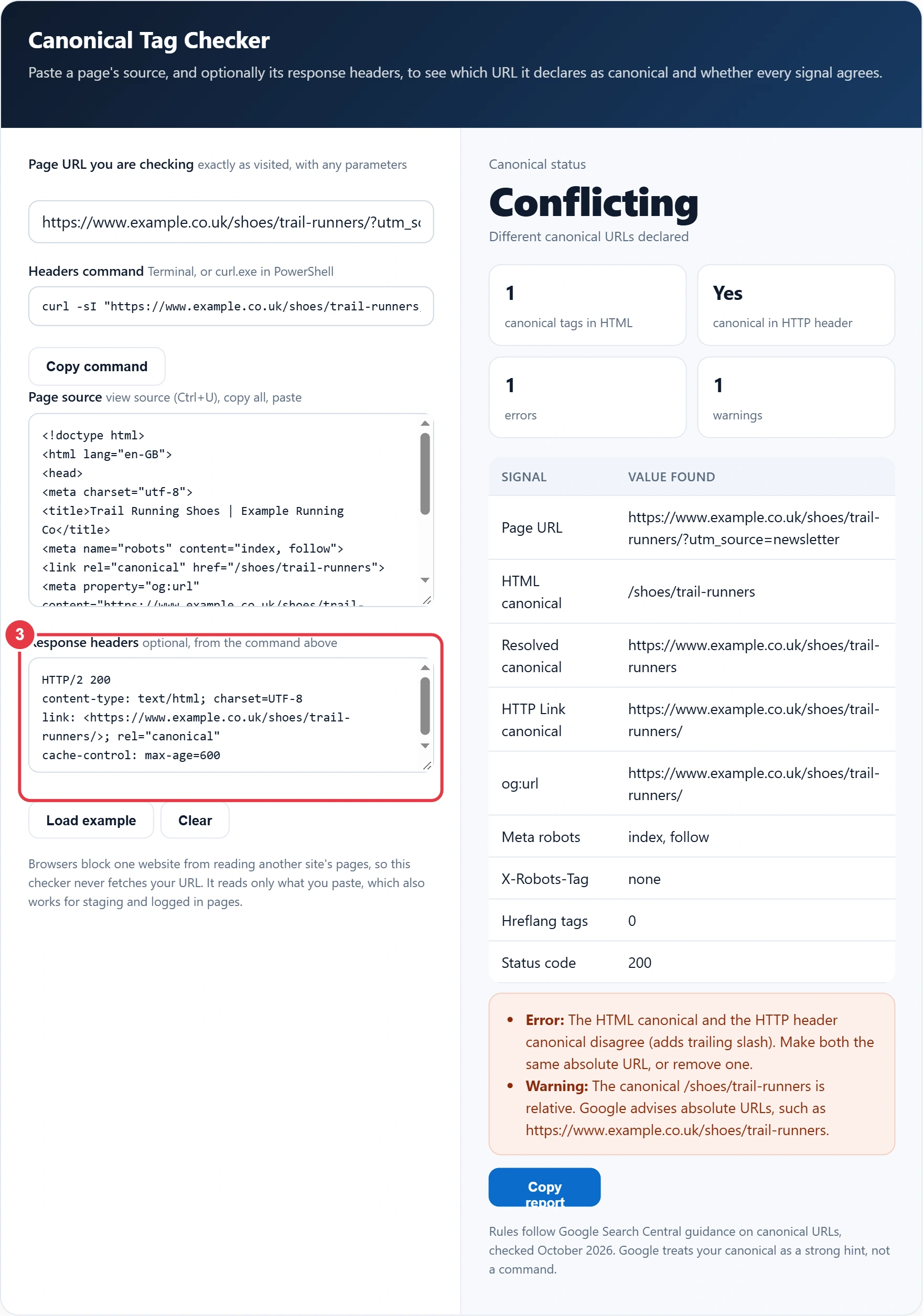
Step 3: Paste the Response Headers
Run the copied command and paste the output. This step is optional but worth doing, because some SEO plugins and CDNs add a canonical in a Link header that you cannot see in the source. The headers also show the status code and any X-Robots-Tag noindex rule.
Step 4: Read the Verdict and Fixes
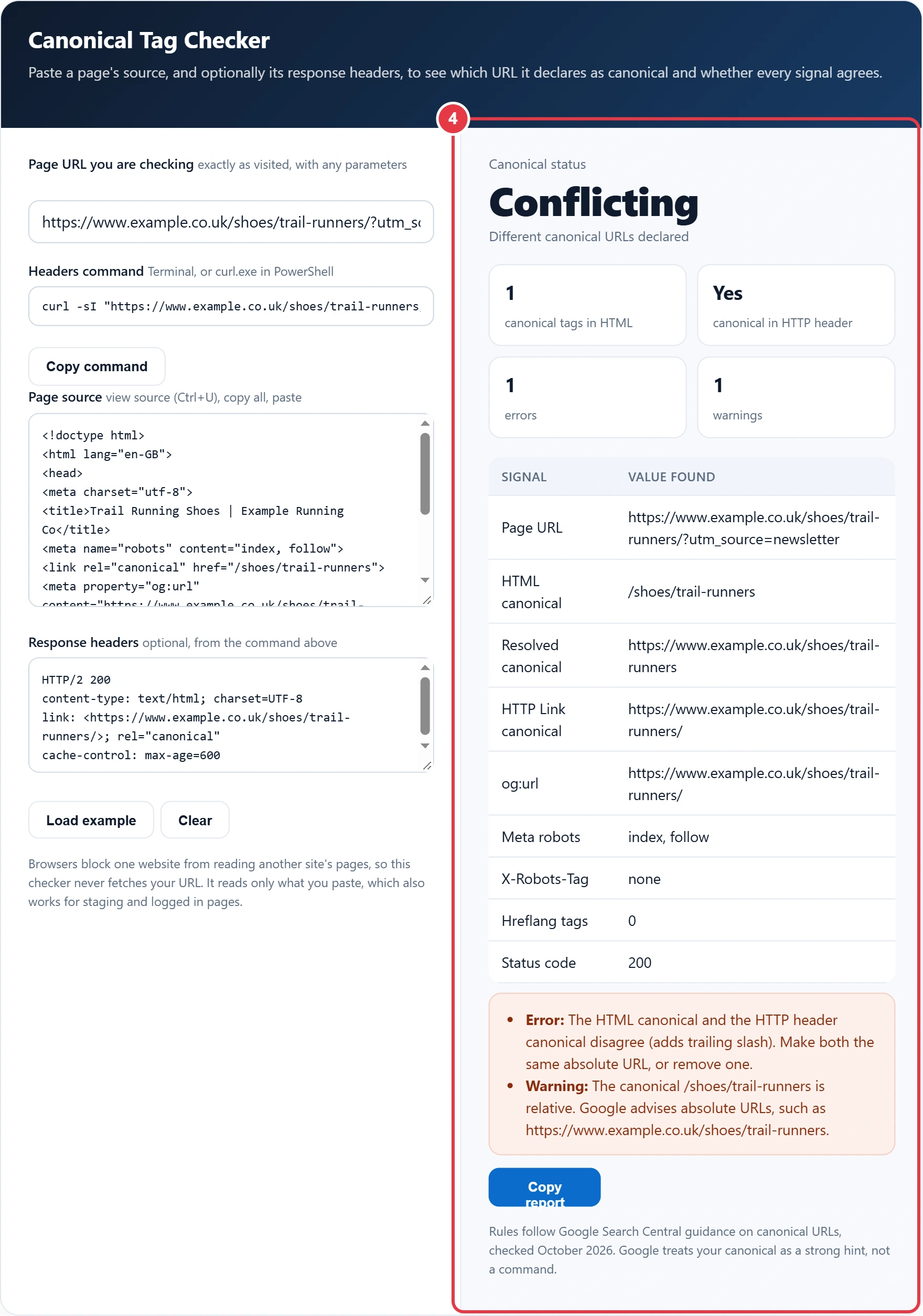
The verdict reads Self referencing, Points elsewhere, Conflicting or Missing. The signals table lists every canonical, og:url, robots rule and hreflang count found, and errors come before warnings. If a page you expect to be indexed still is not, the robots.txt validator shows whether crawling is blocked before Google ever sees the tag.
How Do I Check If a Canonical Tag Is Correct?
Find every canonical the page declares, in both the source and the headers, and confirm there is one absolute URL that they all agree on. Then check that URL loads with status 200 and is not set to noindex.
Here is the example loaded in the tool. Tom runs an online running shop, and his newsletter links to https://www.example.co.uk/shoes/trail-runners/?utm_source=newsletter. His theme hard codes a relative canonical, /shoes/trail-runners, with no trailing slash, while his SEO plugin sends https://www.example.co.uk/shoes/trail-runners/ in a Link header. The checker reports Conflicting with 1 error and 1 warning: the two canonicals differ by a trailing slash, and the HTML one is relative. The fix is to delete the theme tag and keep a single absolute canonical ending in a slash, which also matches his og:url.
Which Canonical Signals Does Google Trust Most?
Redirects are the strongest canonical signal, rel=canonical is also strong, and sitemap inclusion is weak. Signals stack when they agree, so the safest setup is a redirect or canonical backed up by internal links and a sitemap that all use the same URL.
| Method | Strength | Best used for |
|---|---|---|
| 301 or 308 redirect | Strong | Retired duplicates nobody needs to visit |
| rel=canonical link in the head | Strong | Duplicates that must stay live, such as tracking or filter URLs |
| rel=canonical HTTP Link header | Strong | PDFs and other files with no head |
| XML sitemap inclusion | Weak | Supporting the other methods on large sites |
| noindex | Not a canonical signal | Never use it to choose a canonical |
| robots.txt block | Not a canonical signal | Never use it to choose a canonical |
What Are the Most Common Canonical Tag Errors?
The most common error is two canonicals that disagree, usually because a theme and a plugin both add one. Others follow close behind, and the canonical tag checker labels each by name.
| Error | What happens | Fix |
|---|---|---|
| Two different canonicals | Google ignores both | Keep one, remove the other source |
| Relative href | Can resolve to the wrong host or path | Use the full https URL |
| Canonical in the body | Ignored | Move it into the head, above any body content |
| Canonical to a redirect or 404 | Mixed signals, often overridden | Point at the final 200 page |
| noindex plus canonical | Conflicting instructions | Keep the canonical, remove noindex on duplicates |
| Every page canonical to the home page | Inner pages drop out of results | Use self referencing canonicals |
Should Every Page Have a Self Referencing Canonical?
Yes, a self referencing canonical on every indexable page is a sensible default, because it settles parameter and case variants before they cause trouble. For language versions, each page should point to itself and list its alternates with the hreflang tags generator, never canonicalise to another language.
Remember that Google treats a canonical as a strong hint, not an order. If your internal links, sitemap and redirects point somewhere else, Google may choose a different canonical. The canonical link element has been supported by the major search engines since 2009, so consistent signals matter more than the tag on its own.
Canonical Tag Checker Terms You Should Know
These terms explain the duplicate URL signals that the canonical tag checker inspects, so you can fix conflicting canonicals before search engines choose for you.
- Canonical URL
- The single address a site owner nominates as the main version of a page whose content can be reached at several URLs. Search engines usually index and rank that address and credit links pointing at the duplicates to it.
- Self referencing canonical
- A canonical tag on a page that points to that same page's own address. It is a defensive best practice, because it stops tracking parameters and other variants from being treated as separate pages competing in search.
- HTTP Link header
- A response header the server sends before the page body, which can carry a canonical declaration. It is useful for non HTML files such as PDFs and must agree with any canonical tag written inside the page markup.
- Absolute URL
- A complete web address that includes the protocol and domain, not just a path. Canonicals should use this form because relative paths can be resolved incorrectly on staging, mirrored or parameterised versions of the same page.
- Noindex directive
- A robots instruction, placed in a meta tag or X-Robots-Tag header, asking search engines not to show a page in results. Combining it with a canonical sends contradictory signals about whether the content should be indexed.
- Hreflang
- An attribute that tells search engines which language or regional version of a page suits which audience. Each language version should canonicalise to itself, not to another language, or the alternate versions may be dropped.
</>Embed this calculator on your website
Add the free Canonical Tag Checker to your own site or blog. Copy the code below and paste it into an HTML block. It resizes itself and works on phones.
How we checked this tool: the Tools Veria Editorial Team built this tool by hand, checked it against the official rules or published standards where they apply, and tested it against worked examples. Results are estimates for planning, not personal financial or tax advice. Read our editorial policy and disclaimer, or report an error.
Frequently Asked Questions
What does a canonical tag checker do?
A canonical tag checker finds every rel=canonical a page declares, in its HTML and HTTP headers, and checks that there is one absolute URL that all signals agree on. This one also flags relative URLs, tags in the body, noindex clashes and og:url mismatches.
Can a canonical tag be a relative URL?
It can technically be resolved, but Google advises using absolute URLs such as https://www.example.co.uk/page/ rather than /page/. Relative canonicals break easily when content is copied to staging, a CDN or another host.
What happens if a page has two canonical tags?
If the two canonical URLs differ, Google ignores both and chooses a canonical itself. If they are identical it works, but it is untidy, so remove the duplicate, which is usually added by both a theme and an SEO plugin.
Should a canonical tag point to itself?
Yes, the preferred version of a page should carry a self referencing canonical with its own full URL. Only duplicates, such as tracking or filter URLs, should point to a different page.
Can I use noindex and canonical together?
Avoid it. Google says not to use noindex for canonicalisation, and noindex on a page whose canonical points elsewhere sends two conflicting instructions. On duplicates, keep the canonical and remove noindex.
Why did Google choose a different canonical?
Google treats your canonical as a strong hint and can override it when other signals disagree, for example redirects, internal links or sitemap entries pointing to another URL. Make every signal use the same address, then request reindexing in Search Console.