Sam runs a two person joinery business and has a £120 receipt for timber on the desk. His bookkeeper wants the figure before VAT, and his first instinct is to knock 20% off. That instinct is wrong, and learning how to remove VAT from a price properly takes about thirty seconds once you see why.
Quick answer: Here is how to remove VAT from a price: divide the VAT inclusive figure by 1.2 at the 20% rate, or by 1.05 at the 5% rate. So £120 divided by 1.2 is £100 net plus £20 of VAT. Subtracting 20% instead gives £96, which strips out too much.
Below we follow Sam through a handful of real receipts and invoices: a supplier quote, a sale item, an energy bill and a product he resells. Each one shows how to remove VAT from a price with a single division rather than a subtraction, and by the end you will be able to check any VAT inclusive figure in your head or with our free tool.
In This Guide
Why Is Taking 20% Off Not the Right Way to Remove VAT?
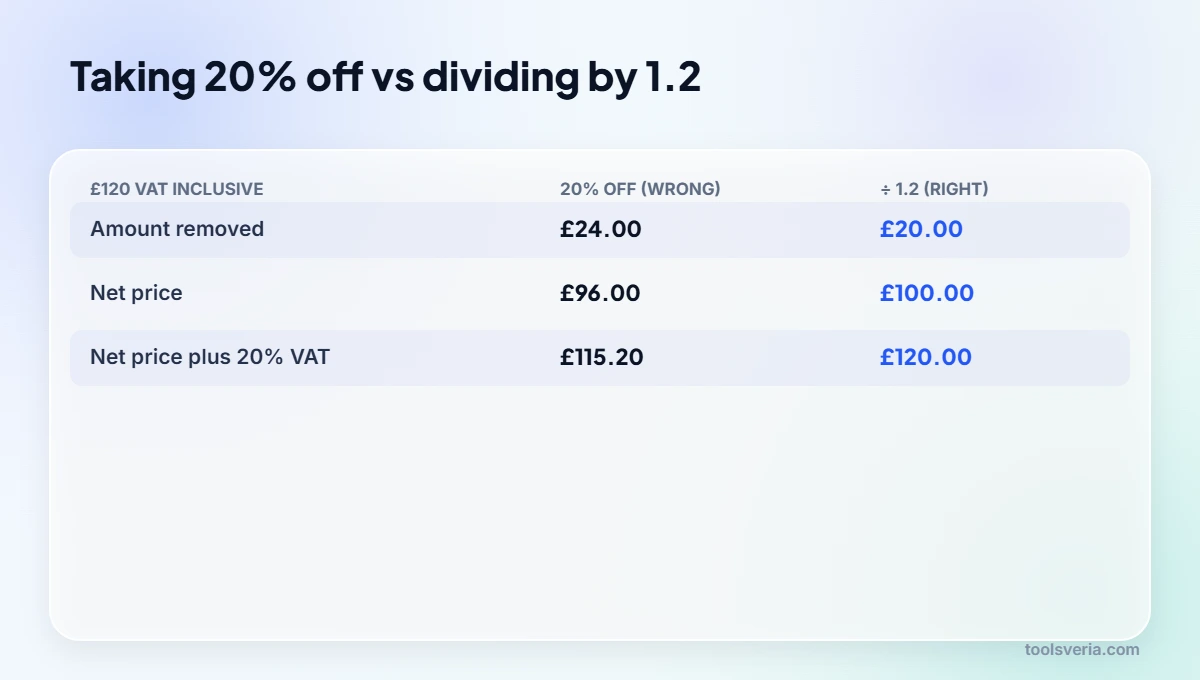
The £20 of VAT was worked out on the smaller original £100, not on the £120 total, so knocking 20% off the larger number gives the wrong answer. Think about how the £120 was built in the first place. The timber merchant started with £100, then added a fifth of that £100 on top, giving £120. So the £20 of VAT was worked out on the smaller number, the one Sam is now trying to find.
Taking 20% off £120 works on the bigger number instead. A fifth of £120 is £24, which leaves £96. Put VAT back on £96 and you reach £115.20, so the subtraction has stripped out £4 more than the merchant ever charged. On a small receipt that is pocket change. On a £6,000 kitchen fit it becomes a £200 hole in Sam’s records, and on a year of purchases it can quietly distort his accounts.
A handy sanity test when working out how to remove VAT from a price: whatever net figure you arrive at, add VAT back on. If you do not land exactly on the price you started with, the method was wrong.
How Do You Remove VAT From a Price?
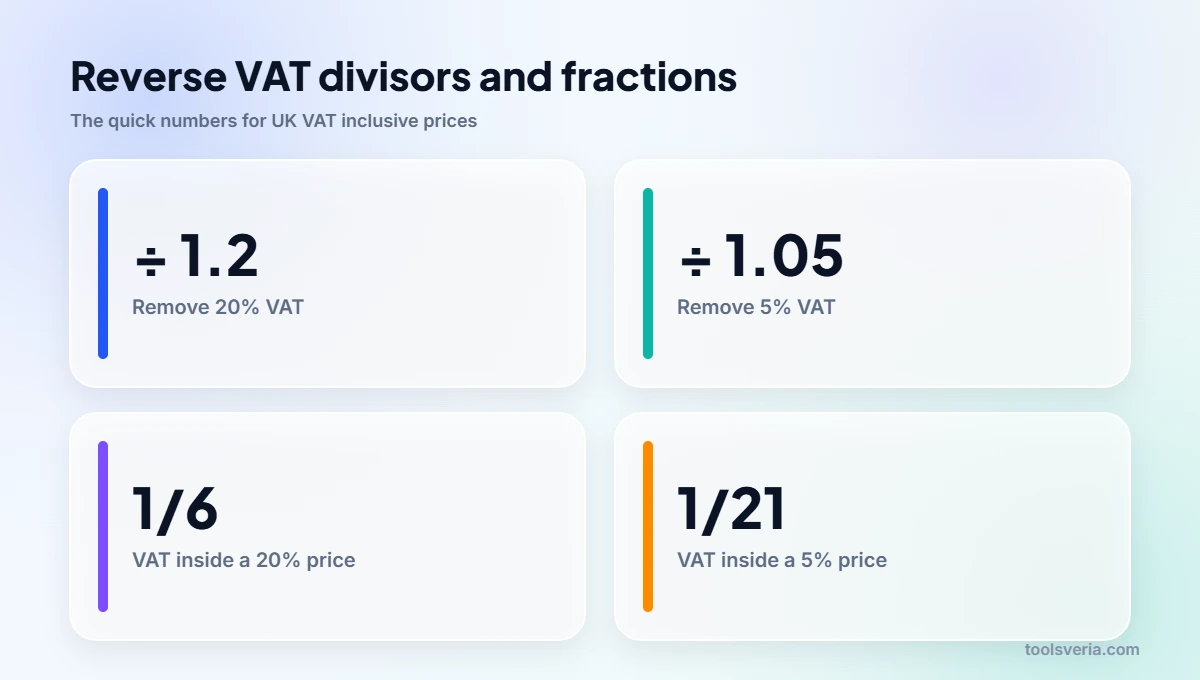
Divide the VAT inclusive price by 1.2, because the merchant multiplied £100 by 1.2 to reach £120, so dividing £120 by 1.2 returns £100 and the £20 gap is the VAT. Because the merchant multiplied £100 by 1.2 to reach £120, Sam simply runs that step backwards. Dividing £120 by 1.2 returns £100, and the gap between the two figures, £20, is the VAT. Two quick steps cover every case:
- Net figure: take the VAT inclusive price and divide it by 1 plus the rate written as a decimal.
- VAT element: subtract that net figure from the price you started with.
At the 20% standard rate the divisor is 1.2. Domestic fuel and a few other items sit in the 5% reduced band, so the divisor there is 1.05. Zero rated items such as most food carry no VAT at all, which means the price on the shelf already is the net price. If you are not sure which band an item belongs to, the GOV.UK page on VAT rates lists the main categories, and those percentages have stayed put for many years.
Only need the VAT? Divide by 6
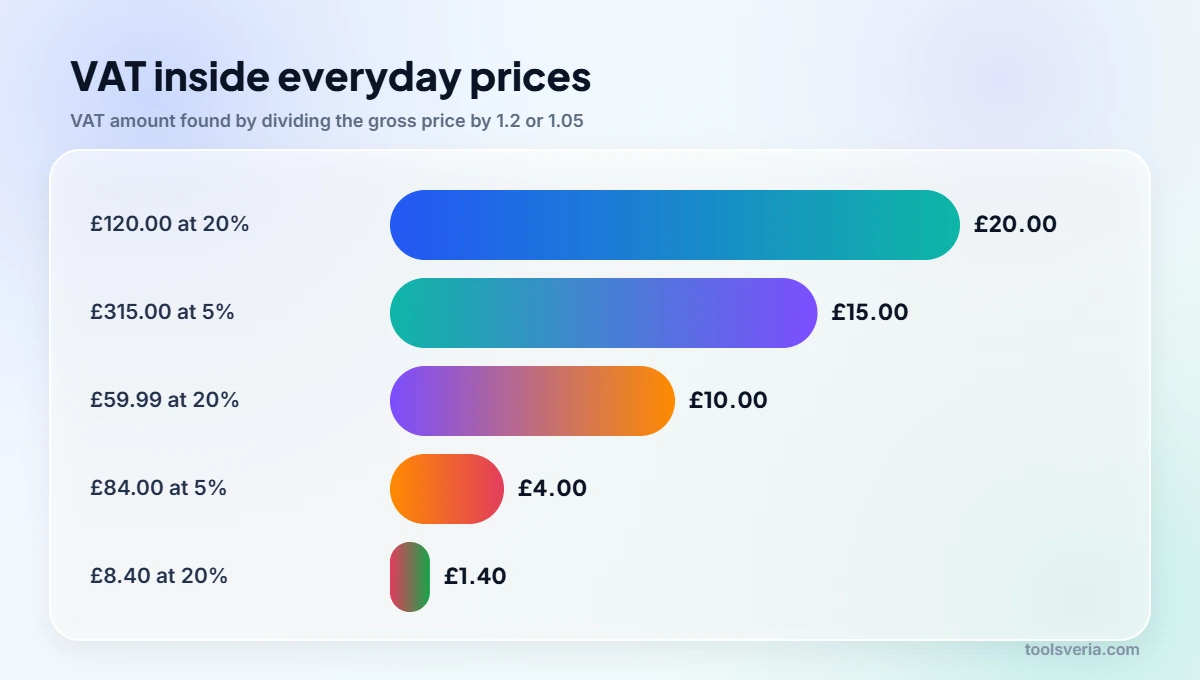
Sometimes Sam only wants the tax figure for his VAT return. HMRC has a name for the shortcut: the VAT fraction. With a 20% rate, the VAT tucked inside any gross price equals one sixth of it, because 20 out of every 120 pounds is tax. With a 5% rate it is one twenty first, since 5 out of 105 is tax. So £120 split by 6 gives £20 straight away, and a £315 bill at 5% split by 21 gives £15.
Sam’s receipts, worked through
Here are six prices from a typical month, each divided by the right figure and rounded to the penny.
| VAT inclusive price | VAT rate | Calculation | Net price | VAT |
|---|---|---|---|---|
| £120.00 | 20% | 120 ÷ 1.2 | £100.00 | £20.00 |
| £59.99 | 20% | 59.99 ÷ 1.2 | £49.99 | £10.00 |
| £1,500.00 | 20% | 1,500 ÷ 1.2 | £1,250.00 | £250.00 |
| £8.40 | 20% | 8.40 ÷ 1.2 | £7.00 | £1.40 |
| £315.00 | 5% | 315 ÷ 1.05 | £300.00 | £15.00 |
| £84.00 | 5% | 84 ÷ 1.05 | £80.00 | £4.00 |
The plumber’s quote
Sam is having the workshop washroom refitted, and the plumber’s figure is £1,500 with VAT included. Splitting it by 1.2 leaves £1,250 for the work itself and £250 of tax. Since the job is for the business and Sam is VAT registered, that £250 is normally what he can claim back, provided he holds a proper VAT invoice and the usual HMRC conditions are met.
A reduced jacket
His partner spots a work jacket marked down to £59.99. On a calculator, 59.99 split by 1.2 shows 49.9917, so the net figure is £49.99 and the tax is a neat £10.00. To see how generous the markdown really was against the original ticket, our discount calculator turns the old and new prices into a percentage saving.
The household energy bill
Sam’s home energy bill comes to £84 and carries the 5% reduced rate. Divided by 1.05, that is £80 of energy and £4 of VAT. Had he reached for 1.2 out of habit, he would have recorded £70 net and £14 of tax, which is badly off. Checking the rate printed on the bill first avoids that slip.
Why Is My VAT Calculation a Penny Off the Invoice?
Many suppliers calculate tax on each line and round each one, so tiny differences build up across a long list of items and nothing has gone wrong. Now and again Sam’s own calculation on an invoice total lands a penny away from the VAT the supplier printed. Nothing has gone wrong. Many suppliers calculate tax on each line and round each one, so tiny differences build up across a long list of items. For his VAT return, Sam always copies the tax figure shown on the invoice rather than his own result. Anyone who issues invoices can find the VAT fraction, and the details an invoice needs to carry, in HMRC’s VAT guide, Notice 700.
Pricing what Sam sells on net figures
Sam also sells small oak chopping boards. He pays £30 net for the timber and labour on each one and puts them out at £60 with VAT included. Glancing at those two numbers, he assumed half of every sale was profit.
The £10 of VAT inside each £60 belongs to HMRC, though, so his real selling price is £50. Profit per board is £20, and his margin is 40%, not 50%. Ten percentage points might sound academic, yet if he had set his wholesale discounts around a 50% margin, some orders would have barely broken even.
With the net price in hand, Sam can plug the real numbers into our profit margin calculator to see what each board earns, and use the markup calculator when he wants to set a new price starting from cost. Feeding both tools net figures keeps the answers honest.
A customer in Dublin has also asked for a quote. Irish VAT runs at 23% as standard in 2026, so the divisor there becomes 1.23, and a €123 gross price works back to €100 net. For the other Irish bands of 13.5% and 9%, our Ireland VAT calculator adds or strips the tax in either direction.
Key points
- Subtracting 20% from a gross price strips out too much: £96 instead of £100 on a £120 receipt.
- Use 1.2 as the divisor at the 20% rate and 1.05 at the 5% rate.
- For the tax alone, split a 20% gross price by 6 or a 5% gross price by 21.
- A one penny gap against a supplier invoice usually comes from line by line rounding.
- Work out margins on net selling prices, or your profit will look bigger than it is.
Frequently Asked Questions
My receipt says £240 including VAT. What do I enter in my books as the cost?
Split £240 by 1.2 and record £200 as the cost. The remaining £40 is the tax, which goes in the VAT column if you are registered.
My till app takes 20% off to show ex VAT prices. Is it wrong?
If it literally subtracts 20%, yes. On a £120 sale it would show £96 net instead of £100, understating every sale by 4%. Check it against a known figure before trusting it.
Is there a quick mental trick for the VAT on a £315 energy bill?
Energy carries 5%, so split the total by 21. That gives £15 of tax on £315, leaving £300 for the energy itself. At 20%, split by 6 instead.
I invoice an Irish client at 23%. Does the same division work?
It does, with 1.23 as the divisor. A €123 gross figure becomes €100 net and €23 of VAT, and the pattern holds for any rate you are given.
Sam now handles his receipts in seconds: confirm the rate, split by 1.2 or 1.05, and add VAT back on to prove the answer. Keep the supplier’s printed tax for your return and do your pricing on net figures, and the numbers in your books will match the money in your bank.