Tomás, a junior developer in Lisbon, called an orders API and got back a single line of 4,000 characters with brackets everywhere. Finding one customer’s email meant scrolling sideways for a minute. Learning how to format JSON took him less time than that: one paste into a formatter, or one line of code, and the same data appeared as a neat, indented tree he could read at a glance.
This guide shows what formatted JSON should look like, how to produce it in the browser, JavaScript, Python, the command line and VS Code, and how to fix the syntax errors that stop a formatter in its tracks.
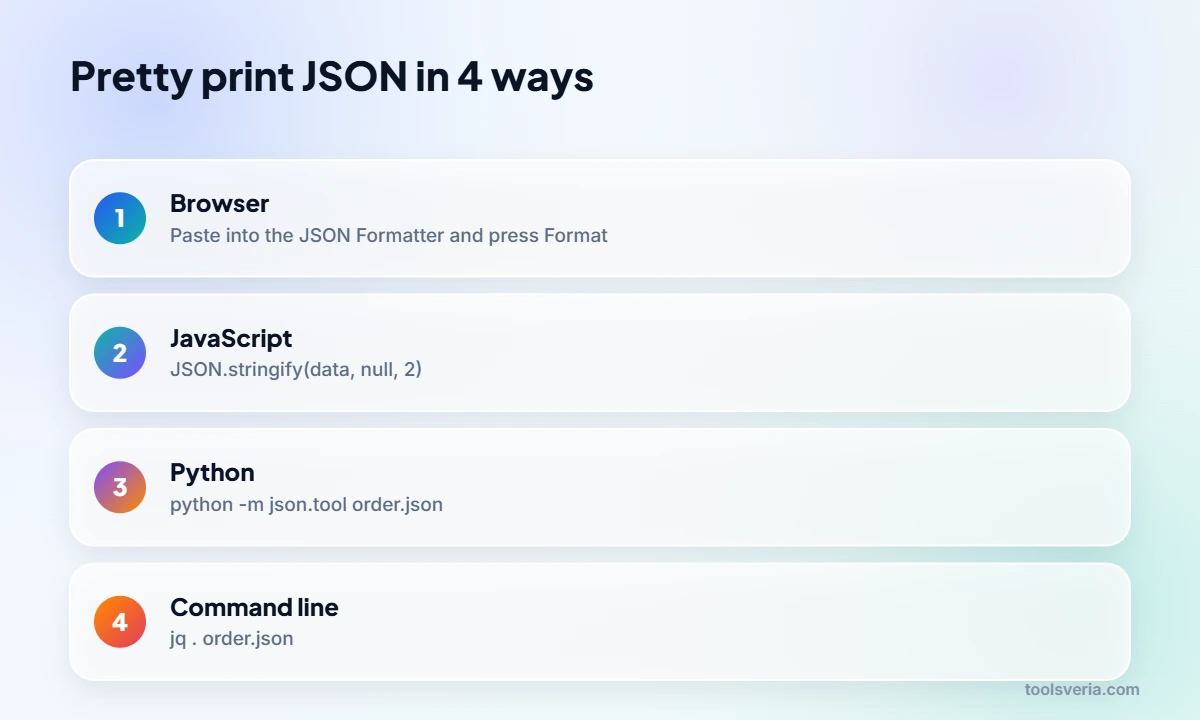
Quick answer: To format JSON, put each key on its own line and indent nested objects and arrays by 2 or 4 spaces. The quickest ways are to paste it into a JSON formatter, run JSON.stringify(data, null, 2) in JavaScript, or run python -m json.tool file.json. All three also validate the JSON and report the first syntax error.
In This Guide
How to format JSON so it is easy to read
Readable JSON follows three habits: one key and value per line, a consistent indent for every level of nesting, and closing brackets lined up under the line that opened them. Formatting never changes the data itself, only the whitespace around it.
Here is a small order from Tomás’s API exactly as it arrived, minified onto one line:
{"orderId":10482,"customer":{"name":"Ana Silva","email":"ana@example.com"},"items":[{"sku":"MUG-01","qty":2,"price":8.5},{"sku":"TEA-12","qty":1,"price":4.25}],"paid":true,"note":null}And here is the same object pretty printed with a 2 space indent:
{
  "orderId": 10482,
  "customer": {
    "name": "Ana Silva",
    "email": "ana@example.com"
  },
  "items": [
    {
      "sku": "MUG-01",
      "qty": 2,
      "price": 8.5
    },
    {
      "sku": "TEA-12",
      "qty": 1,
      "price": 4.25
    }
  ],
  "paid": true,
  "note": null
}
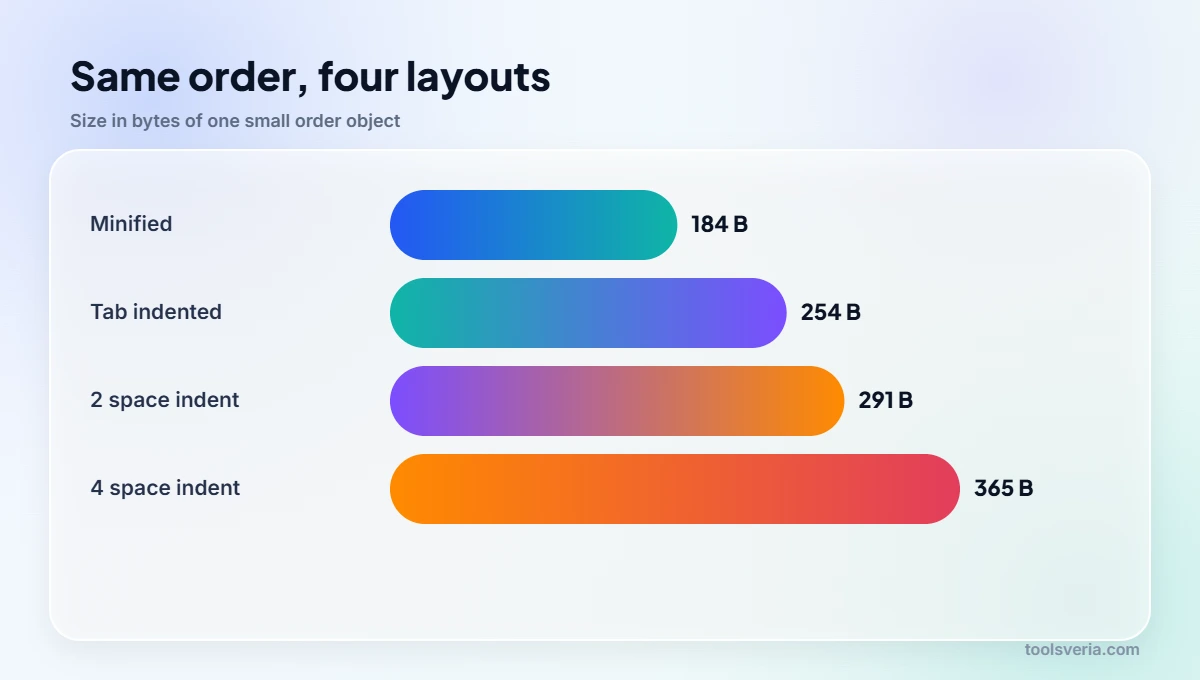
Now the structure is obvious: one customer object, an items array holding two products, and two simple values at the end. Notice the single space after each colon, which nearly every formatter adds. The minified version is 184 bytes; the formatted one is 291 bytes, and the extra 107 bytes are pure whitespace.
What JSON syntax errors stop a formatter from working?
A formatter can only work on valid JSON, and most failures come from a handful of habits carried over from JavaScript or Python: single quotes, unquoted keys, capitalised booleans, trailing commas and comments. The official grammar, published as ECMA-404 and RFC 8259, is much stricter than the languages that use it.
This snippet contains five errors that Tomás typed by hand while testing:
{
  'orderId': 10482,
  customer: "Ana Silva",
  "paid": True,
  "items": [1, 2,],
}| Error | Example | Fix |
|---|---|---|
| Single quotes | ‘orderId’ | Use double quotes: “orderId” |
| Unquoted key | customer: | Quote every key: “customer”: |
| Capitalised boolean or null | True, None, NULL | Lower case only: true, false, null |
| Trailing comma | [1, 2,] and the comma before the final } | Delete the comma after the last item |
| Comments | // or /* */ | Remove them; JSON has no comment syntax |
| Missing comma | “qty”: 2 “price”: 8.5 | Add a comma between pairs |
| Unsupported values | NaN, undefined, Infinity | Use null or a number instead |
Good validators report the line and column of the first problem, so fix errors from the top down and validate again after each one. A trailing comma on line 6 can make the parser complain about line 7, because it only notices something is wrong when the closing bracket arrives.

How do you format JSON in JavaScript, Python and the command line?
In code, JSON is formatted by parsing it and writing it back out with an indent setting: JSON.stringify(data, null, 2) in JavaScript, json.dumps(data, indent=2) in Python, and jq . on the command line. Each one also acts as a validator, because invalid input throws an error instead of printing.
- JavaScript: JSON.stringify(data, null, 2). The third argument is the indent, from 1 to 10 spaces, or a string such as a tab. The MDN reference for JSON.stringify lists every option, including the replacer function in the middle slot.
- Python: json.dumps(data, indent=2, sort_keys=True) returns a formatted string, and sort_keys=True puts keys in alphabetical order, which makes two files easier to compare.
- Python from the terminal: python -m json.tool order.json prints the file with a 4 space indent by default, and add –indent 2 for two spaces.
- jq: jq . order.json pretty prints and colours the output, and jq -c . order.json does the reverse, squeezing it onto one line.
- VS Code: open the file and press Shift+Alt+F on Windows, Shift+Option+F on Mac or Ctrl+Shift+I on Linux to run Format Document.
For a quick one off, the online JSON formatter and validator is faster than opening a terminal, and it highlights the exact line of any error. Once the data is tidy, the JSON to CSV converter can flatten an array of records into a spreadsheet for colleagues who do not read code.
Should you indent JSON with 2 spaces, 4 spaces or tabs?
Two spaces is the most common choice for JSON, because deeply nested data stays readable without drifting off the right edge of the screen, but 4 spaces and tabs are equally valid. Parsers ignore indentation completely, so pick one style per project and stick to it.
The choice does affect size. Tomás’s order is 291 bytes with 2 spaces, 365 bytes with 4 spaces and 254 bytes with tabs, against 184 bytes minified. On a file that size nobody cares, but a 5 MB API response can grow by well over a third when pretty printed, which is why servers send minified JSON and leave formatting to the reader.
A sensible rule of thumb: keep JSON minified in transit and in production storage, and pretty print it in configuration files, documentation, version control and anywhere a person has to read or review it. Structured data for search engines, such as JSON-LD schema, is a good example of the second group; after formatting, the schema markup validator checks that the properties make sense as well as the syntax.
Is it safe to paste JSON into an online formatter?
It is safe only if the formatter processes the text inside your browser or you are certain the data contains nothing sensitive. API responses often carry email addresses, access tokens, session IDs and customer details that should never be sent to an unknown server.
Before pasting, look for keys such as token, password, secret, authorization or email, and replace their values with dummy text if the tool uploads data. Our formatter runs on JavaScript in your own tab, so the text never leaves your device; you can confirm that kind of claim yourself by disconnecting from the internet and checking that the tool still works. For data under a company policy, the command line and editor options above keep everything local by design. The Wikipedia article on JSON explains the format’s history and its security pitfalls in more depth.
Key points
- Formatted JSON puts one key per line and indents each nesting level by 2 or 4 spaces.
- JSON.stringify(data, null, 2), json.dumps(data, indent=2) and jq . all pretty print and validate at once.
- Keys and strings need double quotes, booleans are lower case, and trailing commas and comments are not allowed.
- Formatting only changes whitespace: the sample order grows from 184 to 291 bytes with 2 spaces.
- Paste sensitive JSON only into tools that run locally in your browser.
Key JSON Formatting Terms Explained
These are the terms you will meet while learning how to format JSON, from the data types it allows to the tools that print it neatly.
- JSON
- JSON, short for JavaScript Object Notation, is a text format for data built from objects in curly braces, arrays in square brackets, and values that are strings, numbers, true, false or null. Keys must always be double quoted strings.
- Pretty printing
- Pretty printing adds line breaks and indentation so each key sits on its own line and nested data steps inwards. The order example grows from 184 bytes minified to 291 bytes with 2 space indentation.
- Minification
- Minification removes every space and line break that the parser does not need. It changes nothing about the data, only its size, which is why APIs usually send minified JSON and developers reformat it to read it.
- JSON.stringify
- JSON.stringify is the built in JavaScript method that turns an object into a JSON string. Its third argument sets the indentation, so passing 2 produces two spaces per level, and values above 10 are capped at 10.
- Trailing comma
- A trailing comma is a comma after the last item in an object or array, such as [1, 2,]. JavaScript code tolerates it, but strict JSON parsers reject it, making it one of the most frequent validation errors.
Frequently Asked Questions
My formatter says “Unexpected token” on line 7. Where is the real mistake?
Usually on the line before. A missing or trailing comma on line 6 only becomes a problem when the parser reaches the next key or closing bracket on line 7. Check the end of the previous line first, then look for single quotes or an unquoted key.
Can I keep comments in a JSON config file?
Not in standard JSON, which has no comment syntax, so any // or /* */ will fail strict parsing. Some tools accept variants such as JSONC or JSON5 that allow comments, but files sent to an API or another program should stay comment free.
Does formatting JSON change the data in any way?
No. Pretty printing and minifying only add or remove whitespace between tokens, so the parsed object is identical. The one exception is sorting keys, which changes their order in the text, although JSON objects are treated as unordered anyway.
Why does Python print True but my JSON needs true?
Python’s own booleans are capitalised, but JSON requires lower case. Converting with json.dumps handles this automatically, turning True into true and None into null. Problems only appear when JSON is typed by hand or produced by printing a Python dictionary directly.
How do I format a huge JSON file that crashes my browser?
Use a command line tool instead of a web page. jq . big.json or python -m json.tool big.json can stream through files of hundreds of megabytes, and piping the output to a new file lets you open just the part you need.
What is the difference between formatting and validating JSON?
Validating checks that the text follows JSON syntax rules, while formatting rearranges the whitespace to make it readable. Most tools do both: they parse the input first, which validates it, and only then print it with indentation.
Tomás now pipes every API response through a formatter before reading it, and his pull requests come with neatly indented fixtures that reviewers can follow. Knowing how to format JSON is mostly about habits: pick one indent style, keep sensitive data local and let the tools catch the commas for you. Guidance checked October 2026.