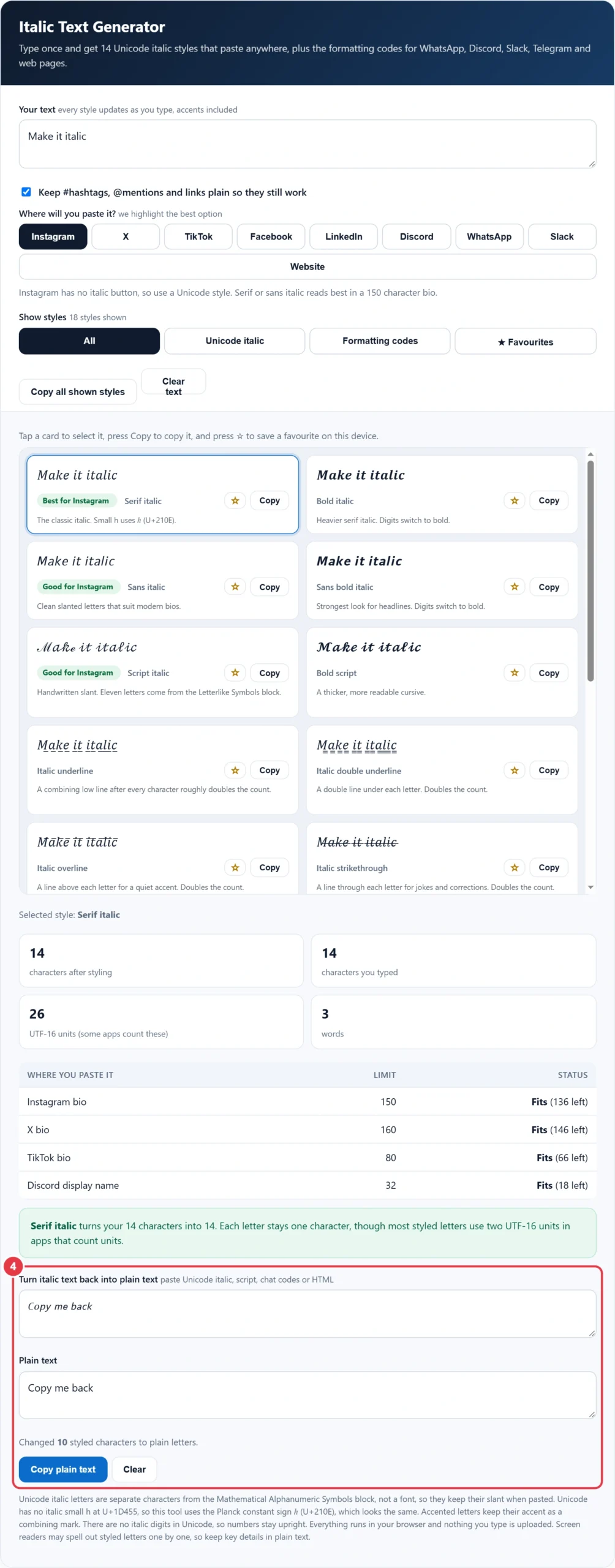
Type once and get 14 Unicode italic styles that paste anywhere, plus the formatting codes for WhatsApp, Discord, Slack, Telegram and web pages.
| Where you paste it | Limit | Status |
|---|---|---|
| Instagram bio | 150 | |
| X bio | 160 | |
| TikTok bio | 80 | |
| Discord display name | 32 |
Unicode italic letters are separate characters from the Mathematical Alphanumeric Symbols block, not a font, so they keep their slant when pasted. Unicode has no italic small h at U+1D455, so this tool uses the Planck constant sign ℎ (U+210E), which looks the same. Accented letters keep their accent as a combining mark. There are no italic digits in Unicode, so numbers stay upright. Everything runs in your browser and nothing you type is uploaded. Screen readers may spell out styled letters one by one, so keep key details in plain text.
This free italic text generator helps anyone who writes social bios, captions or chat messages turn plain words into 14 Unicode italic styles and 4 formatting codes for Instagram, X, TikTok, Facebook, LinkedIn, Discord, WhatsApp, Slack and web pages. The slanted letters come from the Mathematical Alphanumeric Symbols block of Unicode, so they paste as real text in places that offer no formatting buttons. The tool also checks bio limits, keeps hashtags working and turns italic text back into normal letters.
Quick answer: An italic text generator swaps each letter for its slanted Unicode twin, so "Make it italic" becomes 𝑀𝑎𝑘𝑒 𝑖𝑡 𝑖𝑡𝑎𝑙𝑖𝑐 and pastes into Instagram, X or TikTok bios with the same 14 characters. In WhatsApp and Slack type _text_, and in Discord type *text*, because those apps show real italics themselves.
In This Guide
What Is an Italic Text Generator?
An italic text generator is a copy and paste tool that replaces ordinary letters with slanted Unicode characters, giving you italic text in apps that do not let you format words. It does not install a font. It changes the characters themselves, which is why the slant survives when you paste the result into a bio, caption or username.
The method in plain words is: read each letter, look up its italic version in a mapping table, and output that character instead. Capital A becomes 𝐴 (U+1D434), small a becomes 𝑎 (U+1D44E), and so on through the alphabet. Accented letters are split into a base letter and an accent, the base letter is styled and the accent is put back, so é becomes 𝑒́. Spaces, punctuation and numbers stay the same, because Unicode has no italic digits. The formatting codes work differently: they wrap your text in the markers that WhatsApp, Discord, Slack, Telegram and web browsers read as an instruction to show real italics.
How to Use the Italic Text Generator
Step 1: Type Your Text
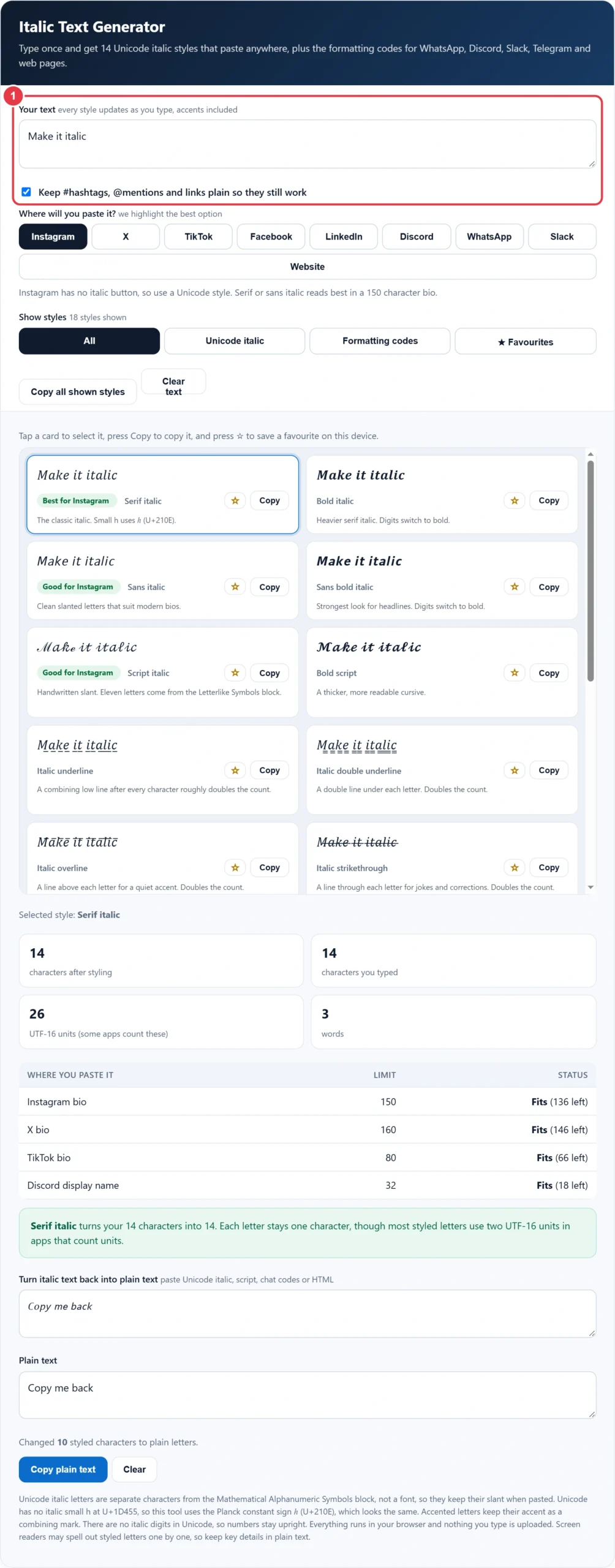
Type or paste up to 500 characters into the box. All 18 styles update live, so you can compare serif, sans, bold, script and underlined italics on one screen. Leave the hashtag option ticked and any #tag, @mention or link stays in plain letters, so it still links and searches normally.
Step 2: Choose Where You Will Paste It
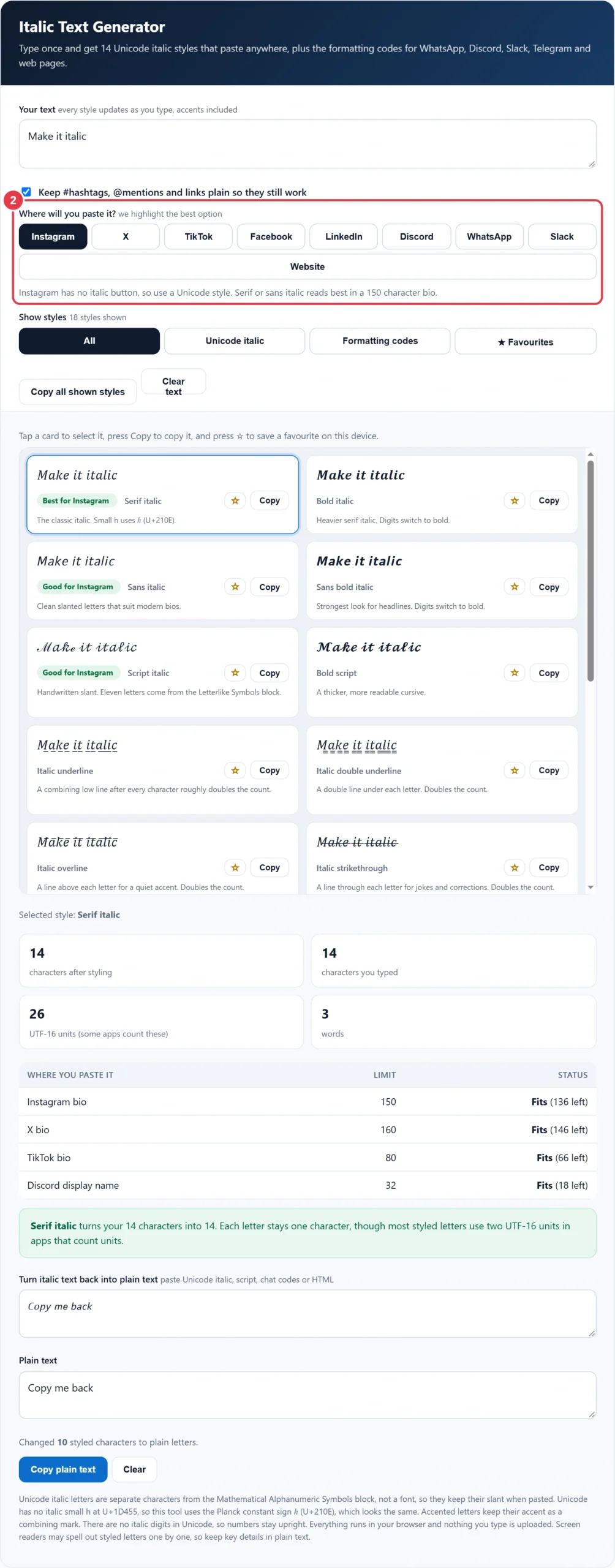
Pick Instagram, X, TikTok, Facebook, LinkedIn, Discord, WhatsApp, Slack or a website. The tool explains whether that place supports real italics and marks the best style with a green badge, so you do not paste Unicode where a simple _text_ code would work better. The filter chips show only Unicode italic, only formatting codes or only your favourites.
Step 3: Copy a Style and Check the Limits
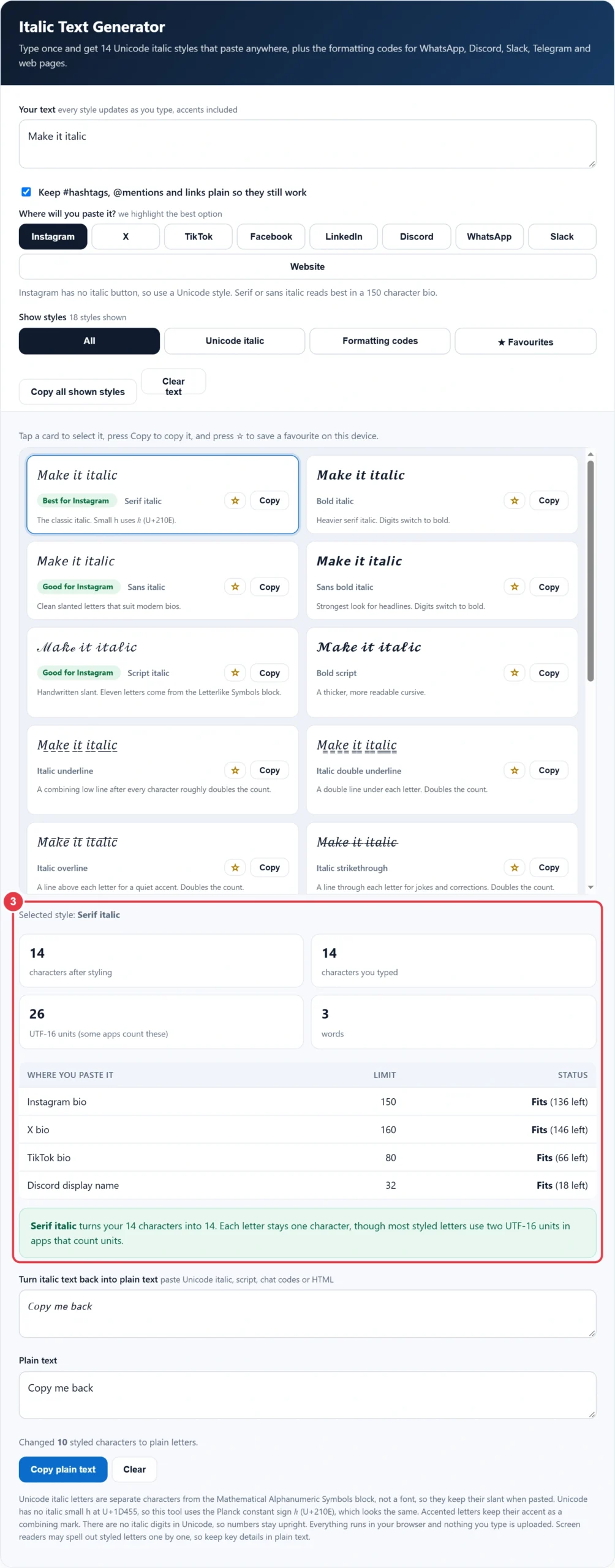
Press Copy on any card and the button changes to Copied, or press the star to keep that style at hand next time on the same device. The selected style shows its true character count against the Instagram bio, X bio, TikTok bio and Discord display name limits. For other looks, the gothic font generator offers Fraktur and blackletter styles that pair well with a short italic line.
Step 4: Turn Italic Text Back Into Plain Text
Paste styled text into the decoder to get plain letters you can edit, search or read aloud. It converts every Unicode italic and script letter, keeps accents, removes underline, overline and strike marks, and strips _text_, *text* and HTML em tags. The sample 𝘊𝘰𝘱𝘺 𝘮𝘦 𝘣𝘢𝘤𝘬 decodes to "Copy me back".
Where Does Real Italic Formatting Work?
Real italic formatting works in WhatsApp, Discord, Slack and Telegram messages and on web pages, while Instagram, TikTok, X, Facebook and LinkedIn need Unicode italic text because their bios and posts offer no italic button. Real formatting is better where it exists, as the words stay searchable and screen readers read them normally.
| Where you type | Real italics? | What to do |
|---|---|---|
| WhatsApp messages | Yes | Type _text_ |
| Discord messages | Yes | Type *text* or _text_ |
| Discord display name | No | Unicode style, 32 characters max |
| Slack messages | Yes | Type _text_ or press Ctrl+I |
| Telegram messages | Yes | Type __text__ |
| Websites and email editors | Yes | Press Ctrl+I or use the HTML em tag |
| Instagram bio and captions | No | Unicode style, 150 character bio |
| TikTok bio | No | Unicode style, 80 character bio |
| X posts and bio | No | Unicode style, 160 character bio |
| Facebook and LinkedIn posts | No | Unicode style for one line |
Italic Text Styles Compared
The table shows the word "italic" in each main style from this italic text generator, with the number of characters it becomes once copied.
| Style | "italic" becomes | Characters | Best use |
|---|---|---|---|
| Serif italic | 𝑖𝑡𝑎𝑙𝑖𝑐 | 6 | Quotes and bio taglines |
| Bold italic | 𝒊𝒕𝒂𝒍𝒊𝒄 | 6 | Names and headings |
| Sans italic | 𝘪𝘵𝘢𝘭𝘪𝘤 | 6 | Clean, modern bios |
| Sans bold italic | 𝙞𝙩𝙖𝙡𝙞𝙘 | 6 | Short headlines |
| Script italic | 𝒾𝓉𝒶𝓁𝒾𝒸 | 6 | Elegant one liners |
| Bold script | 𝓲𝓽𝓪𝓵𝓲𝓬 | 6 | Readable cursive names |
| Mixed italic | 𝑖𝙩𝑎𝙡𝑖𝙘 | 6 | Playful usernames |
| Italic underline | 𝑖̲𝑡̲𝑎̲𝑙̲𝑖̲𝑐̲ | 12 | One highlighted word |
| Italic double underline | 𝑖̳𝑡̳𝑎̳𝑙̳𝑖̳𝑐̳ | 12 | Strong emphasis |
| Italic overline | 𝑖̅𝑡̅𝑎̅𝑙̅𝑖̅𝑐̅ | 12 | Subtle decoration |
| Italic strikethrough | 𝑖̶𝑡̶𝑎̶𝑙̶𝑖̶𝑐̶ | 12 | Jokes and corrections |
| Quote italic | “𝑖𝑡𝑎𝑙𝑖𝑐” | 8 | Quotes in captions |
| Sparkle frame italic | ✦ 𝘪𝘵𝘢𝘭𝘪𝘤 ✦ | 10 | Decorative bio lines |
| WhatsApp and Slack code | _italic_ | 8 | Chat messages |
| Discord code | *italic* | 8 | Discord messages |
| HTML em tag | <em>italic</em> | 15 | Web pages and emails |
Will Italic Text Fit My Bio?
Yes, letter styles keep exactly one character per letter, so italic text uses the same count as plain text, while underline, overline and strike styles roughly double it. Apps that count UTF-16 units may see most styled letters as two units.
Worked example: Leah wants "Hand drawn prints, shipped from Leeds" as her TikTok bio, which allows 80 characters. Plain, it is 37 characters. Serif italic is also 37 characters, leaving 43 spare. Italic underline adds a mark after every character except spaces, giving 69 characters, which still fits with 11 left. In UTF-16 units the same underline text is 99, so any app counting units would reject it. Leah chooses serif italic and keeps the 43 spare characters for her shop link.
What Happens to Numbers, Accents and Hashtags?
Numbers stay upright, accented letters keep their accents and hashtags stay plain, because Unicode only defines italic forms for the basic letters A to Z. Digits have bold and sans bold forms but no italic ones, so the two bold italic styles switch them to bold to match the weight of the letters.
For accents, this italic text generator styles the base letter and adds the accent back as a combining mark, so "Café crème" becomes 𝐶𝑎𝑓𝑒́ 𝑐𝑟𝑒̀𝑚𝑒 and decodes back to the original. Hashtags are different: a tag written in maths letters is a different string from the plain tag, so it does not join the same feed. The keep plain option leaves every #tag, @mention and web address untouched while the words around them turn italic.
Why Does Italic Text Show as Boxes?
Italic text shows as boxes or question marks when the device reading it has no font that contains the Unicode maths letters, which still happens on some older phones, smart TVs and email programs. The characters are not broken: the same post looks correct on a newer device. Script styles borrow eleven letters from a second block, so on a few systems they can look slightly uneven. If your readers use older devices, choose a formatting code where the app supports real italics.
Why Is the Italic h Different?
The italic h is different because Unicode already had the Planck constant sign ℎ (U+210E) before the maths letters were added, so the matching slot U+1D455 was left empty to avoid a duplicate. Script letters such as ℬ, ℰ, ℋ and ℯ come from the Letterlike Symbols block for the same reason, and this tool fills all of those gaps automatically. Weaker tools leave a blank or a box where the h should be.
Italic, Oblique and Cursive: What Is the Difference?
Italic is a separate letter design with handwritten shapes, such as a single storey a, while oblique is the upright typeface simply slanted and cursive is joined handwriting. Italic type was first used in printed books around 1500 by the Venetian printer Aldus Manutius. That is why serif italic in this tool has curved, flowing letters, while sans italic looks closer to an oblique.
In UK writing, italics mark the titles of books, films and newspapers, the names of ships, foreign words not yet absorbed into English, and stress on a single word. On a web page, real italics come from the HTML em element or the i element in the page code, so use them there instead of Unicode letters and keep the page searchable.
Is Italic Text Accessible?
Unicode italic is not fully accessible, because screen readers may read each letter by its full name, such as "mathematical italic small a". The W3C Web Accessibility Initiative explains why content should work with assistive technology, so use italic styles for a short phrase and keep names, links and contact details in plain letters.
If you want a completely different look for a username or bio, the weird font generator has 43 strange styles, the small text generator makes tiny superscript letters and the case converter fixes capitals before you style them. Every tool runs in your browser and nothing you type is uploaded. Checked October 2026.
</>Embed this calculator on your website
Add the free Italic Text Generator to your own site or blog. Copy the code below and paste it into an HTML block. It resizes itself and works on phones.
How we checked this tool: the Tools Veria Editorial Team built this tool by hand, checked it against the official rules or published standards where they apply, and tested it against worked examples. Results are estimates for planning, not personal financial or tax advice. Read our editorial policy and disclaimer, or report an error.
Frequently Asked Questions
How do I type in italics on Instagram?
Instagram has no italic button, so you paste Unicode italic letters instead. Type your words into this italic text generator, copy the serif or sans italic style and paste it into your bio or caption. Each letter still counts as one character towards the 150 character bio limit.
How do I make text italic in WhatsApp?
Put an underscore on each side of the words, like _hello there_, and WhatsApp shows them in italics once you send the message. You can also long press selected text on most phones and choose Italic. Unicode is only needed for your About text or name.
How do you do italics in Discord?
Wrap the words in single asterisks or underscores, such as *text* or _text_, and Discord shows real italics in messages. Display names do not support formatting, so use a Unicode italic style there and keep it within the 32 character limit.
How do I make italic text on Facebook?
Most Facebook posts and comments have no italic button, so you paste Unicode italic letters instead. Type your words into the generator, copy the serif or sans italic style and paste it. Leave names, tags and hashtags in plain letters so tagging and search still work.
Why does italic text show as boxes?
Boxes appear when the device reading the text has no font containing the Unicode maths italic letters, which happens on some older phones, smart TVs and email programs. The text itself is fine and shows correctly on newer devices. Where the app supports real italics, a formatting code avoids the problem.
Why are there no italic numbers?
Unicode defines italic forms only for the letters A to Z and some Greek letters, not for digits 0 to 9. Numbers therefore stay upright in italic styles. The bold italic styles switch digits to bold so they still look heavier next to the letters.