Paste links from any backlink export and get a clean disavow.txt in the format Google Search Console accepts.
Format follows Google's rules: UTF-8 text, one entry per line, domain: prefix for whole sites, # for comments, at most 100,000 lines and 2 MB. Your list stays in your browser and is never uploaded.
This disavow file generator turns a messy list of spam backlinks into a clean disavow.txt that site owners and SEOs can upload to Google Search Console in one go. It writes the file in the format set out in Google's disavow links help page, removes duplicates and covered URLs, and makes sure your own site and trusted domains are never disavowed by mistake.
Quick answer: a disavow file is a plain UTF-8 text file with one entry per line: domain:spamsite.com to ignore every link from a site, or a full URL to ignore one page. Paste your links into the disavow file generator, check the protected list, download disavow.txt and upload it in Google's disavow tool.

In This Guide
What Is a Disavow File?
A disavow file is a text file that asks Google to ignore specific links pointing to your site when it assesses your rankings. It does not remove the links from the web; it only tells Google not to count them.
The format is strict but simple. Each line holds either domain: followed by a hostname, which covers every link from that site and its subdomains, or one complete URL, which covers that single page only. Lines starting with # are comments that Google ignores. The tool reads each pasted line, pulls out the first valid domain or URL even from a CSV row, lowercases the hostname, strips www. from domain lines, then removes any URL already covered by a domain: line. The result is the shortest correct file for the links you chose.
How to Use the Disavow File Generator
Step 1: Paste Your Spam Links
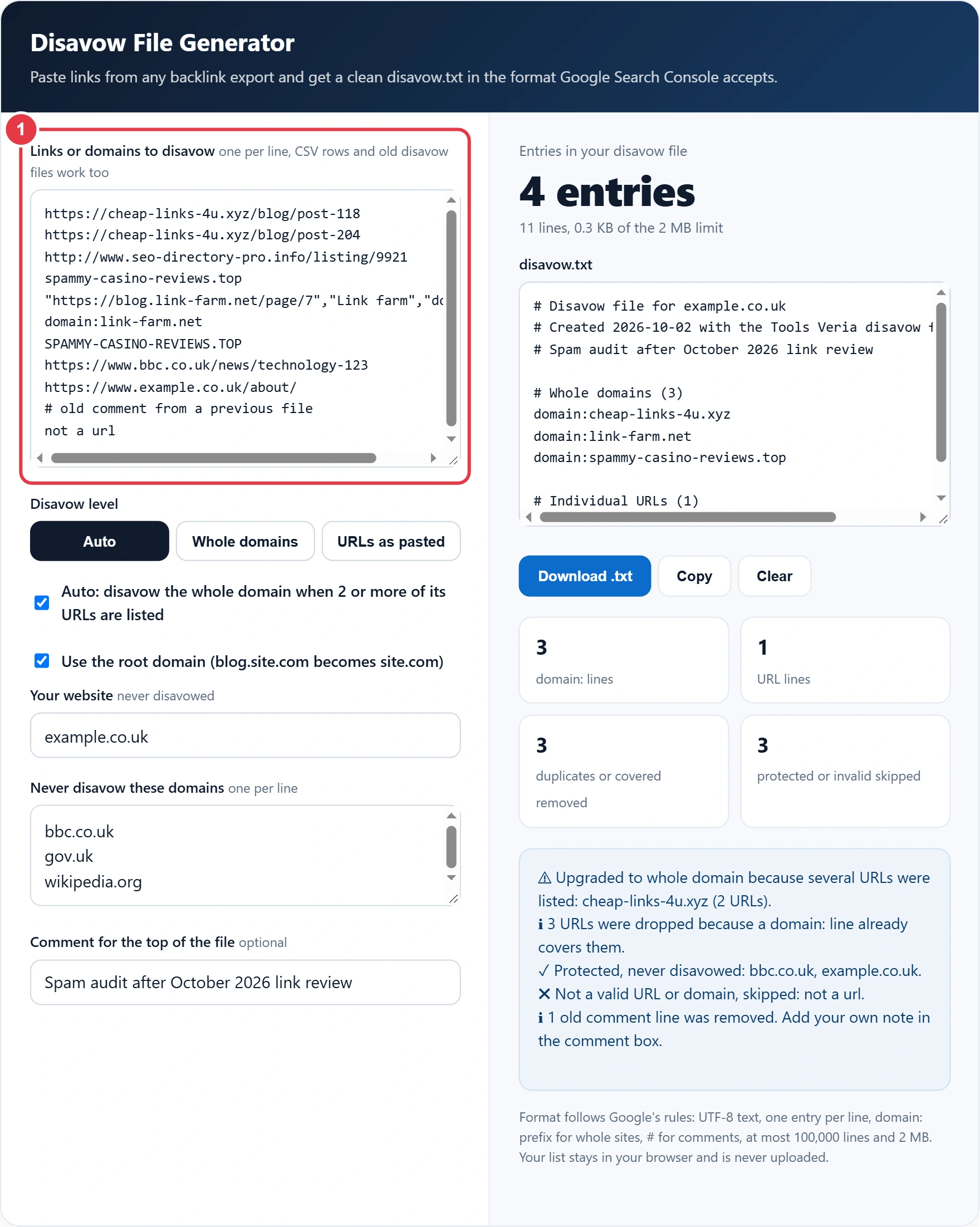
Paste referring URLs or domains from Search Console's Links report or any backlink tool export. Whole CSV rows are fine, and so is an old disavow file you want to merge. If your export arrives as JSON from an API, the JSON to CSV converter flattens it into rows you can paste straight in here.
Step 2: Choose the Disavow Level
Auto keeps full URLs as single page entries and turns bare domains into domain: lines. With the upgrade box ticked, any site with two or more listed URLs becomes a domain: line. Whole domains forces every entry to domain level, and URLs as pasted keeps page level entries only.

Step 3: Protect Your Own and Trusted Sites
Enter your domain and any sites you never want to lose links from, such as news outlets, suppliers or your trade body. Anything matching them, including subdomains, is skipped and listed so you can see what was saved. Add a short comment explaining the audit for whoever opens the file next.

Step 4: Review and Download disavow.txt
Read through the output, then download the file. In Search Console's disavow tool, pick the matching URL prefix property and upload it. Remember that a new upload replaces the old list for that property, so always upload your full, merged file.

When Should You Disavow Links?
You should disavow links only when you have a considerable number of spammy, artificial or low quality links and they have caused, or are likely to cause, a manual action. That is Google's own rule. Most sites never need a disavow file, because Google already ignores the random spam links every site picks up.
Here is a worked example. Marcus runs a plumbing firm in Bristol and once paid an agency for 600 directory links. In 2026 Search Console showed a manual action for unnatural links. He exported 1,240 linking URLs, found 1,180 of them sat on 74 directory and article spinning sites, and pasted the lot into the generator. Auto mode with the upgrade box ticked produced 74 domain: lines and 9 single URLs, and his protected list kept links from the local council and two trade bodies. A 1,240 line mess became an 87 line file he could actually review, and he filed a reconsideration request explaining what he had removed.
Disavow File Format Rules
| Rule | Google's requirement | Example |
|---|---|---|
| File type | Plain text, UTF-8 or 7-bit ASCII | disavow.txt |
| Whole site | Prefix with domain: | domain:spam-links.xyz |
| Single page | Full URL on its own line | https://spam.example.com/page-7 |
| Comments | Start the line with # | # Removed after audit |
| Maximum size | 100,000 lines and 2 MB | Blank and comment lines count |
| URL length | Up to 2,048 characters per entry | Longer URLs are rejected |
| Property type | URL prefix properties only | https://www.example.co.uk/ |
| New upload | Replaces the existing list | Always upload the full file |
Should I Disavow a Domain or a URL?
Disavow the whole domain in almost every case, because spam sites usually link from many pages and add new ones over time. A URL line only covers that exact page, so the same site can still link to you from page 8 tomorrow. Use single URLs only for a bad link on an otherwise good site, such as a hacked comment on a genuine blog.
Be careful with the root domain setting on platforms like blogspot.com, where thousands of unrelated people share one domain. For those, untick Use the root domain so only the spam subdomain is listed, and never disavow a whole shared platform.
How Long Does a Disavow File Take to Work?
Google says it can take a few weeks for a disavow file to take effect, because each listed link is only discounted when Google next recrawls the linking page. If you had a manual action, file a reconsideration request after uploading and describe the cleanup, including links you had removed at source.
Disavowing will not fix ranking drops caused by thin content or technical issues, so rule those out first. A quick look at your crawl rules with the robots.txt validator often explains a sudden fall faster than a backlink audit does, and Google's spam policies describe which kinds of links count as link spam in the first place. Format rules checked October 2026.
Disavow File Generator Terms You Should Know
These terms explain the link quality concepts behind the disavow file generator, helping you decide which backlinks to disavow and format the file correctly.
- Disavow file
- A plain text file uploaded to Google that lists links a site owner wants excluded when the site is assessed. It works at the level of a Search Console property, and each new upload replaces the previous list entirely.
- Domain directive
- A line beginning with domain: followed by a hostname, which tells Google to ignore links from every page on that site and its subdomains. It is usually safer than listing individual URLs from a site that produces spam.
- Unnatural link
- A backlink created mainly to manipulate search rankings rather than earned on merit, such as paid links, link exchanges or automated directory listings. These are the links a disavow file is intended to neutralise.
- Link farm
- A group of websites that exist mainly to link to one another or to client sites in order to inflate link counts. Links from such networks carry spam signals and are common candidates for disavowal.
- Manual action
- A penalty applied by a human reviewer at Google when a site breaks spam policies, often for unnatural inbound links. Disavowing the offending links is typically part of the clean up before requesting reconsideration.
- Root domain
- The registrable part of a hostname, such as example.co.uk, without any subdomain in front. Disavowing at this level also covers blog, shop or other subdomains that may host further spam links.
</>Embed this calculator on your website
Add the free Disavow File Generator to your own site or blog. Copy the code below and paste it into an HTML block. It resizes itself and works on phones.
How we checked this tool: the Tools Veria Editorial Team built this tool by hand, checked it against the official rules or published standards where they apply, and tested it against worked examples. Results are estimates for planning, not personal financial or tax advice. Read our editorial policy and disclaimer, or report an error.
Frequently Asked Questions
What format does a Google disavow file need?
A disavow file must be a plain text file in UTF-8 or 7-bit ASCII with one entry per line. Use domain:example.com for a whole site, a full URL for a single page, and start comment lines with #.
Does disavowing links remove them?
No. Disavowing asks Google to ignore those links when it assesses your site, but the links stay live on the other websites. To remove a link completely, contact the site owner and ask them to take it down.
Can disavowing links hurt my rankings?
Yes, if you disavow good links. Google stops counting every link you list, so disavowing genuine editorial links can lower your rankings. Only list links you are confident are spammy, paid or part of a link scheme.
How many lines can a disavow file have?
A disavow file can have at most 100,000 lines and be no larger than 2 MB, and blank and comment lines count towards the line limit. Each URL can be up to 2,048 characters long.
Does uploading a new disavow file replace the old one?
Yes. Uploading a new file replaces the existing disavow list for that Search Console property. Merge your old file and new links in this generator first, then upload the complete list.
Can I use the disavow tool with a Domain property?
No. Google's disavow tool works only with URL prefix properties in Search Console, not Domain properties. Add or select a URL prefix property, such as https://www.example.co.uk/, before uploading your file.