Tick the tools your website uses, add your own cookies, then copy or download a UK cookie policy with a full cookie table.
A starting template, not legal advice. Check every section against how your business really works, fill in anything in square brackets, and take advice from a solicitor if your business or data use is complex. Nothing you type leaves your browser.
This cookie policy generator creates a free cookie policy and a full cookie table for UK websites, from WordPress blogs to WooCommerce shops, written for the Privacy and Electronic Communications Regulations (PECR) as they apply in 2026. It reflects the ICO guidance on cookie consent exceptions finalised in April 2026, fills in known cookie names and durations for popular tools, and lets you copy or download the result with no account.
Quick answer: a UK cookie policy must list every cookie or similar technology your site uses, who sets it, what it does and how long it lasts, and explain how visitors accept, reject or object. The cookie policy generator above builds that table from the tools you tick and marks which cookies need consent.

In This Guide
What Is a Cookie Policy Generator?
A cookie policy generator is a tool that turns a list of the services on your website into a plain English cookie policy with a table of every cookie. The method: the tools you use give the cookie names, providers and durations, and the category of each cookie decides whether the law requires consent, so each row ends with a clear consent status.
Most competing tools scan a live site, which needs an account and often misses cookies that only appear after login, checkout or playing a video. Starting from the tools you know you run, then adding your own cookies, gives a more complete list. You can still check it against your browser's developer tools before you publish.
How to Use the Cookie Policy Generator
Step 1: Add Your Website Details
Enter your business name, website and a contact email. Then describe where visitors change their minds, such as a Cookie settings link in your footer, because the law expects withdrawing consent to be as easy as giving it.

Step 2: Tick Your Tools and Add Your Own Cookies
Tick each tool your site runs: WordPress, WooCommerce, Google Analytics 4, Microsoft Clarity, YouTube embeds, Meta Pixel or Google Ads. Add anything else on its own line in the format name | provider | purpose | duration | category, using necessary, preferences, analytics, marketing or embedded as the category.
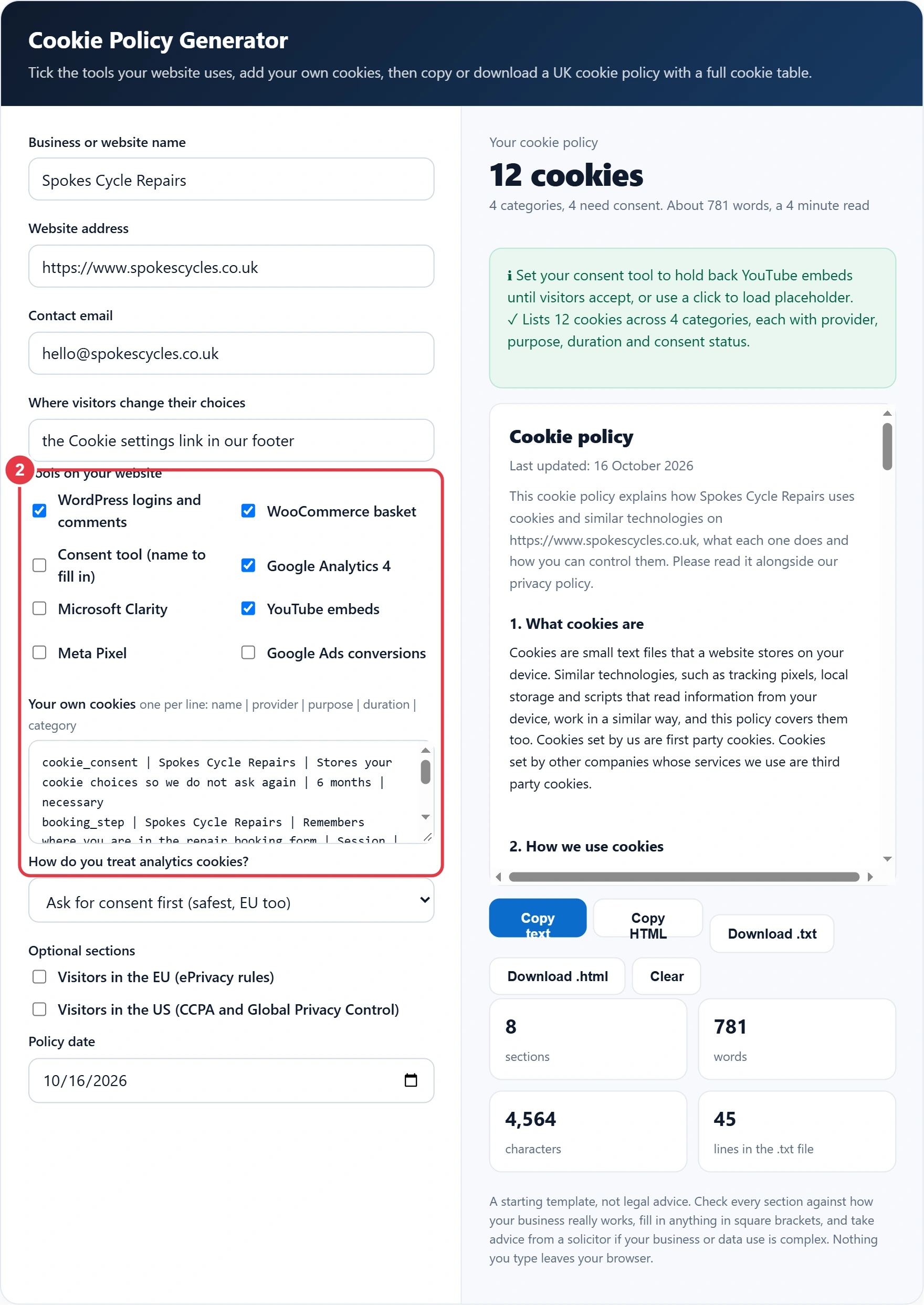
Step 3: Choose How You Treat Analytics
Ask for consent first is the safest choice and is required in the EU. The UK statistics exception lets analytics run without consent only if the data is used purely for statistics, you explain it and you give a free way to object. Add EU or US sections if you have many visitors there.

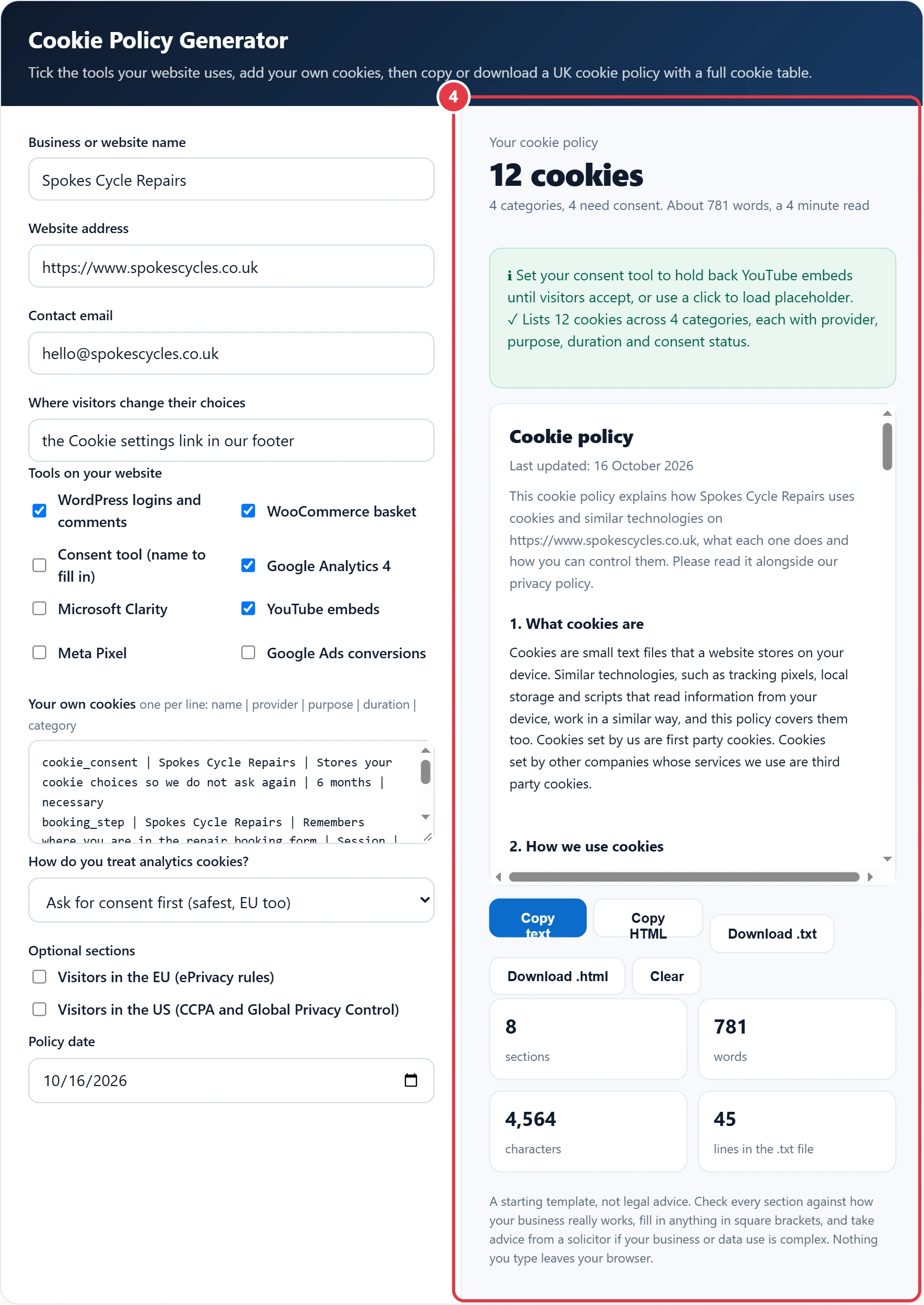
Step 4: Check the Table, Then Copy or Download
Fill in anything in square brackets, read the notes, then copy the HTML into a page at /cookie-policy/ or download a file. Link it from your banner and footer, and from the policy you create with the privacy policy generator, so visitors can move between the two easily.
Do I Need a Cookie Policy for My UK Website?
Yes, if your website stores or reads cookies or similar technologies on visitors' devices, which almost every site does. PECR requires clear information about each one and its purpose, and consent for any that are not exempt, so most UK sites publish a cookie policy with a full cookie table.
Here is a worked example. Tom runs Spokes Cycle Repairs in Bristol on WordPress and WooCommerce, with Google Analytics 4 and two YouTube repair videos. He ticks four tools and adds three cookies of his own. The cookie policy generator lists 12 cookies in 4 categories, and 4 of them need consent: the two GA4 cookies and the two YouTube cookies. If Tom turns off Google signals and Google Ads linking and switches analytics to the UK statistics exception, only the 2 YouTube cookies still need consent, provided his banner offers a free way to object to analytics.
Which Cookies Need Consent in the UK?
In the UK, advertising, tracking and most embedded content cookies need consent, strictly necessary cookies never do, and statistics or settings cookies can run without consent if you explain them and offer a simple, free way to object.
| Category | Examples | UK from 2026 | EU |
|---|---|---|---|
| Strictly necessary | Basket, login, security, cookie choice | No consent | No consent |
| Preferences | Language, units, comment details | No consent if explained, with a free opt out | Usually consent |
| Analytics | GA4, Clarity, other statistics tools | No consent if statistics only, explained, with a free opt out | Consent |
| Embedded content | YouTube, Vimeo, Google Maps | Consent when they track | Consent |
| Marketing | Meta Pixel, Google Ads, remarketing | Consent | Consent |
Any technology that stores or reads information on a device is covered, as regulation 6 of PECR on legislation.gov.uk makes clear, so pixels, local storage and fingerprinting scripts count as well as cookies. That is why the generator lists the Meta Pixel alongside ordinary cookies.
How Do I Find Out Which Cookies My Site Uses?
Open your site in a private browser window, accept all cookies, visit your main pages, add something to the basket and play any embedded video, then open the browser's developer tools and look under Application, then Cookies. Every name listed there should appear in your cookie table.
Repeat the check after rejecting cookies. Only strictly necessary cookies, and any statistics or settings cookies you rely on an exception for, should appear. If GA4 or YouTube cookies show up after you clicked Reject, your banner is not blocking scripts properly, and the policy would be wrong however well it is written. Copy any extra names into the Your own cookies box of the cookie policy generator, with the duration shown in the Expires column.
What Changed for Cookies in 2026?
The Data (Use and Access) Act 2025 added new exceptions to PECR, and the ICO finalised its storage and access technologies guidance on 29 April 2026. Cookies used only to collect statistics to improve a service, or to adapt how a site looks or works to a user's preferences, no longer need consent, as long as you give clear information and a simple, free means of objecting. If someone objects, you must stop.
Two limits matter. Any cookie that also serves advertising still needs consent for that part, which is why the generator warns about GA4 with Google signals or Ads linking switched on. And some providers set their own rules: Microsoft has required a consent signal for Clarity visitors in the UK and EEA since 31 October 2025, so the tool marks Clarity as consent based whatever you choose.
Cookie Policy, Cookie Banner and Privacy Policy
The banner collects choices, the cookie policy explains each cookie in detail, and the privacy policy covers all personal data under UK GDPR. Shoppers also expect clear terms, and the terms of service generator writes them in the same plain style, so your legal pages read as one set. They must agree with each other: if your banner has four categories, your policy should use the same four.
- Repeat after changes: a new plugin, chat widget or embed usually adds cookies.
- Block before consent: a policy saying you ask first is only true if your banner really holds scripts back.
- Review every quarter: providers rename cookies and change durations without notice.
Cookie names and durations for the preset tools come from each provider's own documentation, and the policy is a starting template rather than legal advice. Figures checked October 2026 against ICO guidance, legislation.gov.uk and provider documentation.
Cookie Policy Generator Terms You Should Know
These terms explain the privacy rules behind the cookie policy generator, so you can classify each cookie correctly and describe consent in plain English.
- HTTP cookie
- A small piece of data a website stores in a visitor's browser and reads back on later requests. Cookies keep people logged in, remember baskets and preferences, and power analytics and advertising across visits.
- Strictly necessary cookie
- A cookie essential to deliver a service the visitor has explicitly asked for, such as a shopping basket or secure login. These are exempt from the consent requirement, although they should still be listed and explained in the policy.
- First party and third party cookies
- A first party cookie is set by the website being visited, while a third party cookie is set by another domain whose content is embedded, such as a video player or advertising network. Third party cookies usually track across sites.
- Cookie duration
- How long a cookie remains in the browser before it expires. Session cookies disappear when the browser closes, while persistent cookies stay for a set period, and the policy should state each duration honestly.
- Prior consent
- The requirement to obtain a clear, affirmative choice from the visitor before any non essential cookie is stored or read. Pre-ticked boxes or continued browsing do not count, and refusing must be as easy as accepting.
- Global Privacy Control
- A browser signal that tells websites a user does not want their personal information sold or shared. Under California privacy law, businesses must treat it as a valid opt out request, which is why US sections mention it.
</>Embed this calculator on your website
Add the free Cookie Policy Generator to your own site or blog. Copy the code below and paste it into an HTML block. It resizes itself and works on phones.
How we checked this tool: the Tools Veria Editorial Team built this tool by hand, checked it against the official rules or published standards where they apply, and tested it against worked examples. Results are estimates for planning, not personal financial or tax advice. Read our editorial policy and disclaimer, or report an error.
Frequently Asked Questions
Do I need a cookie policy if I only use Google Analytics?
Yes. Google Analytics 4 sets the _ga and _ga_[container ID] cookies, each lasting up to 2 years by default, so you must explain them. You also need consent first unless you use the UK statistics exception with a free opt out.
Can I use analytics cookies without consent in the UK?
Since the 2026 PECR changes, yes in some cases. Analytics used only to collect statistics to improve your site can run without consent if you explain it clearly and give a simple, free way to object. Analytics linked to advertising still needs consent.
What is the difference between a cookie policy and a cookie banner?
A cookie banner collects visitors' choices when they arrive. A cookie policy is a page explaining every cookie, its provider, purpose and duration, and how to change choices later. A UK website needs both, and they must use the same categories.
How long can cookies last?
There is no fixed legal maximum, but durations must be proportionate and stated in your policy. For example, Google Analytics cookies last up to 2 years by default, the YouTube VISITOR_INFO1_LIVE cookie 180 days and the Google Ads _gcl_au cookie 90 days.
Do strictly necessary cookies need consent?
No. Cookies strictly necessary to provide a service the visitor asked for, such as a shopping basket, login session or remembering cookie choices, are exempt from consent under PECR. You must still list and explain them in your cookie policy.
How often should I update my cookie policy?
Update it whenever you add, remove or change a tool that sets cookies, and review it at least every three months. Check your live site in browser developer tools, because plugins and providers often add or rename cookies without warning.