
Amara scored 42 out of 56 on a chemistry mock, her restaurant bill came to £64 and she wants to leave 15%, and a jacket she likes is advertised at £54 including 20% VAT. Three different situations, yet learning how to calculate percentage once covers all of them, because every percentage question is built from the same three numbers: a part, a whole and a rate.
This guide is for students, shoppers, freelancers and anyone checking a payslip or a discount. You will learn the three core sums, a handful of mental shortcuts that work without a calculator, the spreadsheet formulas that do it in bulk, and the mistakes that produce confident but wrong answers.
Quick answer: To calculate a percentage, divide the part by the whole and multiply by 100. For example, 42 out of 56 is 42 ÷ 56 = 0.75, which is 75%. To find a percentage of a number, multiply the number by the rate divided by 100, so 15% of £64 is £64 × 0.15 = £9.60.
In This Guide
What does a percentage actually mean?
A percentage is a number expressed as a share of 100, so 75% means 75 parts in every 100. The word comes from the Latin “per centum”, meaning “by the hundred”, and the history of the symbol is covered in the Wikipedia article on percentages. Because everything is scaled to 100, percentages let you compare things that start with very different totals, and that is the real reason to know how to calculate percentage results quickly.
That is why Amara’s 42 out of 56 is easier to judge as 75%. Her friend Leon scored 57 out of 76 on a different paper. Which result is better? Converting both to percentages answers it straight away: 57 ÷ 76 is also 0.75, so they performed identically even though the raw marks look nothing alike.
Every percentage can also be written as a decimal or a fraction. Dividing by 100 turns a percentage into a decimal (15% becomes 0.15), and that decimal is the number you actually multiply by. Keeping the table below in your head saves a great deal of button pressing.
| Percentage | Decimal | Fraction | Quick way to find it |
|---|---|---|---|
| 1% | 0.01 | 1/100 | Move the decimal point two places left |
| 5% | 0.05 | 1/20 | Half of 10% |
| 10% | 0.1 | 1/10 | Move the decimal point one place left |
| 12.5% | 0.125 | 1/8 | Halve three times |
| 20% | 0.2 | 1/5 | Double 10% |
| 25% | 0.25 | 1/4 | Halve, then halve again |
| 33.3% | 0.333 | 1/3 | Divide by 3 |
| 50% | 0.5 | 1/2 | Halve |
| 75% | 0.75 | 3/4 | Take 50% and add 25% |

How to calculate percentage of a number
To find a percentage of a number, convert the percentage to a decimal and multiply. Amara’s 15% tip on a £64 bill is £64 × 0.15, which equals £9.60. Written as a rule: result = number × (rate ÷ 100).
The same sum handles tax. A £45 item with VAT at the UK standard rate of 20%, listed on the GOV.UK VAT rates page, carries £45 × 0.2 = £9 of VAT, giving a total of £54. If you want the total in one step, multiply by 1 plus the rate instead: £45 × 1.2 = £54. Our VAT calculator does both directions for any rate.
Discounts work the opposite way. A 30% reduction leaves 70% of the price, so a £80 pair of trainers costs £80 × 0.7 = £56 in the sale. Multiplying by what is left is faster than working out the saving and subtracting it, and it is exactly what the discount calculator shows for any price and reduction.
How do you work out what percentage one number is of another?
To find what percentage one number is of another, divide the part by the whole and multiply by 100. Amara’s 42 marks out of 56 gives 42 ÷ 56 = 0.75, and 0.75 × 100 = 75%. The part always goes on top and the total always goes underneath.
Household budgets are a good real use. Jonas takes home £2,600 a month and pays £950 in rent. Dividing £950 by £2,600 in the percentage calculator gives 0.3654, so rent takes about 36.5% of his income. Once he knows that, he can compare it with friends in other cities, or with his own spending a year ago, on equal terms.
Results above 100% are perfectly valid in this type of question. If a fundraiser aimed for £500 and raised £640, then £640 ÷ £500 = 1.28, which means it reached 128% of its target.
How do you find the original number from a percentage?
To find the original number when you know a part and its percentage, divide the part by the rate as a decimal. Maya has saved £360 and her app says that is 30% of her holiday goal. The goal is £360 ÷ 0.3 = £1,200. This is often called a reverse percentage.
Reverse percentages matter most when a price already includes an increase. The £54 jacket includes 20% VAT, so £54 represents 120% of the pre tax price. Dividing £54 by 1.2 gives £45. Taking 20% off £54 instead gives £43.20, which is wrong by £1.80, a mistake that turns up on expense claims and invoices all the time.
The pattern is simple: if the figure you hold has had a percentage added, divide by 1 plus the rate. If it has had a percentage removed, divide by 1 minus the rate. A sale price of £56 after 30% off came from £56 ÷ 0.7 = £80.
Mental shortcuts that need no calculator
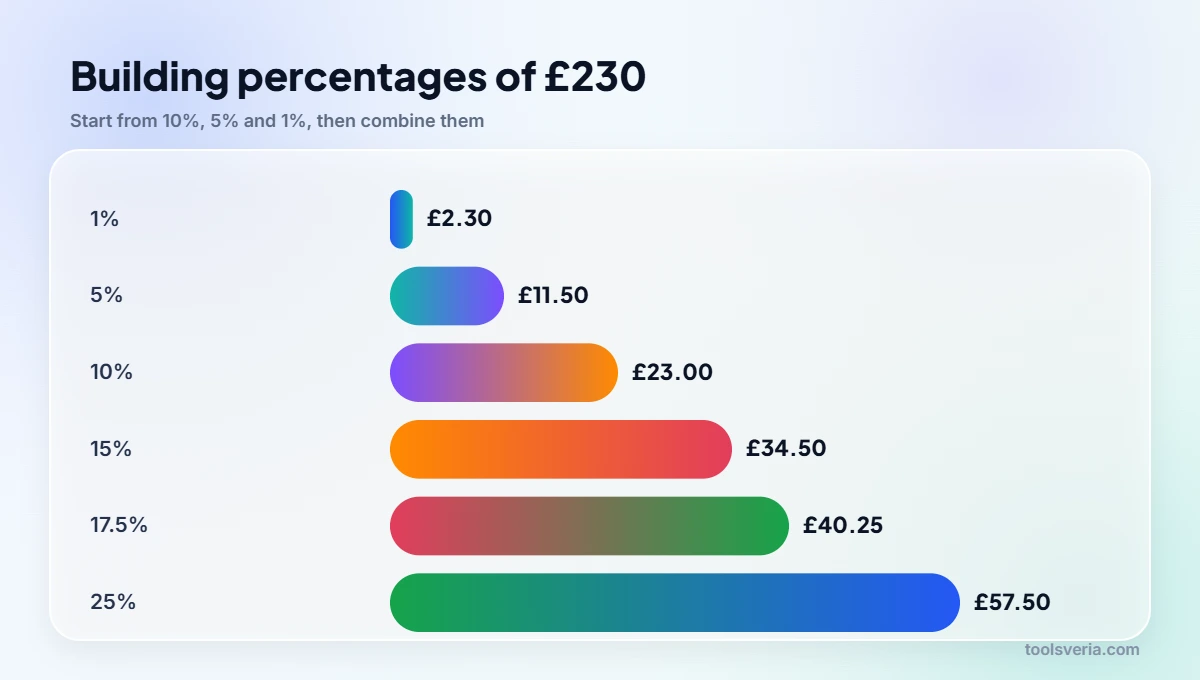
Most everyday percentages can be built from 10%, 5% and 1%. Take a £230 bill. Ten percent is £23, found by moving the decimal point one place. Five percent is half of that, £11.50, and 1% is £2.30. From those blocks, 15% is £23 + £11.50 = £34.50, and 17.5% is £23 + £11.50 + £5.75 = £40.25.
A second trick is that percentages can be swapped round. Eight percent of 50 is the same as 50% of 8, which is obviously 4. Likewise 4% of 75 equals 75% of 4, which is 3. Whenever one number is awkward and the other is friendly, flip them.
- For 20%, find 10% and double it: 20% of £230 is £46.
- For 25%, halve and halve again: 25% of £230 is £57.50.
- For 90%, find 10% and subtract it: 90% of £230 is £207.
- For 1.5%, find 1% and add half of it again: 1.5% of £230 is £3.45.
Percentages in Excel and Google Sheets
Spreadsheets handle percentages with ordinary division and a percentage format. With marks scored in B2 and the total in C2, the formula =B2/C2 returns 0.75; apply the percentage format and the cell shows 75%. Do not multiply by 100 as well, or the cell will display 7500%.
For a percentage of a value, type the rate directly into the formula. If a price sits in A2, =A2*15% returns 15% of it and =A2*(1+20%) adds 20% VAT. Reverse percentages follow the same logic as by hand: =A2/(1+20%) strips VAT from a gross price. Copy the formula down a column and a whole list of results updates at once.
Common percentage mistakes and how to avoid them
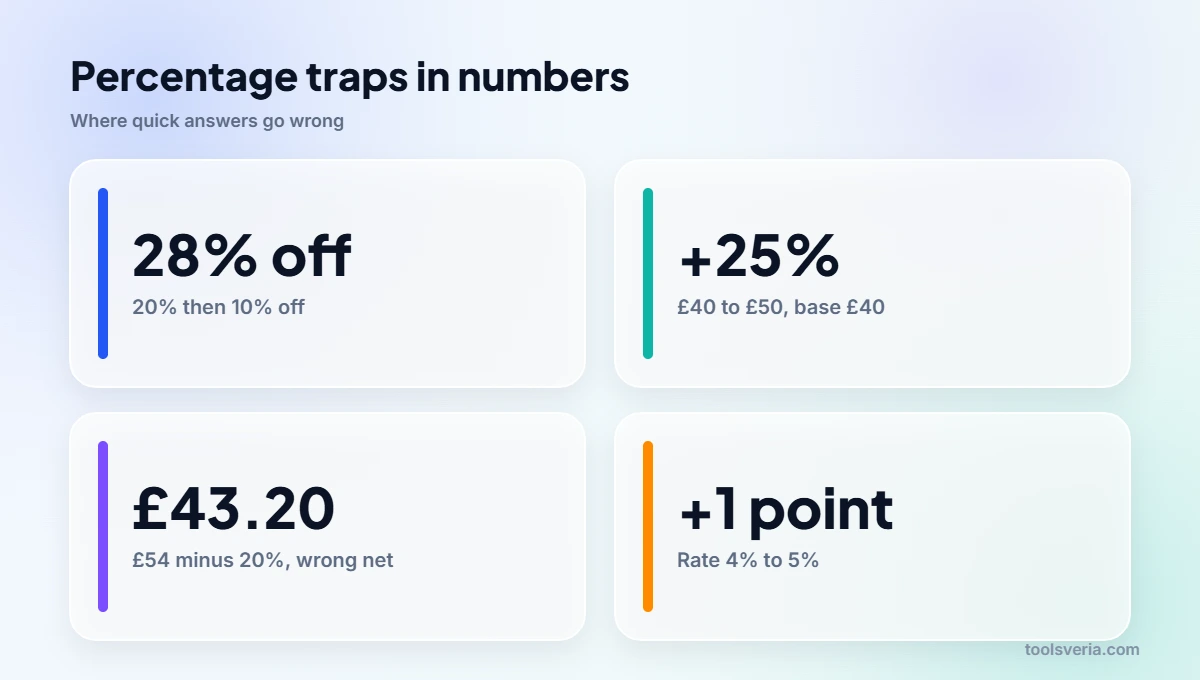
The most frequent error is dividing by the wrong total. When a price moves from £40 to £50, the change of £10 is 25% of the starting price but only 20% of the new one. Our guide on working out a percentage increase or decrease explains why the starting figure is always the base.
Stacked discounts are the second trap. A shop offering 20% off plus an extra 10% at the till does not give 30% off. The price is multiplied by 0.8 and then by 0.9, leaving 0.72 of the original, which is a 28% discount in total. On a £150 coat that is £108, not the £105 shoppers often expect.
The third trap is mixing up percentages and percentage points. A savings rate rising from 4% to 5% has risen by one percentage point, yet by 25% in relative terms. Both statements are true; they simply measure different things.
Key points
- Part ÷ whole × 100 gives the percentage: 42 out of 56 is 75%.
- Number × rate as a decimal gives a percentage of it: 15% of £64 is £9.60.
- Part ÷ rate as a decimal gives the original: £360 ÷ 0.3 is £1,200.
- Remove an added percentage by dividing, so £54 ÷ 1.2 gives the £45 pre VAT price.
- Successive discounts multiply rather than add, so 20% then 10% off is 28% off.
Key Percentage Terms Explained
These terms appear whenever you learn how to calculate percentage problems, from test marks and tips to VAT receipts and savings goals.
- Part
- The portion you are measuring, written on top when you divide. In Amara’s mock exam the part is 42 marks, and in Jonas’s budget the part is £950 of rent paid each month.
- Whole
- The complete total that the part is compared against, written underneath when you divide. Amara’s paper had a whole of 56 marks, while Jonas’s whole is his £2,600 monthly take home pay.
- Rate
- The percentage itself, which becomes a decimal multiplier once divided by 100. A 15% rate becomes 0.15, so a £64 bill multiplied by 0.15 produces a £9.60 tip.
- Reverse percentage
- Working back from a figure that already includes a percentage change to the original value. You divide by 1 plus the rate after an increase, so £54 divided by 1.2 returns £45.
- Percentage point
- The plain arithmetic gap between two percentages. A savings rate moving from 4% to 5% rises by one percentage point, even though the rate itself has grown by 25% in relative terms.
Frequently Asked Questions
I got 38 out of 50 on a test. What percentage is that?
Your score is 76%. Divide 38 by 50 to get 0.76, then multiply by 100. A quick check: 50 is half of 100, so doubling 38 gives the same answer of 76.
How do I take 20% VAT out of a price that already includes it?
Divide the gross price by 1.2. A £54 price gives £45 before VAT, so the VAT itself is £9. Subtracting 20% of £54 gives £43.20, which is wrong because the 20% was charged on £45, not on £54.
Is 15% of 80 the same as 80% of 15?
Yes, both equal 12. Multiplication works in either order, so you can always swap the rate and the number. This trick turns awkward sums such as 8% of 50 into easy ones like 50% of 8, which is 4.
My spreadsheet shows 7500% instead of 75%. What went wrong?
You multiplied by 100 and also applied the percentage format, which multiplies by 100 again. Use =B2/C2 on its own with percentage formatting, or keep the ×100 and format the cell as a plain number instead.
Can a percentage be more than 100?
Yes, whenever the part is larger than the whole. Raising £640 against a £500 target is 128% of the goal. A fall, however, cannot exceed 100%, because losing more than the whole would take the value below zero.
What is the quickest way to work out a 15% tip in my head?
Find 10% by moving the decimal point, then add half of that amount. On a £64 bill, 10% is £6.40 and half of it is £3.20, so the tip is £9.60. The same method gives 15% of £230 as £34.50.
Knowing how to calculate percentage figures properly paid off for Amara: she now knows her mock score was 75%, her tip is £9.60 and the jacket costs £45 before VAT. Whatever the situation, decide which of the three numbers is missing, pick the matching sum and check the answer against a quick mental estimate. Figures checked October 2026.