Rosa runs a small bakery and wants customers to scan a code on each table to see the autumn menu. Her first attempt, a tiny code printed on glossy card, refused to scan in the café’s dim corner. Knowing how to make a QR code properly is mostly about the details that come after you paste in a link: error correction, size, contrast and the blank border around the pattern.
This guide is for small business owners, teachers, event organisers and anyone sharing a link, Wi-Fi network or contact card. It covers the five steps to a working code, how the code stores data, how big to print it, the difference between static and dynamic codes, and how to keep people safe from fake codes.
Quick answer: To make a QR code, open a QR code generator, paste your link or text, choose an error correction level (M suits most uses), and download the image as a PNG or SVG. Print it at least 2 cm wide with a clear white border, then test it with two different phones before sharing it.
In This Guide
What is a QR code and how does it store data?
A QR code is a square two dimensional barcode that stores text, usually a web address, as a grid of black and white squares called modules. It was invented in 1994 by Denso Wave, a Toyota group company, to track car parts, and it is now defined by the international standard ISO/IEC 18004. The Wikipedia article on QR codes covers its history in detail.
The three large squares in the corners are finder patterns, which tell the phone where the code is and which way up it sits. The dotted lines between them are timing patterns that help it count the modules. Everything else holds your data plus extra recovery data, so a code can still be read when part of it is scratched or covered.
Codes come in 40 sizes called versions. Version 1 is 21 by 21 modules, and each version adds 4 modules per side, so version 10 is 57 by 57 and version 40 is 177 by 177. Longer content needs a bigger version, which means smaller modules at the same print size and harder scanning.
How to make a QR code in five steps
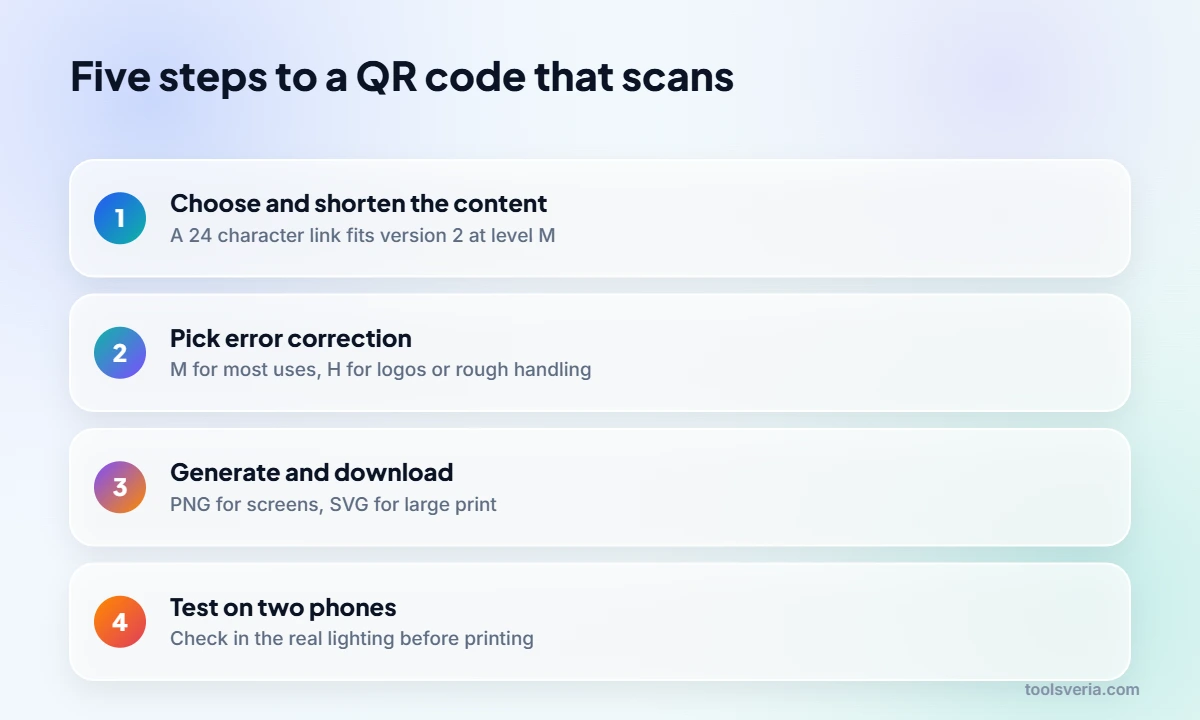
Making a QR code takes five steps: choose the content, keep it short, pick an error correction level, generate and download, then test. Rosa’s menu shows each one.
- Choose what the code holds. Rosa’s holds the menu page, https://example.com/menu, which is 24 characters.
- Keep the content short. Adding tracking tags made her link 75 characters, which pushes the code from version 2 to version 5 at level M.
- Pick an error correction level. M recovers about 15% damage and suits most printed codes; choose H for codes that may get dirty or carry a logo.
- Generate and download. PNG is fine for screens and most printing; SVG scales without blurring for large posters.
- Test with at least two phones, one iPhone and one Android if possible, in the lighting where the code will actually be used.
If you want to know how many people scan the code, add campaign tags to the link before generating it. The UTM link builder creates those tags, and our explainer on what UTM parameters do shows how they appear in analytics. Keep the tags brief, since every character makes the code denser.

Which error correction level should you choose?
Choose level M for most uses, H for codes that may be damaged or partly covered, and L only for clean on screen codes where size matters most. The four levels trade capacity for resilience, and the table shows how much text each version holds in byte mode, the mode used for web links.
| Version | Modules per side | Level L (about 7% recovery) | Level M (about 15%) | Level H (about 30%) |
|---|---|---|---|---|
| 1 | 21 | 17 characters | 14 characters | 7 characters |
| 2 | 25 | 32 characters | 26 characters | 14 characters |
| 3 | 29 | 53 characters | 42 characters | 24 characters |
| 4 | 33 | 78 characters | 62 characters | 34 characters |
| 5 | 37 | 106 characters | 84 characters | 44 characters |
| 10 | 57 | 271 characters | 213 characters | 119 characters |
| 40 | 177 | 2,953 characters | 2,331 characters | 1,273 characters |
There is also level Q, at about 25% recovery, between M and H. Rosa’s 24 character link fits version 2 at level M, a 25 by 25 grid, but needs version 3 at level H. Her 75 character tracked link needs version 5 at M and version 8 at H, a 49 by 49 grid with much smaller modules.

How big should a printed QR code be?
A widely used rule of thumb is that the code should be at least one tenth of the scanning distance in width, and never smaller than about 2 cm for close range use. A table card read from 30 cm needs a code of about 3 cm, while a poster read from 2 metres needs one about 20 cm wide.
Leave a quiet zone of at least four modules of plain background on every side. Without it, phones struggle to find the edges, which was half of Rosa’s problem: her designer had placed the code right against a patterned border. Use dark modules on a light background with strong contrast, avoid glossy laminates that glare under lights, and do not invert the colours, because some older scanners cannot read light on dark codes.
Static or dynamic: which kind of QR code do you need?
A static QR code stores your content directly in the pattern, so it works forever and needs no account, but it cannot be changed after printing. A dynamic QR code stores a short redirect link owned by a QR service, which lets you change the destination and count scans later.
The catch with dynamic codes is dependence. If the provider closes or your subscription ends, every printed code can stop working at once. Rosa chose a static code pointing to a menu page on her own website, so she can update the menu itself whenever she likes while the code never changes. That approach gives most of the flexibility of a dynamic code with none of the lock in.
Static codes can hold more than links. A Wi-Fi code uses a format such as WIFI:T:WPA;S:CafeGuest;P:crumpet4821;; and lets guests join without typing a password. Contact cards use the vCard format, and plain text works too. A generator that runs entirely in your browser, like our free QR code generator, never sends that Wi-Fi password to a server.
Are QR codes safe to scan?
QR codes themselves are harmless, but a code can point to any web address, including a fake login or payment page, which is a form of phishing sometimes called “quishing”. Fraudsters have stuck fake codes over genuine ones on car park machines and posters.
As a creator, help people trust your code. Print your web address beside it so scanners can check the preview, use your own domain rather than an unfamiliar short link, and check your codes regularly for stickers placed on top. As a scanner, read the address your phone previews before opening it, and never enter bank details on a page reached from a code on a parking meter.
Key points
- QR codes come in 40 versions, from 21 by 21 modules up to 177 by 177.
- Error correction level M recovers about 15% damage and suits most printed codes.
- Shorter content gives a smaller version with larger modules that scan more easily.
- Print at about one tenth of the scanning distance, with a quiet zone of four modules.
- Static codes never expire; dynamic codes depend on the provider staying in business.
Key QR Code Terms Explained
These technical terms explain what happens inside the pattern and why the settings matter when you learn how to make a QR code that scans reliably.
- Module
- One black or white square in the grid. Version 1 codes are 21 modules across and each version adds 4 per side, so longer content means more, smaller modules at the same print size.
- Version
- The size class of a QR code, numbered 1 to 40. Version 2 is 25 by 25 modules and holds 26 characters at level M, while version 40 reaches 177 by 177.
- Error correction level
- The share of the pattern that can be damaged and still read: about 7% for L, 15% for M, 25% for Q and 30% for H. Higher levels need a bigger version.
- Quiet zone
- The plain border around the code, at least four modules wide on every side. Phones use it to find the code’s edges, and printing a code against a pattern often stops it scanning.
- Finder pattern
- One of the three large squares in the corners that tell a phone where the code is and how it is rotated. Logos and designs must never cover any of them.
Frequently Asked Questions
Do QR codes I make for free ever expire?
A static code never expires, because the content is stored in the pattern itself. Only dynamic codes, which route through a provider’s redirect link, can stop working if that service ends or your plan lapses.
Can I put my logo in the middle of a QR code?
Yes, if you use error correction level H, which can recover about 30% of the pattern. Keep the logo well under that area, never cover the three corner finder patterns, and test thoroughly with several phones before printing.
Why will my QR code not scan?
The usual causes are a missing quiet zone, low contrast, glare from glossy printing, or a code too small for the scanning distance. A long link also makes modules tiny, so shorten the content or print larger.
Do I need an app to scan a QR code?
Usually not. The built in camera on recent iPhones and most Android phones recognises QR codes automatically and shows the link to open. Older phones may need Google Lens or a free scanner app.
Should I download my QR code as PNG or SVG?
PNG works for websites, documents and most print jobs if you export it large enough. SVG is a vector format that stays sharp at any size, so printers prefer it for posters, banners and vehicle graphics.
How many characters can one QR code hold?
Up to 2,953 bytes of text at version 40 with level L. In practice, keep web links under about 60 characters so the code stays at version 4 or below and remains easy to scan from print.
Rosa’s new table cards carry a 3 cm static code at level M, a clean white border and her web address printed underneath, and they scan first time even in the dim corner. That is how to make a QR code that works: short content, sensible error correction, enough size and a real test. Figures checked October 2026.