A free QR code generator for links, text, Wi-Fi, email and phone, made in your browser with no sign up.
Static code: the content is stored in the pattern itself, so it never expires and nothing is tracked. Everything is generated in your browser; nothing is uploaded.
This QR code generator turns a link, plain text, Wi-Fi login, email address or phone number into a scannable code you can download as a PNG or SVG, for cafés, shops, events, teachers and anyone printing flyers in the UK, US or worldwide. It builds the code to the QR code standard (ISO/IEC 18004) entirely in your browser, so there is no account, no tracking and no expiry date.
Quick answer: To make a QR code, choose what it should open, paste the link or type the details, pick an error correction level and download the image. A QR code generator stores the content inside the pattern, so a static code like this works forever. Use level M for screens and level Q or H for print.
In This Guide
What Is a QR Code Generator?
A QR code generator is a tool that converts text into a square grid of dark and light modules that a phone camera can read back. QR stands for "quick response", and the format was created by Denso Wave, part of the Denso group, in 1994 to track car parts on production lines.
In plain words, the generator turns your text into bytes, adds Reed Solomon error correction codes, places them in the grid and applies the mask that is easiest to scan. Three large squares in the corners tell the camera where the code is, and the smaller patterns keep it aligned. As a QR code maker, this tool picks the smallest of the 40 versions that fits your content.
How to Use the QR Code Generator
Step 1: Choose What the Code Opens
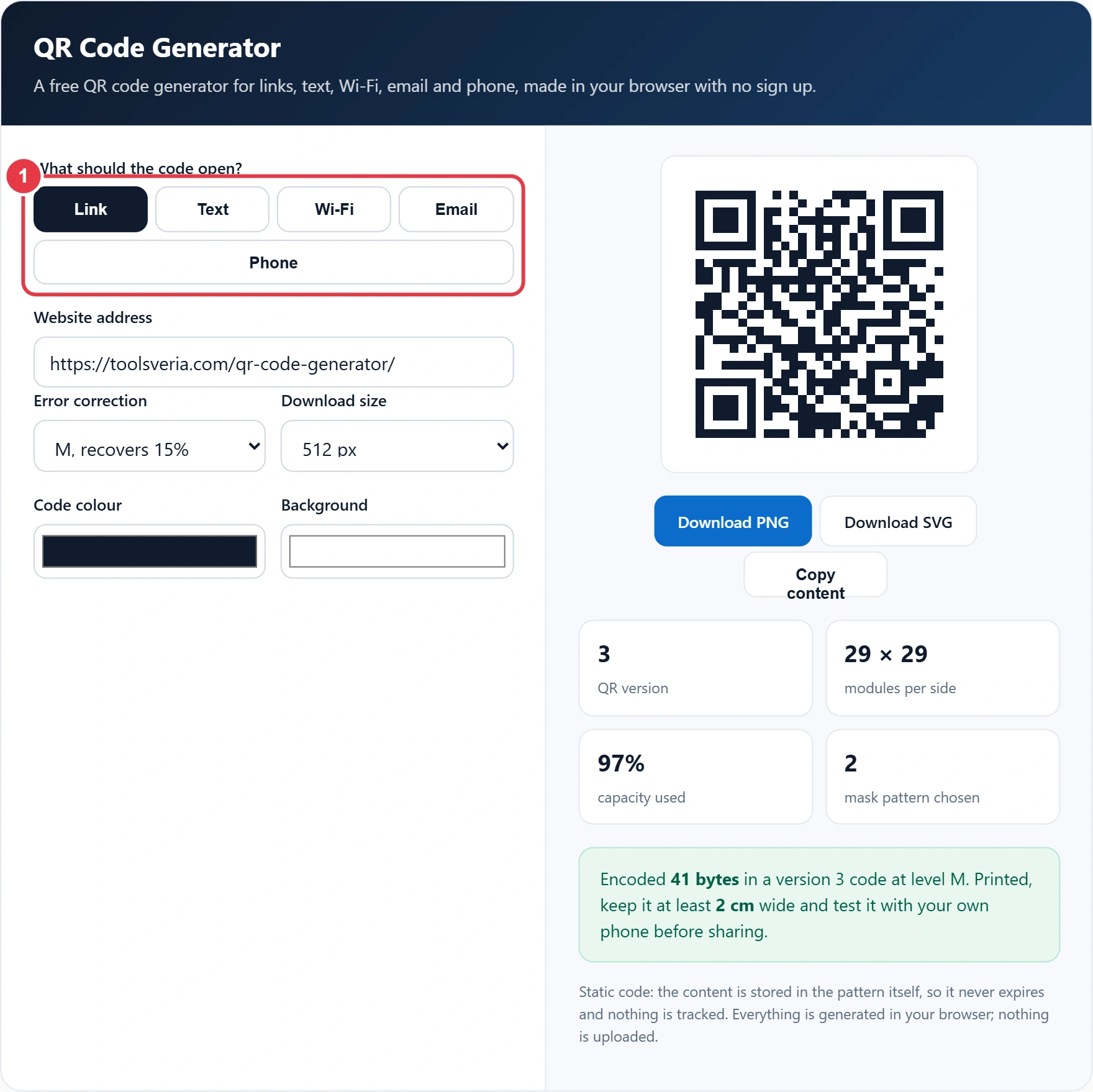
Pick Link for a web page, Text for a short message, Wi-Fi so guests can join your network, Email to open a new message, or Phone to start a call. Each option formats the content the way phone cameras expect.
Step 2: Enter the Content
Paste the full web address, including https. For Wi-Fi, type the network name and password exactly, because they are case sensitive. Before you print a link for a campaign, the UTM link builder adds tracking tags so your analytics can show how many visits came from the printed code.

Step 3: Set Error Correction, Size and Colours
Higher error correction lets the code survive scratches, dirt or a logo sticker, at the cost of a denser pattern. Pick 1024 or 2048 pixels for print, or choose SVG, which scales to any size. Keep a dark code on a light background; the tool warns you if contrast drops too low.

Step 4: Check and Download
The QR code generator's preview updates as you type. The boxes show the QR version, the module count, how full the code is and which mask was chosen. Scan the preview with your own phone, then download the PNG or SVG.

Which QR Code Error Correction Level Should I Use?
In any QR code generator, use level M for codes shown on screens and level Q or H for anything printed, handled or placed outdoors. Each step up stores more recovery data, so the same link needs a larger version with smaller modules.
| Level | Damage it can recover | Best for | Max bytes at version 10 |
|---|---|---|---|
| L | About 7% | Long text on clean screens | 271 |
| M | About 15% | Websites, slides, emails | 213 |
| Q | About 25% | Flyers, menus, packaging | 151 |
| H | About 30% | Outdoor signs, codes with a logo | 119 |
The largest code, version 40 at level L, holds 2,953 bytes, but such a dense pattern is hard to scan. Short links scan fastest, so trim long addresses where you can. The slug generator helps you create a short, readable page address before you encode it.
Do Free QR Codes Expire?
No. A static QR code from a free QR code generator like this one never expires, because the link or text is stored in the pattern itself and no server is involved. It keeps working as long as the destination exists.
Codes that stop working are usually "dynamic" codes from subscription services, which point to a short redirect link the company controls. When the trial ends, the redirect stops. This free QR code generator only makes static codes, so you keep full control, but you cannot change the destination after printing. Point the code at a page you own if the details might change.
How Big Should a Printed QR Code Be?
A printed QR code should be at least 2 cm wide for close scanning, and about one tenth of the scanning distance for posters. A code read from 1 metre away needs to be about 10 cm wide.
Worked example: Sofia runs a café and wants table cards that open her menu page and a second card for guest Wi-Fi. The menu link is 41 characters, which fits a version 3 code at level M, 29 modules wide. Because the cards will get coffee splashes, she switches to level Q, which moves the code to version 4. For the Wi-Fi card she enters "Cafe Guest" and the password, and guests join without typing. She prints both at 4 cm, tests them on an older phone, and laminates them. Tested October 2026.
Key QR Code Terms Explained
These terms explain how a QR code generator builds each pattern and why size, version and error correction change how easily it scans.
- QR code version
- The size of a QR code, from version 1 at 21 by 21 modules to version 40 at 177 by 177. Each version adds 4 modules per side, and the generator picks the smallest that fits.
- Module
- One dark or light square in the QR grid. Scanners need each module to be clearly visible, which is why printed codes should be at least 2 cm wide and dense codes need more space.
- Reed Solomon error correction
- A coding method that adds recovery bytes so a damaged code still reads. QR codes offer four levels, L, M, Q and H, which recover about 7, 15, 25 and 30 percent of the data.
- Finder pattern
- The three large squares in the corners of a QR code. They let a camera find the code, judge its angle and work out which way up it is, so they must never be covered.
- Quiet zone
- The empty margin around a QR code, four modules wide in the standard. Without it, scanners can confuse the code with nearby text or graphics, so the downloads always include it.
- Mask pattern
- One of eight patterns used to flip modules so the code avoids large blocks and confusing shapes. The generator tests all eight and keeps the one with the lowest penalty score.
</>Embed this calculator on your website
Add the free QR Code Generator to your own site or blog. Copy the code below and paste it into an HTML block. It resizes itself and works on phones.
How we checked this tool: the Tools Veria Editorial Team built this tool by hand, checked it against the official rules or published standards where they apply, and tested it against worked examples. Results are estimates for planning, not personal financial or tax advice. Read our editorial policy and disclaimer, or report an error.
Frequently Asked Questions
Is this QR code generator really free?
Yes. There is no sign up, no watermark, no scan limit and no expiry. The codes are static and made in your browser, so there is no server cost to recover and no tracking of who scans them.
Can I put a logo in the middle of a QR code?
Yes, if you choose level H, which can rebuild about 30% of the code. Keep the logo under roughly 20% of the area, away from the three corner squares, and always test scanning on a few phones before printing.
Why will my QR code not scan?
Common causes are low contrast, a light code on a dark background, a missing white border, printing too small or a very long link. Use a dark code on white, keep the quiet zone, print at 2 cm or more and shorten the content.
How do I make a QR code for Wi-Fi?
Choose Wi-Fi, enter the network name and password exactly, and pick the security type, usually WPA. Phones that scan it offer to join the network without typing. Changing the password later means you need a new code.
Should I download PNG or SVG?
Use PNG for websites, documents and social posts. Use SVG for print and design software, because it is a vector file that stays sharp at any size, from a business card to a banner.
Can someone track who scans my QR code?
Not with a static code. The camera reads the content directly, so this generator never learns about scans. If you want visit counts, add UTM tags to your link and check your own website analytics.